
1. परिचय
खरेदी केल्याबद्दल धन्यवाद.asing the BLOW 4625FHD DVB-T2 H.265 Digital Terrestrial TV Tuner. This device allows you to receive digital terrestrial television broadcasts (DVB-T2) with H.265 (HEVC) compression, offering high-definition video quality. This manual provides essential information for the safe and efficient setup, operation, and maintenance of your new tuner. Please read it thoroughly before use and retain it for future reference.
2. सुरक्षितता माहिती
- विद्युत सुरक्षा: विजेचा धक्का टाळण्यासाठी, क्यूबिक उघडू नका.asing. सर्व सेवा पात्र कर्मचाऱ्यांकडे सोपवा.
- उर्जा स्त्रोत: फक्त निर्दिष्ट पॉवर अॅडॉप्टर वापरा. व्हॉल्यूम सुनिश्चित कराtage उपकरणाच्या आवश्यकतांशी जुळते.
- वायुवीजन: वायुवीजन उघड्या जागा बंद करू नका. जास्त गरम होण्यापासून रोखण्यासाठी उपकरणाभोवती पुरेसा वायुप्रवाह सुनिश्चित करा.
- ओलावा: Keep the device away from water, rain, and excessive humidity.
- स्वच्छता: साफसफाई करण्यापूर्वी वीज खंडित करा. मऊ, कोरडे कापड वापरा. द्रव क्लीनर किंवा एरोसोल वापरू नका.
- प्लेसमेंट: Place the device on a stable, flat surface. Avoid placing it near heat sources or in direct sunlight.
3. पॅकेज सामग्री
पॅकेज उघडताना, कृपया सर्व घटक उपस्थित आहेत आणि चांगल्या स्थितीत आहेत याची पडताळणी करा:
- BLOW 4625FHD DVB-T2 Tuner Unit
- रिमोट कंट्रोल
- Power Adapter (integrated cable)
- वापरकर्ता मॅन्युअल (हा दस्तऐवज)

Image 3.1: Retail packaging of the BLOW 4625FHD DVB-T2 Tuner, showing the tuner unit and remote control.
4. उत्पादन संपलेview
4.1. फ्रंट पॅनेल
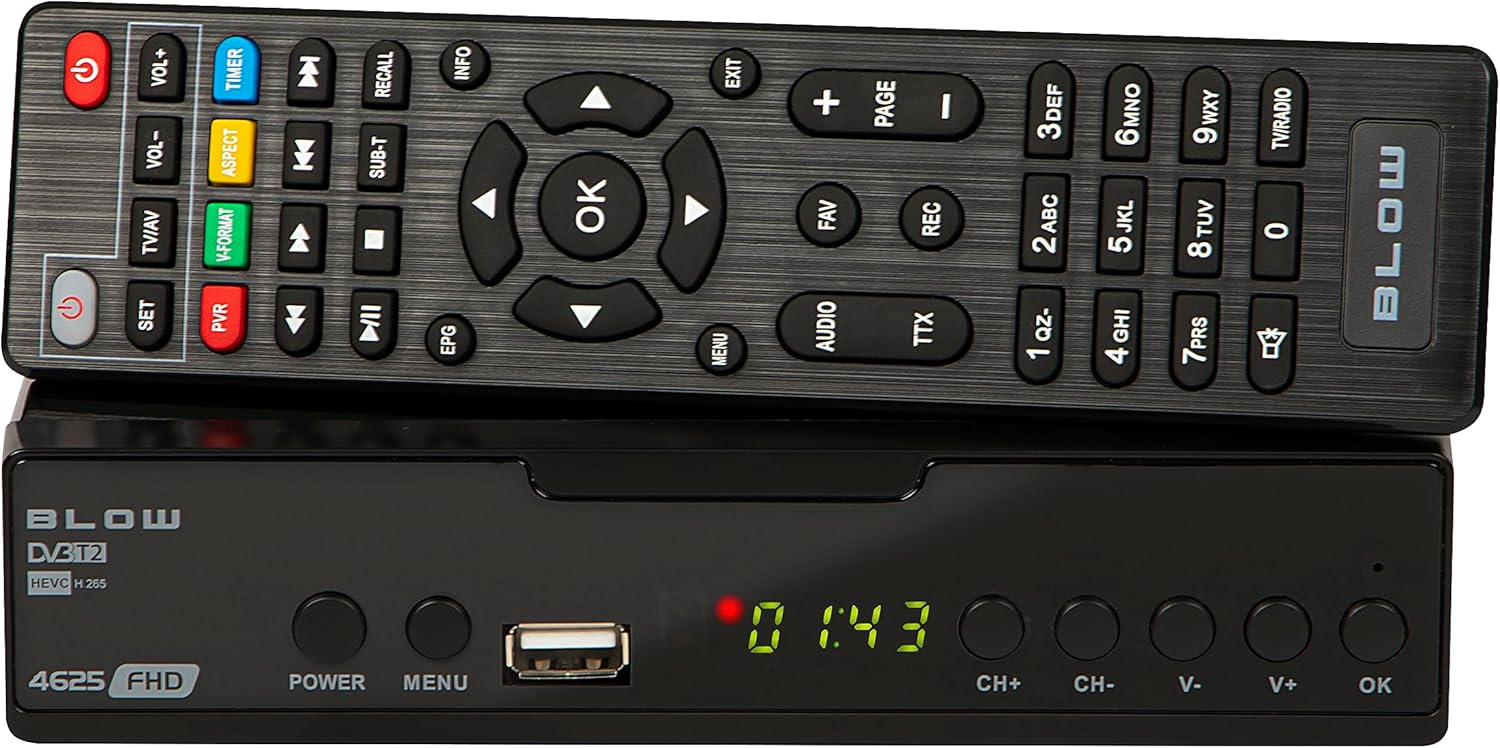
प्रतिमा 4.1: समोर view of the BLOW 4625FHD DVB-T2 Tuner with its remote control.
The front panel features a digital display, a USB port for media playback and PVR functions, and essential control buttons:
- डिस्प्ले: Shows channel number, time, or menu information.
- शक्ती: Turns the device on or off (standby).
- मेनू: मुख्य मेनूमध्ये प्रवेश करते.
- यूएसबी पोर्ट: USB स्टोरेज डिव्हाइसेस कनेक्ट करण्यासाठी.
- CH+/CH-: चॅनेल वर किंवा खाली बदलते.
- V+/V-: व्हॉल्यूम वर किंवा खाली समायोजित करते.
- ठीक आहे: मेनूमधील निवडींची पुष्टी करते.
4.2. मागील पॅनेल

Image 4.2: Rear panel of the BLOW 4625FHD DVB-T2 Tuner, showing various input and output ports.
मागील पॅनेल सर्व आवश्यक कनेक्शन पोर्ट प्रदान करते:
- आरएफ इन: Connects to your terrestrial antenna.
- आरएफ आउट: For looping the antenna signal to another device (e.g., another TV or tuner).
- समाक्षीय: डिजिटल ऑडिओ आउटपुट.
- एचडीएमआयः High-Definition Multimedia Interface output for connecting to modern TVs.
- स्कर्ट: Analog video and audio output for connecting to older TVs.
- एसी इनः डिव्हाइससाठी पॉवर इनपुट.
4.3. रिमोट कंट्रोल
The remote control provides full functionality for operating the tuner. Familiarize yourself with its buttons for easy navigation and control.
- शक्ती: ट्यूनर चालू/बंद करते.
- VOL+/VOL-: व्हॉल्यूम समायोजित करते.
- CH+/CH-: चॅनेल बदलतो.
- ठीक आहे: निवडीची पुष्टी करते.
- नेव्हिगेशन बटणे (वर/खाली/डावीकडे/उजवीकडे): मेनू नेव्हिगेट करते.
- मेनू: मुख्य मेनू उघडतो.
- बाहेर पडा: वर्तमान मेनू किंवा स्क्रीनमधून बाहेर पडते.
- EPG: इलेक्ट्रॉनिक प्रोग्राम मार्गदर्शक प्रदर्शित करते.
- PVR: Accesses Personal Video Recorder functions.
- आरईसीः Starts recording the current program.
- FAV: Accesses favorite channel list.
- TV/AV: Switches between TV and AV input modes on the tuner.
- V-फॉर्मेट: Changes video output format.
- ऑडिओ: Selects audio track (if available).
- TTX: टेलिटेक्स्ट फंक्शन.
- संख्या बटणे (0-9): थेट चॅनेल निवड.
5. सेटअप
5.1. Connecting the Tuner
- अँटेना कनेक्शन: Connect your terrestrial antenna cable to the आरएफ इन port on the rear panel of the tuner.
- TV Connection (HDMI): For best picture quality, connect an HDMI cable from the HDMI port on the tuner to an available HDMI input on your television.
- TV Connection (SCART): If your TV does not have an HDMI input, connect a SCART cable from the SCART port on the tuner to the SCART input on your television.
- वीज कनेक्शन: सह पॉवर अॅडॉप्टरला जोडा एसी इन port on the tuner, then plug the adapter into a wall outlet.
5.2. First Time Installation and Channel Scan
- Turn on your television and select the correct input source (HDMI or SCART) corresponding to where you connected the tuner.
- दाबा पॉवर button on the tuner or remote control to turn on the device.
- The first time you power on the tuner, a "First Time Installation" wizard will appear. Follow the on-screen prompts.
- Select your preferred language, country, and other initial settings.
- Initiate the "Auto Scan" or "Channel Search" function. The tuner will automatically search for available DVB-T2 channels in your area. This process may take several minutes.
- Once the scan is complete, the tuner will save the channels and display the first available channel.
6. ऑपरेटिंग
6.1. Basic TV Viewing
- चॅनेल बदलणे: वापरा सीएच + / सीएच- buttons on the remote or front panel, or enter the channel number directly using the number buttons.
- व्हॉल्यूम समायोजित करणे: वापरा VOL + / VOL- रिमोटवरील बटणे.
- निःशब्द: दाबा नि:शब्द करा button on the remote to mute/unmute audio.
- Information Bar: दाबा माहिती button on the remote to display current program information.
6.2. Electronic Program Guide (EPG)
दाबा ईपीजी button on the remote control to access the Electronic Program Guide. This displays program schedules for all available channels. Use the navigation buttons to browse through channels and programs. Press OK करण्यासाठी view details or set a reminder/recording.
६. मीडिया प्लेबॅक (USB)
The BLOW 4625FHD supports media playback from a USB storage device. Insert a USB drive into the front USB port. Navigate to the "Multimedia" or "USB" section in the main menu to browse and play supported audio (MP3, WMA) and video files.
6.4. Personal Video Recorder (PVR)
To use the PVR function, connect a USB storage device (e.g., USB flash drive or external hard drive) to the USB port. The device must be formatted correctly (usually FAT32 or NTFS). You can record live TV programs by pressing the आरईसी button on the remote. Scheduled recordings can be set via the EPG or the PVR menu.
- त्वरित रेकॉर्डिंग: While watching a program, press आरईसी रेकॉर्डिंग सुरू करण्यासाठी. दाबा थांबा समाप्त करणे
- अनुसूचित रेकॉर्डिंग: In the EPG, select a program and press OK, then choose the option to schedule a recording.
- प्लेबॅक रेकॉर्डिंग: Access recorded content through the PVR or Multimedia menu.
7. देखभाल
- स्वच्छता: Ensure the device is unplugged before cleaning. Use a soft, dry, lint-free cloth to wipe the exterior. Do not use abrasive cleaners, waxes, or solvents.
- वायुवीजन: Regularly check that the ventilation slots are not obstructed by dust or debris.
- सॉफ्टवेअर अपडेट्स: वेळोवेळी उत्पादकाची तपासणी करा website for any available software updates. Follow the instructions provided with the update carefully.
8. समस्या निवारण
| समस्या | संभाव्य कारण / उपाय |
|---|---|
| चित्र किंवा आवाज नाही |
|
| "सिग्नल नाही" असा मेसेज |
|
| रिमोट कंट्रोल काम करत नाही |
|
| Picture freezes or pixelates |
|
9. तपशील
| मॉडेल | BLOW 4625FHD (77-048) |
| परिमाण (L x W x H) | 9D x 9B x 2.5H cm |
| वजन | 428 ग्रॅम |
| कनेक्टिव्हिटी | HDMI, USB, SCART, Coaxial, RF IN/OUT |
| व्हिडिओ आउटपुट निराकरण | 1080p |
| समर्थित मानके | DVB-T2, H.265 (HEVC), H.264 |
| वारंवारता श्रेणी | VHF: 170-230MHz, UHF: 470-860MHz |
| ऑडिओ स्वरूप | MP3, WMA |
| ऑडिओ आउटपुट मोड | स्टीरिओ, सराउंड |
| वीज पुरवठा | 12 Volt, 43 Milliampere (Operating) |
| स्टँडबाय वीज वापर | <0.5W |
| शिफारस केलेला वापर | Digital terrestrial TV viewing आणि रेकॉर्डिंग |
| उत्पादक | फुंकणे |
10. हमी
The BLOW 4625FHD DVB-T2 H.265 Digital Terrestrial TV Tuner comes with a 2-वर्ष निर्मात्याची वॉरंटी from the date of purchase. This warranty covers defects in materials and workmanship under normal use. It does not cover damage caused by misuse, accident, unauthorized modification, or external causes. Please retain your proof of purchase for warranty claims.
11. समर्थन
If you encounter any issues that cannot be resolved using the troubleshooting guide, or if you require further assistance, please contact your retailer or the manufacturer's customer support. Refer to the product packaging or the manufacturer's official webसंपर्क तपशीलांसाठी साइट.


