
1. उत्पादन संपलेview
The UNI-T UT372 is a non-contact digital laser tachometer designed for measuring the rotational speed (RPM) and count of objects. It utilizes a laser pointer and reflective tape to provide accurate and stable measurements without physical contact. This device is suitable for various industrial and scientific applications.
प्रमुख वैशिष्ट्ये:
- 5-digit LCD screen with RPM/count and time dual display.
- Measurement modes: MAX (Maximum), MIN (Minimum), AVG (Average), and Normal.
- समायोज्य एसampling rate (0.5-255 seconds).
- Automatic power-off function (cancelable).
- Selectable laser pointer (on/off).
- Clock and time setting capabilities.
- डेटा होल्ड फंक्शन.
- Low power consumption, allowing for approximately 40 hours of continuous operation.
- Equipped with a USB interface for data transfer (UT372 only).
- Certified with CE and UKCA standards.
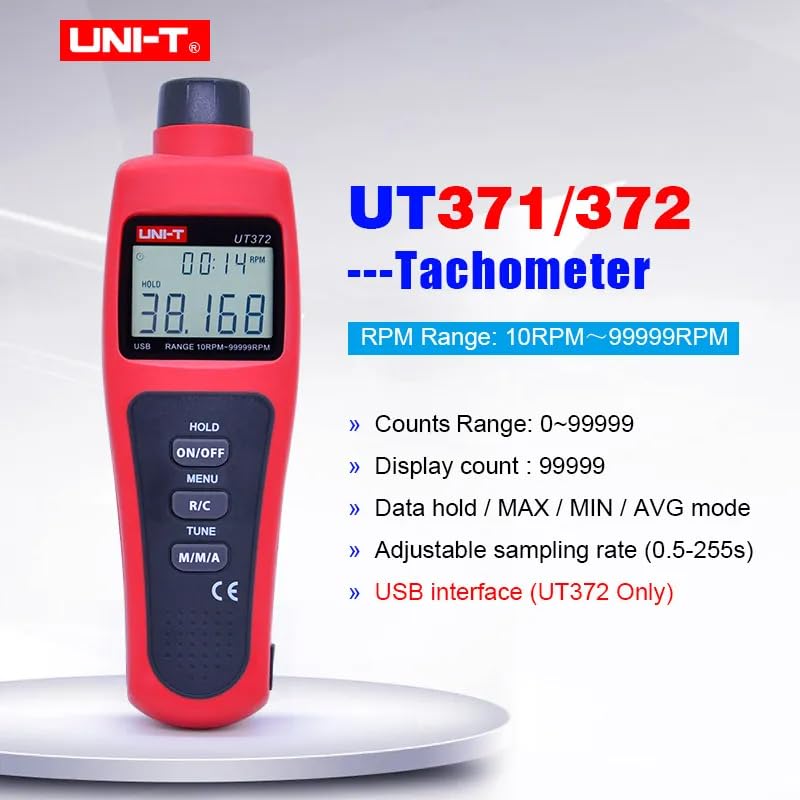
Image 1.1: The UNI-T UT372 tachometer displaying its main features and specifications.
2. सुरक्षितता माहिती
कृपया डिव्हाइस चालवण्यापूर्वी सर्व सुरक्षा सूचना वाचा आणि समजून घ्या. या सूचनांचे पालन न केल्यास डिव्हाइसला दुखापत किंवा नुकसान होऊ शकते.
- Do not look directly into the laser beam. The laser is a Class 2 laser product.
- Do not attempt to modify or disassemble the device. Repairs should only be performed by qualified personnel.
- Ensure the battery compartment is securely closed before use.
- जर उपकरण जास्त काळ वापरणार नसेल तर गळती रोखण्यासाठी बॅटरी काढून टाका.
- Keep the device away from water, dust, and extreme temperatures.
3. पॅकेज सामग्री
Carefully unpack the box and check if all items are present and undamaged. If any item is missing or damaged, contact your supplier.
- UNI-T UT372 Digital Laser Tachometer
- परावर्तित टेप
- USB Interface Cable (for UT372 only)
- PC Software CD (for UT372 only)
- इंग्रजी वापरकर्ता मॅन्युअल
- Batteries (1.5V LR6 x 4)

Image 3.1: The UNI-T UT372 tachometer and its standard accessories as packaged.
4. Product Layout and Panel Introduction
Familiarize yourself with the components and controls of your UT372 tachometer.

प्रतिमा २.१: समोर आणि बाजूला view of the UT372 tachometer with labeled components.
- Tachometer Light Source: Emits the laser beam for measurement.
- एलसीडी डिस्प्ले: Shows measurement readings, modes, and other indicators.
- HOLD / ON/OFF Button: Press to power on/off the device. Short press to activate/deactivate data hold.
- मेनू बटण: सेटिंग्ज समायोजनांसाठी मेनूमध्ये प्रवेश करते.
- R/C (RPM / Counts) Button: Toggles between RPM and Count measurement modes.
- TUNE Button: Used for adjusting settings within the menu.
- M/M/A (MAX/MIN/AVG) Button: Cycles through Maximum, Minimum, and Average measurement modes.
- USB Port (UT372 only): For connecting to a computer for data transfer.
२. सेटअप आणि बॅटरी इन्स्टॉलेशन
5.1 बॅटरी इंस्टॉलेशन
- डिव्हाइसच्या मागील बाजूस बॅटरी कंपार्टमेंट कव्हर शोधा.
- कव्हर स्लाइड करून किंवा अनस्क्रू करून उघडा.
- Insert four 1.5V LR6 (AA) batteries, ensuring correct polarity (+/-).
- बॅटरी कंपार्टमेंट कव्हर सुरक्षितपणे बंद करा.
5.2 Applying Reflective Tape
For accurate non-contact measurement, apply a piece of reflective tape to the rotating object whose speed or count you wish to measure. Ensure the tape is clean and securely attached.
6. ऑपरेटिंग सूचना
6.1 पॉवर चालू/बंद
दाबा HOLD / ON/OFF button to turn the tachometer on or off.
6.2 RPM Measurement
- Ensure the device is in RPM measurement mode (indicated on the LCD). If not, press the आर/सी स्विच करण्यासाठी बटण.
- Point the laser beam at the reflective tape on the rotating object.
- Maintain a measurement distance between 50mm and 200mm (2 to 8 inches) from the target.
- The RPM reading will be displayed on the LCD.
- टीप: If no signal is detected within 7 seconds, the LCD will display "0.0000". If the RPM exceeds 99999, the LCD will display "OL" (Overload).

Image 6.1: Illustrates the correct distance and method for RPM measurement.
6.3 Counts Measurement
- दाबा आर/सी button to switch to Count measurement mode.
- Point the laser beam at the reflective tape on the object.
- The device will count the number of times the laser beam reflects off the tape.
6.4 Mode Selection (MAX/MIN/AVG)
दाबा M/M/A खालील डिस्प्ले मोडमधून सायकल करण्यासाठी बटण वारंवार दाबा:
- अधिकतम: जास्तीत जास्त मोजलेले मूल्य प्रदर्शित करते.
- मिनिट: Displays the minimum measured value.
- सरासरी: Displays the average measured value.
- सामान्य: Displays the current real-time measurement.
6.5 डेटा होल्ड
During measurement, a short press of the HOLD / ON/OFF button will freeze the current reading on the display. Press it again to release the data hold and resume live measurement.
6.6 एसampलिंग रेट समायोजन
एसampling rate can be adjusted from 0.5 to 255 seconds. Refer to the detailed user manual for specific steps on how to access and change this setting via the मेनू आणि ट्यून बटणे
6.7 USB Interface (UT372 Only)
The UT372 model features a USB port for connecting to a computer. Use the provided USB cable and PC software CD to transfer measurement data for analysis and logging. Follow the instructions provided with the software for installation and operation.
7. देखभाल
- स्वच्छता: उपकरण स्वच्छ करण्यासाठी मऊ, कोरडे कापड वापरा. अपघर्षक क्लीनर किंवा सॉल्व्हेंट्स वापरू नका.
- स्टोरेज: Store the tachometer in a cool, dry place away from direct sunlight and extreme temperatures. Remove batteries if storing for extended periods.
- Reflective Tape: Ensure the reflective tape is clean and free from damage for accurate readings. Replace as needed.
8. समस्या निवारण
- डिव्हाइस चालू होत नाही: बॅटरीची स्थापना तपासा आणि बॅटरी संपल्या नाहीत याची खात्री करा. आवश्यक असल्यास बदला.
- "0.0000" displayed during RPM measurement: Ensure the laser is correctly aimed at the reflective tape and the measurement distance is within 50-200mm. Check if the reflective tape is properly applied and clean.
- "OL" displayed: The measured RPM exceeds the device's maximum range (99999 RPM).
- चुकीचे वाचन: Verify the reflective tape is securely attached and clean. Ensure the target object is stable during measurement. Check for any obstructions in the laser path.
- कमी बॅटरी सूचक: Replace batteries promptly when the low battery icon appears on the display.
9. तपशील
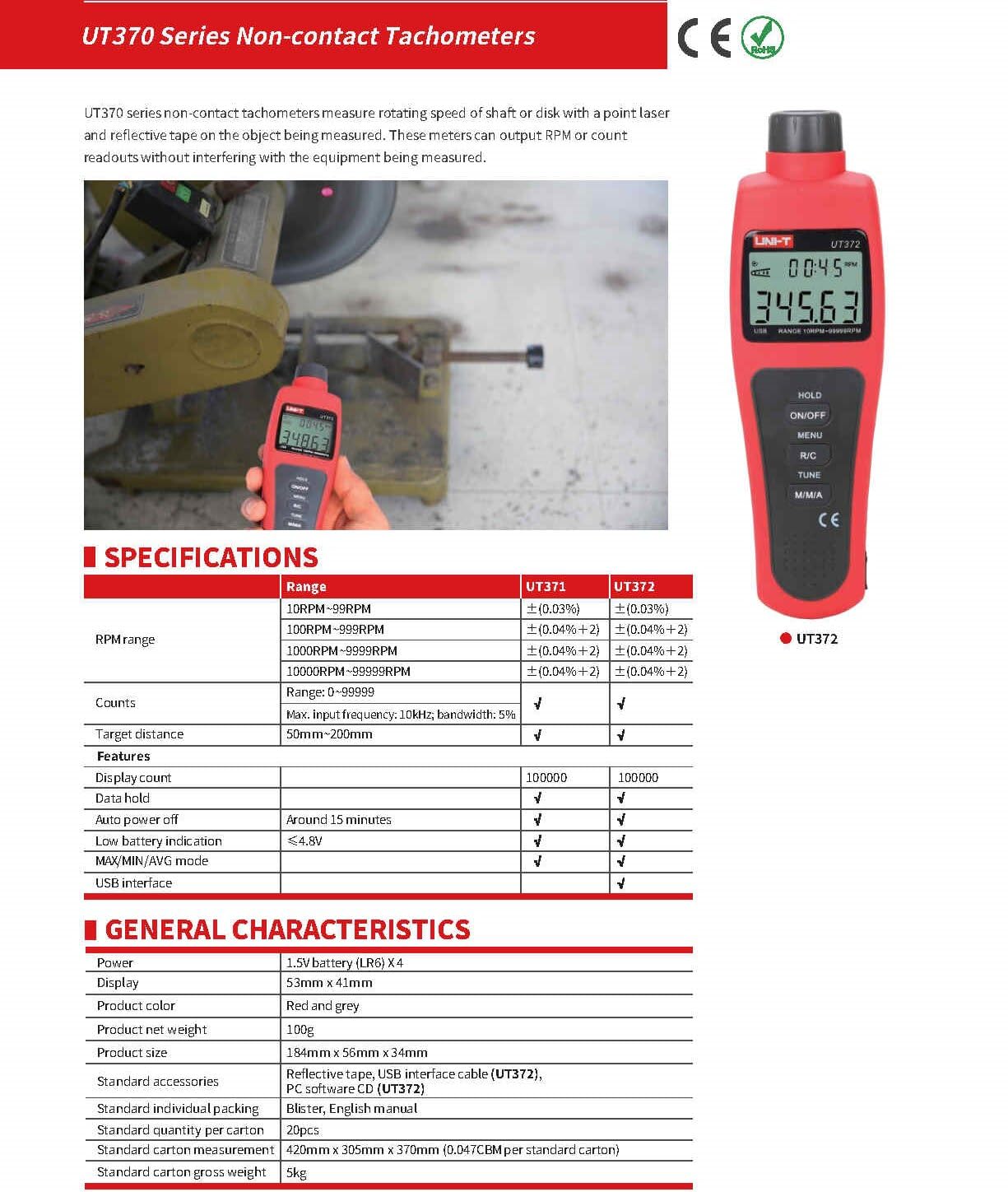
Image 9.1: Detailed specifications for the UT370 series tachometers.
| पॅरामीटर | UT372 Specification |
|---|---|
| RPM श्रेणी | 10 RPM ~ 99999 RPM (Accuracy: ±(0.04%+2)) |
| Counts Range | 0 ~ 99999 |
| प्रदर्शन संख्या | 99999 |
| लक्ष्य अंतर | 50 मिमी ~ 200 मिमी |
| कमाल इनपुट वारंवारता | 10kHz, bandwidth: 5% |
| शक्ती | 1.5V Battery (LR6) x 4 |
| डिस्प्ले | 53 मिमी x 41 मिमी एलसीडी |
| उत्पादनाचा रंग | Red and Grey |
| उत्पादनाचे निव्वळ वजन | 100 ग्रॅम |
| उत्पादनाचा आकार | 184 मिमी x 56 मिमी x 34 मिमी |
| ऑटो पॉवर बंद | Around 15 minutes (cancelable) |
| कमी बॅटरी संकेत | <4.8V |
| यूएसबी इंटरफेस | होय |
| ऑपरेटिंग तापमान | 0°C ते 50°C (32°F ते 122°F) |
| स्टोरेज तापमान | -20°C ते 60°C (-4°F ते 140°F) |
| आर्द्रता | <80% आरएच (नॉन-कंडेन्सिंग) |
10. हमी आणि समर्थन
UNI-T products are designed and manufactured to high quality standards. For warranty information, technical support, or service, please refer to the warranty card included with your product or contact your local UNI-T distributor or customer service center. Please have your product model number (UT372) and purchase date available when contacting support.