
SEAFRONT SEAFRONTqbks9m7dhv
SEAFRONT 1.1kW Variable Frequency Drive (VFD) User Manual
Model: SEAFRONTqbks9m7dhv
1. परिचय
This manual provides essential information for the safe and efficient operation of your SEAFRONT 1.1kW Variable Frequency Drive (VFD). Please read this manual thoroughly before installation, operation, or maintenance to ensure proper usage and prevent potential hazards. Keep this manual for future reference.
The SEAFRONT VFD is designed to control the speed of 3-phase motors, converting a single-phase input (176-264V) into a three-phase output (0-220V) with a frequency range of 0.1-400Hz. It features V/F control, vector control, and output torque control, along with an external LED digital display panel for easy monitoring and adjustment.

आकृती 1: समोर view of the SEAFRONT 1.1kW VFD, showing the LED display, control buttons (PROG, RUN, STOP, OK, UP, DOWN), and a rotary knob for frequency adjustment.
2. सुरक्षितता माहिती
उपकरणांना वैयक्तिक इजा किंवा नुकसान टाळण्यासाठी नेहमी खालील सुरक्षा खबरदारी पाळा:
- स्थापना आणि वायरिंग केवळ पात्र कर्मचाऱ्यांनीच केले पाहिजे.
- कोणतेही वायरिंग किंवा देखभाल करण्यापूर्वी वीजपुरवठा खंडित झाला आहे याची खात्री करा.
- Do not touch the terminals while power is applied or shortly after power is removed, as residual voltage उपस्थित असू शकतात.
- The VFD enclosure is made of flame-retardant PC material, providing good insulation. However, proper grounding is essential.
- Do not operate the VFD with damaged cables or if the enclosure is open.
- Protect the VFD from moisture, dust, direct sunlight, and corrosive gases.
3. उत्पादन संपलेview आणि वैशिष्ट्ये
The SEAFRONT 1.1kW VFD is a compact and robust motor speed controller designed for various industrial applications. Key features include:
- एकाधिक नियंत्रण मोड: Supports V/F control, vector control, and output torque control for versatile motor management.
- टिकाऊ बांधकाम: Features a flame-retardant PC enclosure for good insulation and environmental protection.
- High Performance Coils: Utilizes copper core coils for strong resistance, stable performance, and high load capacity.
- विस्तृत वारंवारता श्रेणी: Operates within a frequency range of 0.1-400Hz.
- External LED Display: Equipped with an external LED digital display panel for clear status indication and parameter adjustment.
- कॉम्पॅक्ट डिझाइन: Small size with high torque output, suitable for various applications.
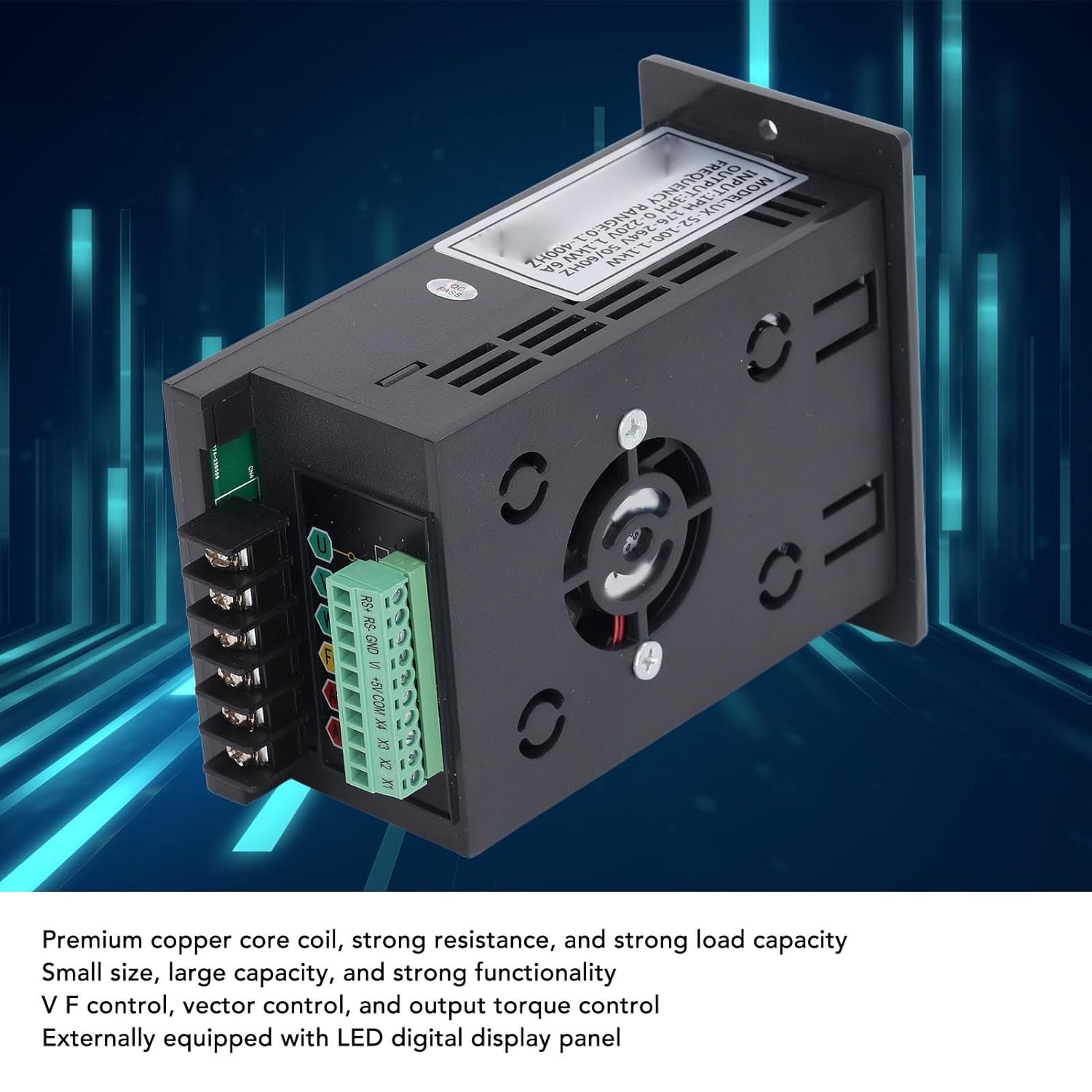
Figure 2: Internal components of the VFD, highlighting the premium copper core coils for stable performance and the integrated cooling fan.
4. सेटअप आणि स्थापना
4.1 अनपॅकिंग आणि तपासणी
Upon receiving the VFD, carefully unpack it and inspect for any signs of damage during transit. Verify that all components are present according to the packing list (if provided). If any damage or missing parts are found, contact your supplier immediately.
4.2 माउंटिंग
Mount the VFD in a vertical position on a flat, stable surface. Ensure adequate ventilation around the unit to prevent overheating. Maintain sufficient clearance from other equipment and walls for proper airflow. Avoid mounting in areas with excessive vibration, dust, or direct heat sources.
4.3 वायरिंग
All wiring must comply with local electrical codes and safety regulations. Ensure the main power supply is disconnected before proceeding with any wiring.
- Power Input (AC): Connect the single-phase 176-264V AC power supply to the "AC" terminals. Ensure correct polarity if applicable, though AC typically does not have strict polarity.
- मोटर आउटपुट (U, V, W): Connect the three-phase motor leads to the "U", "V", and "W" output terminals.
- जमीन (FG): Connect the frame ground (FG) terminal to a reliable earth ground. This is crucial for safety.
- Control Terminals (RS+, RS-, GND, V+, +5V, COM, X1, X2, X3, X4): These terminals are for external control signals, such as remote start/stop, speed reference (analog input V+), and digital inputs (X1-X4). Refer to the detailed wiring diagram for specific connections based on your application.

Figure 3: Wiring terminals on the VFD, including AC input, U/V/W motor output, FG ground, and control terminals.
5. ऑपरेटिंग सूचना
५.१ प्रारंभिक पॉवर-अप
After completing all wiring and safety checks, apply power to the VFD. The LED display should illuminate, indicating the unit is powered on. The display will typically show the current frequency or a default parameter.
5.2 मूलभूत ऑपरेशन
- प्रारंभ/थांबा: दाबा धावा मोटर सुरू करण्यासाठी बटण आणि थांबा ते थांबवण्यासाठी बटण.
- वारंवारता समायोजन: Use the rotary knob on the front panel to adjust the output frequency, which directly controls the motor speed. Turn clockwise to increase frequency, counter-clockwise to decrease.
- Parameter Navigation: वापरा प्रो button to enter the parameter setting mode. Use the UP आणि खाली buttons to navigate through parameters. Press OK to select a parameter and confirm changes.
5.3 Advanced Control Settings
The VFD offers various programmable parameters for fine-tuning motor control. These include acceleration/deceleration times, maximum/minimum frequencies, V/F curve settings, and input/output terminal configurations. Refer to the detailed parameter list in the full technical manual for advanced programming.
Example अर्ज: The VFD is suitable for a wide range of equipment, including fans, water pumps, automated machine tools, and engraving machines.

Figure 4: Common application scenarios for the SEAFRONT VFD, demonstrating its versatility in industrial and automated settings.
6. देखभाल
Regular maintenance helps ensure the longevity and reliable operation of your VFD. Always disconnect power before performing any maintenance.
- स्वच्छता: थंड होण्यास अडथळा आणणारी धूळ साचू नये म्हणून VFD चे बाह्य आणि वायुवीजन उघडे वेळोवेळी स्वच्छ करा. मऊ, कोरडे कापड वापरा. द्रव क्लीनर वापरू नका.
- पंख्याची तपासणी: Check the cooling fan for proper operation and ensure it is free from obstructions. Replace the fan if it becomes noisy or stops working.
- टर्मिनल घट्टपणा: Periodically check all terminal connections for tightness. Loose connections can cause overheating and intermittent operation.
- पर्यावरण तपासणी: ऑपरेटिंग वातावरण निर्दिष्ट तापमान आणि आर्द्रता श्रेणींमध्ये राहील याची खात्री करा.
7. समस्या निवारण
This section provides solutions to common issues. For problems not listed here or if issues persist, contact technical support.
| समस्या | संभाव्य कारण | उपाय |
|---|---|---|
| VFD चालू होत नाही. | इनपुट पॉवर नाही; चुकीचे वायरिंग; फ्यूज फुटला. | Check power supply; verify wiring connections; inspect fuses. |
| मोटर सुरू होत नाही | Incorrect control signal; motor wiring error; VFD in fault state. | Check RUN command; verify motor connections (U, V, W); check VFD display for error codes. |
| मोटर गती अस्थिर | Improper V/F curve setting; motor load fluctuations; interference. | Adjust V/F parameters; ensure stable load; check for electromagnetic interference. |
| ओव्हरकरंट/ओव्हरलोड फॉल्ट | Motor overloaded; acceleration time too short; short circuit in motor wiring. | Reduce motor load; increase acceleration time; check motor and wiring for shorts. |
8. तपशील
| पॅरामीटर | मूल्य |
|---|---|
| मॉडेल क्रमांक | SEAFRONTqbks9m7dhv |
| इनपुट व्हॉल्यूमtage | 1PH 176-264V |
| आउटपुट व्हॉल्यूमtage | 3PH 0-220V |
| रेटेड पॉवर | 1.1kW |
| रेट केलेले वर्तमान | 6A |
| वारंवारता श्रेणी | 0.1-400Hz |
| नियंत्रण मोड | V/F control, Vector control, Output torque control |
| संलग्न साहित्य | ज्वाला-प्रतिरोधक पीसी |
| डिस्प्ले | External LED Digital Display Panel |

Figure 5: Dimensional drawing of the VFD, indicating measurements for installation planning.
9. हमी आणि समर्थन
This product comes with a standard manufacturer's warranty. For specific warranty terms and conditions, please refer to the documentation provided with your purchase or contact your retailer. For technical support, troubleshooting assistance, or spare parts inquiries, please contact SEAFRONT customer service or your authorized distributor.
टीप: Availability of spare parts information is currently unavailable. Please contact support for assistance.
Ask a question about this manual
Ask about setup, troubleshooting, compatibility, parts, safety, or missing instructions. Manuals+ will review the question and use this page’s manual context to help answer it.