
1. परिचय
Thank you for choosing the G-MARK Karaoke Base 3 Wireless Microphone System. This system is designed to provide high-quality audio for various applications including home karaoke, church events, weddings, and DJ parties. It features a 2-channel UHF wireless receiver, two cordless handheld microphones, and versatile connectivity options including 3.5mm AUX and Bluetooth. Please read this manual thoroughly before operation to ensure proper setup and optimal performance.
2. उत्पादन संपलेview
२.२ समाविष्ट घटक
पॅकेजमध्ये खालील बाबींचा समावेश आहे:
- 1 x UHF Receiver with 2 x Antennas
- 2 x Handheld Microphones
- 1 x पॉवर अडॅप्टर
- 1 x 1/4" to 1/4" cable adapter
- 1 x 1/8" to 1/8" cable adapter
- 2 x Anti-Slip Rings
- 2 x Sponge Mic Covers
- १ x वापरकर्ता मॅन्युअल (हे दस्तऐवज)
2.2 प्रमुख वैशिष्ट्ये
- Advanced Audio Configuration: Built-in echo reverb device and UHF wireless system (550-595MHz frequency range) for reduced interference. Automatic frequency recognition and matching.
- Cardioid Pattern Microphones: Uni-directional pickup pattern minimizes background noise, ensuring clear vocal reproduction.
- Robust Audio Sound: Two handheld microphones with quality mic cores. Adjustable echo reverberation, treble, and bass for customized audio effects.
- ब्लूटूथ सुसंगत: Receiver supports Bluetooth music streaming for connection with PCs and other devices.
- Stable Wireless Performance: Dual-channel design with a large dynamic signal range, offering up to 100 feet of wireless operation.
- बहु-सुसंगतता: Features XLR, 6.35mm (1/4"), and 3.5mm (1/8") output jacks. Can connect directly to Bluetooth speakers with AUX input or TV soundbars.

Image: Dynamic Core with Cardioid Pickup Pattern. This diagram illustrates the uni-directional sound pickup pattern of the microphone, designed to focus on the sound source directly in front of it while minimizing ambient noise.
४. सेटअप सूचना
3.1 रिसीव्हर कनेक्शन
- वीज कनेक्शन: Connect the provided power adapter to the DC 12V input on the receiver and plug it into a power outlet.
- अँटेना स्थापना: Screw the two antennas securely into their respective ports on the receiver.
- ऑडिओ आउटपुट: Connect the receiver to your audio system (speaker, amplifier, soundbar, PC) using one of the following methods:
- एक्सएलआर आउटपुटः व्यावसायिक ऑडिओ उपकरणांसाठी.
- 6.35mm (1/4") Output Jack: Use the provided 1/4" to 1/4" cable adapter if needed.
- 3.5mm (1/8") AUX Output Jack: Use the provided 1/8" to 1/8" cable adapter if connecting to devices with a 3.5mm AUX input, such as Bluetooth speakers or TV soundbars.
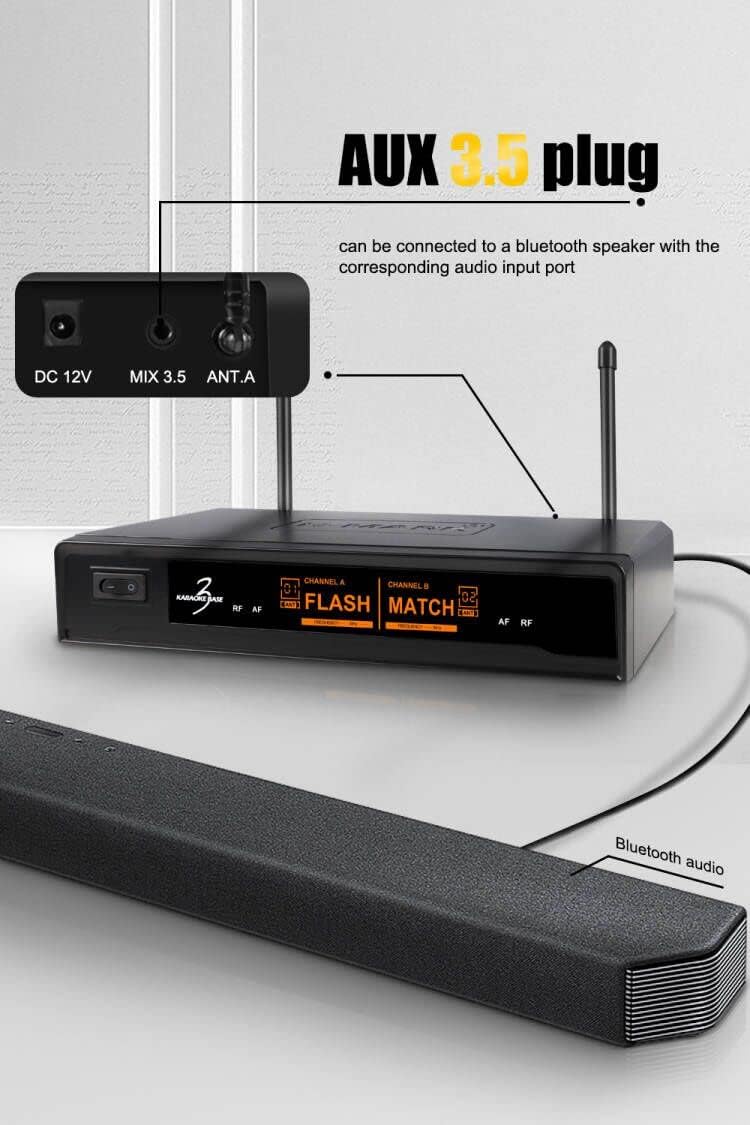
Image: AUX 3.5mm Plug Connection. This image demonstrates how to connect the receiver's 3.5mm AUX output to a Bluetooth speaker or soundbar using the appropriate cable.
२.३ मायक्रोफोन सेटअप
- Insert batteries into each handheld microphone (batteries not included).
- Turn on the receiver and the microphones. The system will automatically recognize and match the suitable frequencies.
3.3 ब्लूटूथ पेअरिंग
To stream music via Bluetooth:
- रिसीव्हर चालू असल्याची खात्री करा.
- On your smartphone, PC, or other Bluetooth-enabled device, navigate to the Bluetooth settings.
- साठी शोधा available devices. The receiver should appear as "BASE 3".
- Select "BASE 3" to pair. Once connected, you can stream music through the receiver to your connected audio system.
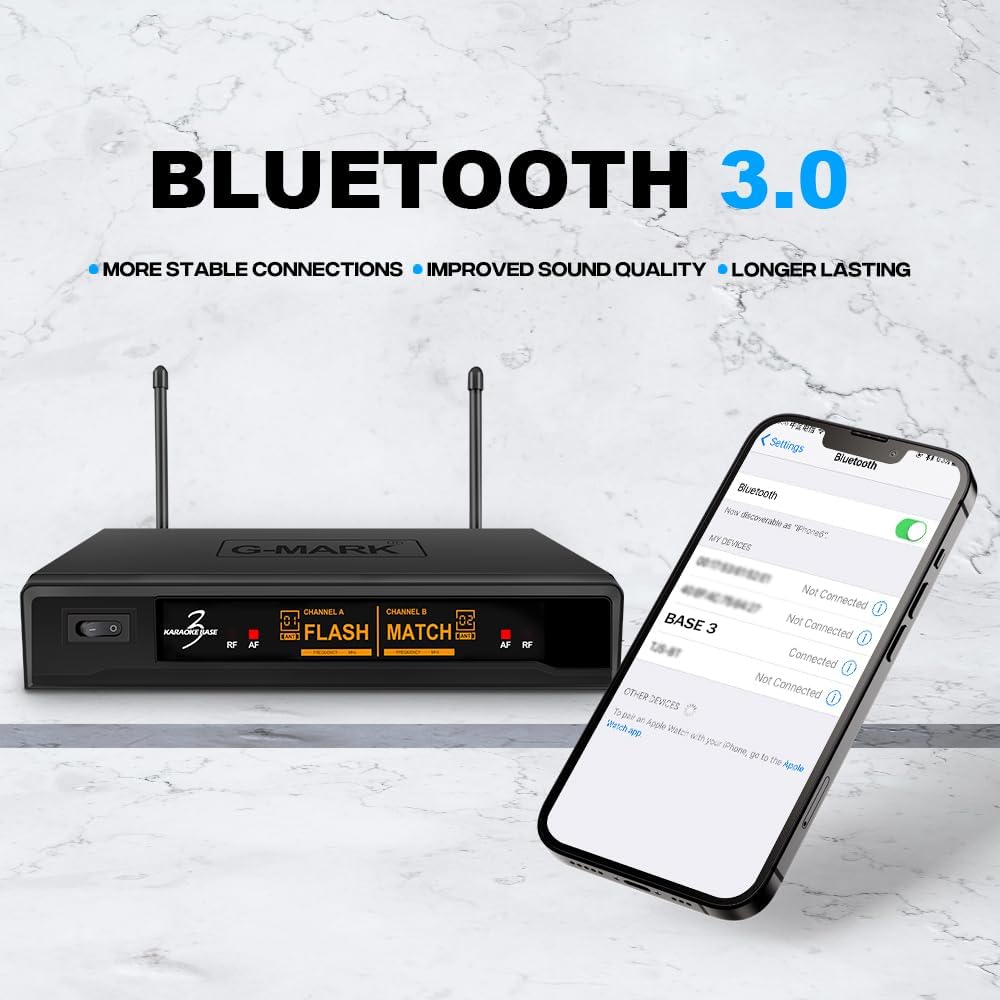
Image: Bluetooth 3.0 Connectivity. This image shows a smartphone's Bluetooth settings screen, indicating how to find and connect to the "BASE 3" receiver for wireless audio streaming.
4. ऑपरेटिंग सूचना
६.४ मायक्रोफोन नियंत्रणे
Each handheld microphone features controls for adjusting audio effects:

Image: Professional Microphone with Sound Effect Adjustments. This illustration highlights the various controls on the handheld microphone, including adjustments for Echo, Treble, Bass, Volume, and the Power switch.
- ECHO +/-: Adjusts the echo reverberation strength.
- त्रास +/-: Adjusts the high-frequency response of your voice.
- बास +/-: Adjusts the low-frequency response of your voice.
- VOL +/-: Adjusts the microphone's output volume.
- चालू/बंद: Power switch for the microphone.
Experiment with these controls to find the optimal sound for your voice and environment.
4.2 Echo Reverb Function
The system includes a built-in echo reverb function to enhance vocal performance, making your voice sound fuller and more spacious. Adjust the ECHO setting on the microphone to achieve the desired effect.
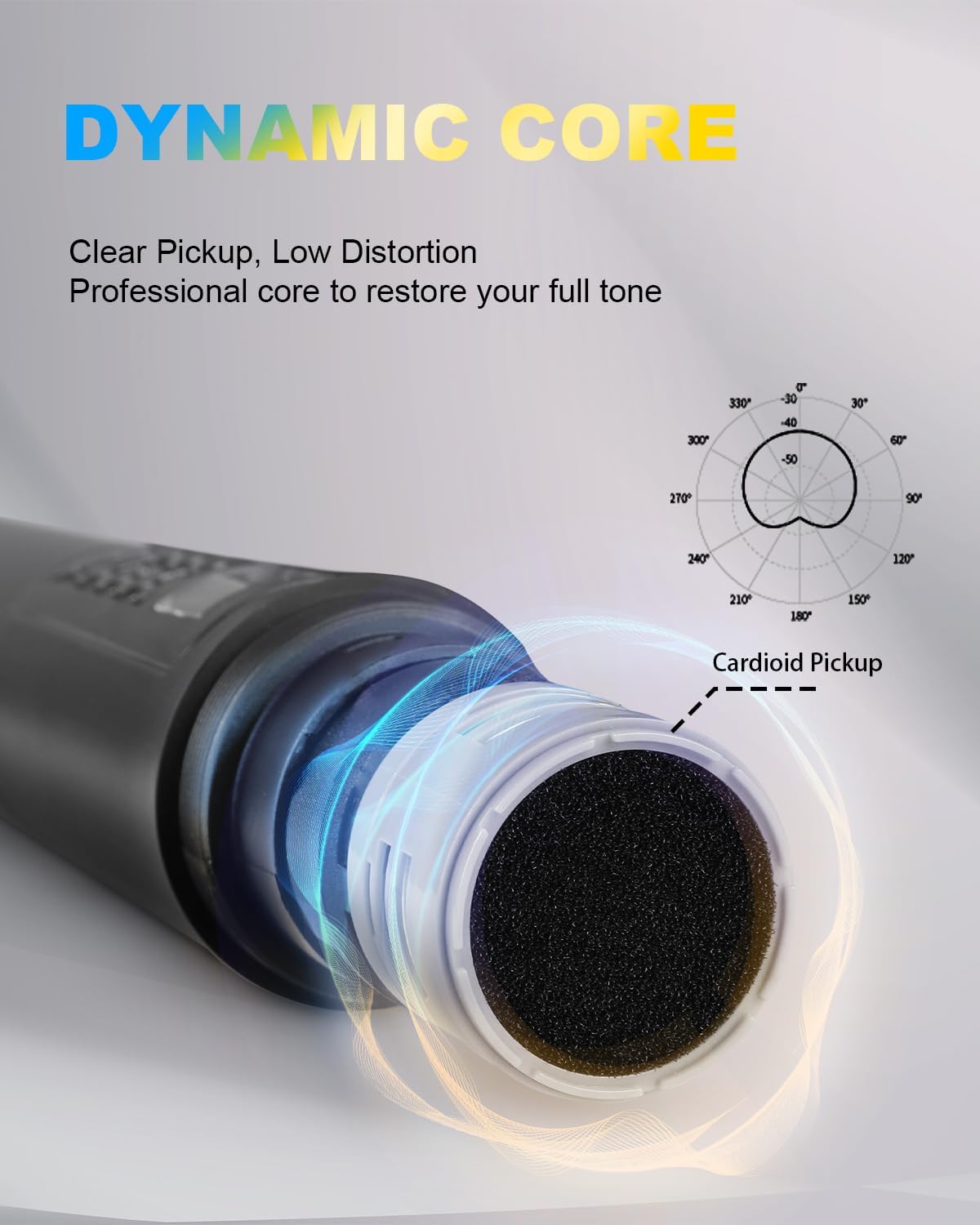
Image: Built-in Echo Reverb Function. This graphic visually represents the integrated echo reverb capability of the system, designed to enrich vocal output.

Image: 5 Levels of Reverb Adjustment. This image, a screenshot from a video, demonstrates the microphone's display indicating the availability of 5 distinct levels for reverb adjustment, allowing users to fine-tune the echo effect.
5. देखभाल
- स्वच्छता: Use a soft, dry cloth to clean the receiver and microphones. Do not use liquid cleaners or solvents.
- स्टोरेज: वापरात नसताना थेट सूर्यप्रकाश आणि अति तापमानापासून दूर थंड, कोरड्या जागी सिस्टम साठवा.
- बॅटरी बदलणे: Replace microphone batteries promptly when performance degrades to ensure optimal operation.
- मायक्रोफोन कव्हर्स: Use the provided sponge mic covers to protect the microphone capsules and reduce plosive sounds.
6. समस्या निवारण
| समस्या | संभाव्य कारण | उपाय |
|---|---|---|
| मायक्रोफोनमधून आवाज नाही |
|
|
| अडथळा किंवा खराब आवाज गुणवत्ता |
|
|
| ब्लूटूथ डिव्हाइस जोडत नाही |
|
|
7. तपशील
| वैशिष्ट्य | तपशील |
|---|---|
| ब्रँड | जी-मार्क |
| मॉडेलचे नाव | Karaoke Base 3 |
| कनेक्टिव्हिटी तंत्रज्ञान | XLR, 1/4" Output Jack, 1/8" Output Jack |
| कनेक्टर प्रकार | 3.5 मिमी जॅक, XLR |
| विशेष वैशिष्ट्ये | कॉर्डलेस, वायरलेस |
| सुसंगत साधने | स्मार्टफोन, कराओके मशीन |
| रंग | काळा |
| ध्रुवीय नमुना | युनिडायरेक्शनल (कार्डिओइड) |
| प्रतिबाधा | 600 ओम |
| मायक्रोफोन फॉर्म फॅक्टर | मायक्रोफोन सिस्टम |
| उर्जा स्त्रोत | Battery Powered (Microphones), Power Adapter (Receiver) |
| सिग्नल टू नॉईस रेश्यो | 80 dB |
| चॅनेलची संख्या | 2 |
| वारंवारता प्रतिसाद | 50-15000 Hz |
| UHF वारंवारता श्रेणी | 550-595 MHz |
| वायरलेस श्रेणी | ३२ फूटांपर्यंत (अंदाजे १० मीटर) |
8. हमी आणि समर्थन
For warranty information or technical support, please contact G-MARK customer service through your purchase platform or the official G-MARK website. Please have your product model number (Karaoke Base 3) and purchase details ready when contacting support.