
1. परिचय
The OC Acoustic Newport Plug-in Bluetooth Speakers offer a convenient and clutter-free audio solution. Designed to plug directly into any standard electrical outlet, these speakers eliminate the need for charging cables and free up counter space. Enjoy crisp, loud sound without the hassle of batteries or wires.

प्रतिमा: समोर view of the OC Acoustic Newport Plug-in Bluetooth Speaker.
२. बॉक्समध्ये काय आहे?
पॅकेजमध्ये सर्व वस्तू आहेत का ते तपासा:
- OC Acoustic Newport Plug-in Bluetooth Speakers (Pair)
- USB charging cable (for device charging via speaker's USB port)
3. सेटअप
Follow these steps to set up your Newport Plug-in Bluetooth Speakers:
- प्लग इन: Insert the speaker directly into any standard electrical outlet. The speaker is designed to not block the second plug.
- पॉवर चालू: Once plugged in, the speaker will automatically power on. A light indicator will confirm it is ready for pairing.

Image: The Newport speaker plugged into a wall outlet.
4. ऑपरेटिंग सूचना
4.1 ब्लूटूथ पेअरिंग
To connect your device to the Newport speaker via Bluetooth:
- Ensure the Newport speaker is plugged into an outlet and powered on.
- तुमच्या स्मार्टफोन किंवा टॅबलेटवर, ब्लूटूथ सेटिंग्जवर नेव्हिगेट करा.
- ब्लूटूथ चालू करा.
- Scan for available devices. The Newport speaker will appear as "Newport_XXXX" (where XXXX is a unique identifier).
- Select "Newport_XXXX" from the list to pair. A confirmation sound will indicate successful pairing.
4.2 Party Mode (Multiroom Audio)
To create a multiroom audio system with multiple Newport speakers:
- Ensure all Newport speakers are plugged in and powered on.
- Pair your primary device to one Newport speaker following the Bluetooth Pairing instructions above.
- Refer to the OC Acoustic app or additional documentation for specific instructions on linking multiple Newport speakers for Party Mode, as this feature typically requires app control.
4.3 Built-in USB Type-A Charging Port
The Newport speaker includes a USB Type-A port for convenient charging of your mobile devices.
- Locate the USB port on the side of the speaker.
- तुमच्या डिव्हाइसची USB चार्जिंग केबल या पोर्टशी कनेक्ट करा.
- तुमचे डिव्हाइस चार्जिंग सुरू होईल.
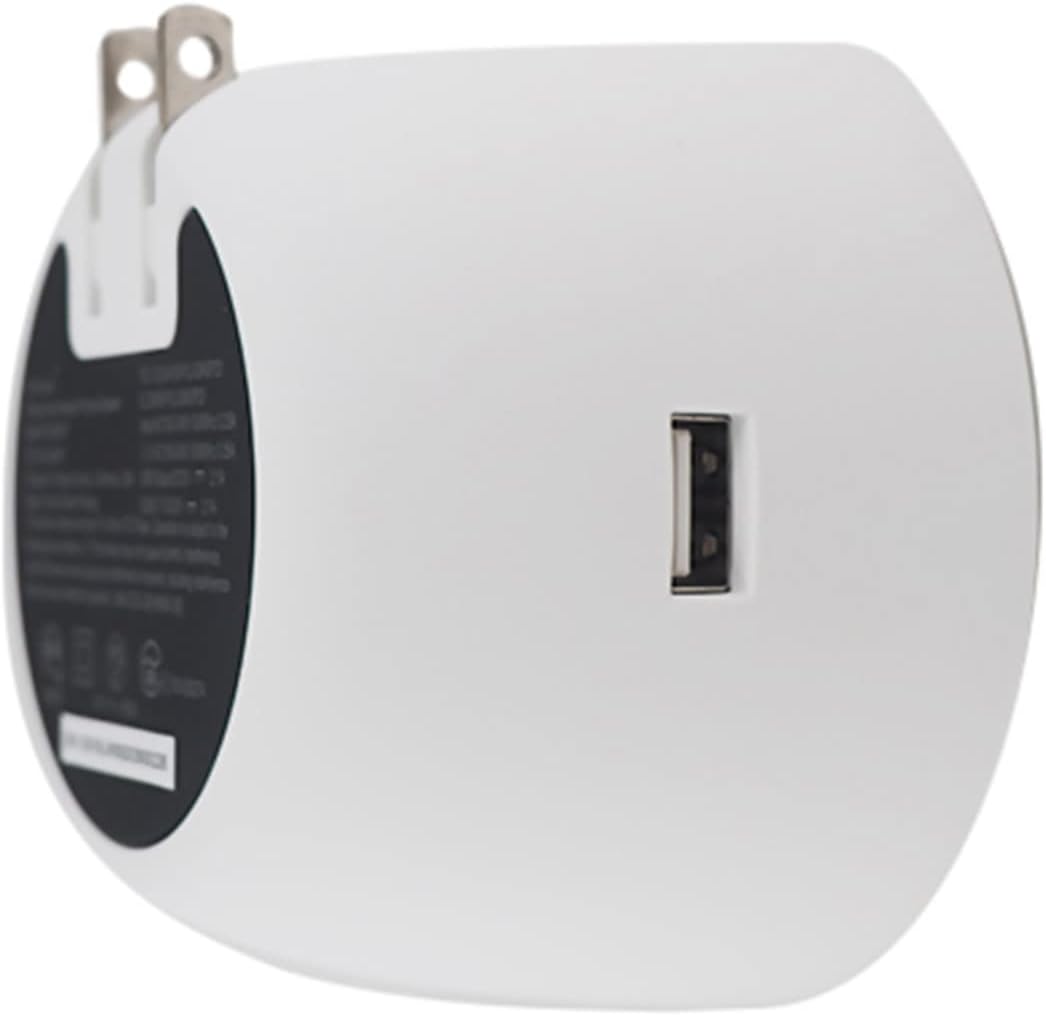
प्रतिमा: मागे view of the Newport speaker, highlighting the USB charging port.
5. समस्या निवारण
5.1 Unit Pairing but No Sound
If your device shows as paired but you hear no sound:
- तुमच्या डिव्हाइसवर, ब्लूटूथ सेटिंग्जवर जा.
- Locate the paired Newport speaker (e.g., "Newport_5da9").
- Select the information icon (usually an 'i' in a circle) next to the speaker name.
- Choose the option to "Forget This Device" or "Unpair".
- Restart the pairing process from Section 4.1.
5.2 Reconnecting After Unplugging
If you unplug your Newport speaker and then plug it back in, it may not automatically reconnect to your device.

Image: Close-up of the Newport speaker, indicating the power button location.
उपाय: After plugging the speaker back into the outlet, press the power button on the speaker to re-establish the connection with your previously paired device.
6. तपशील
| वैशिष्ट्य | तपशील |
|---|---|
| ब्रँड | OC ध्वनिक |
| मॉडेलचे नाव | Newport Plug-in Bluetooth Speakers - Pair |
| मॉडेल क्रमांक | JBLSENSELITEBLKAM |
| कनेक्टिव्हिटी तंत्रज्ञान | ब्लूटूथ, यूएसबी |
| माउंटिंग प्रकार | प्लग-इन |
| स्पीकरचा प्रकार | ब्लूटूथ स्पीकर |
| अतिरिक्त वैशिष्ट्ये | यूएसबी पोर्ट |
| सबवूफर व्यास | 2 इंच |
| रंग | Light Gray/White |
| जलरोधक आहे | असत्य |
| वॉरंटी प्रकार | मर्यादित |
| नियंत्रण पद्धत | स्पर्श करा |
| स्पीकरचा आकार | 2 इंच |
| वूफर व्यास | 2 इंच |
| ब्लूटूथ श्रेणी | 20.12 मीटर |
| कंट्रोलर प्रकार | Battery powered (refers to connected device) |
| आयटमचे परिमाण D x W x H | १६"उ x २६"प x ४७"उ |
| आयटम वजन | 2 पाउंड |
| सुसंगत साधने | स्मार्टफोन, टॅब्लेट |
| उर्जा स्त्रोत | कॉर्ड केलेले इलेक्ट्रिक |
| अंगभूत मीडिया | यूएसबी चार्जिंग केबल |
| आयटमची संख्या | 2 |
| UPC | 683950295810 |
| उत्पादक | OC ध्वनिक |
| ऑडिओ चॅनेलची संख्या | 2.0 |
| वायरलेस तंत्रज्ञान | ब्लूटूथ |
| सबवूफर कनेक्टिव्हिटी तंत्रज्ञान | वायरलेस |
| कनेक्टिव्हिटी प्रोटोकॉल | ब्लूटूथ |
| GTIN | 683950295810 |

Image: Dimensions of the Newport Plug-in Bluetooth Speaker.
१०. उत्पादन व्हिडिओ
अधिकृत उत्पादन व्हिडिओ एका क्षणासाठी पहा.view of the OC Acoustic Newport Plug-in Bluetooth Speakers:
व्हिडिओ: अधिकृत उत्पादन व्हिडिओ शोasing the features and use of the OC Acoustic Newport speakers.
8. हमी आणि समर्थन
8.1 हमी माहिती
The OC Acoustic Newport Plug-in Bluetooth Speakers come with a ५ वर्षांची उत्पादकाची मर्यादित वॉरंटी. ही वॉरंटी सामान्य वापरात असलेल्या साहित्यातील दोष आणि कारागिरीला व्यापते. वॉरंटी दाव्यांसाठी कृपया खरेदीचा पुरावा जपून ठेवा.
8.2 ग्राहक समर्थन
For technical assistance, warranty claims, or general inquiries, please visit the official OC Acoustic website or contact their customer support. Refer to the product packaging or the brand's online resources for the most current contact information.