
बेसियस बोवी WM02
Baseus Bowie WM02 TWS Bluetooth Earbuds
वापरकर्ता मॅन्युअल
परिचय
Thank you for choosing the Baseus Bowie WM02 TWS Bluetooth Earbuds. These ultra-compact and lightweight earbuds are designed for comfortable, long-term wear, offering a seamless audio experience with advanced Bluetooth 5.3 technology and an impressive 25-hour battery life (with charging case). This manual will guide you through the setup, operation, and maintenance of your new earbuds.

Image: Baseus Bowie WM02 TWS Bluetooth Earbuds in white, with their charging case.
सेटअप
१. अनबॉक्सिंग आणि घटक
प्रथम वापरण्यापूर्वी, कृपया सर्व घटक पॅकेजमध्ये असल्याची खात्री करा:
- Baseus Bowie WM02 TWS Earbuds
- चार्जिंग केस
- USB-C चार्जिंग केबल
- कानाच्या टिपांचे अनेक आकार (एस, एम, एल)
- वापरकर्ता मॅन्युअल
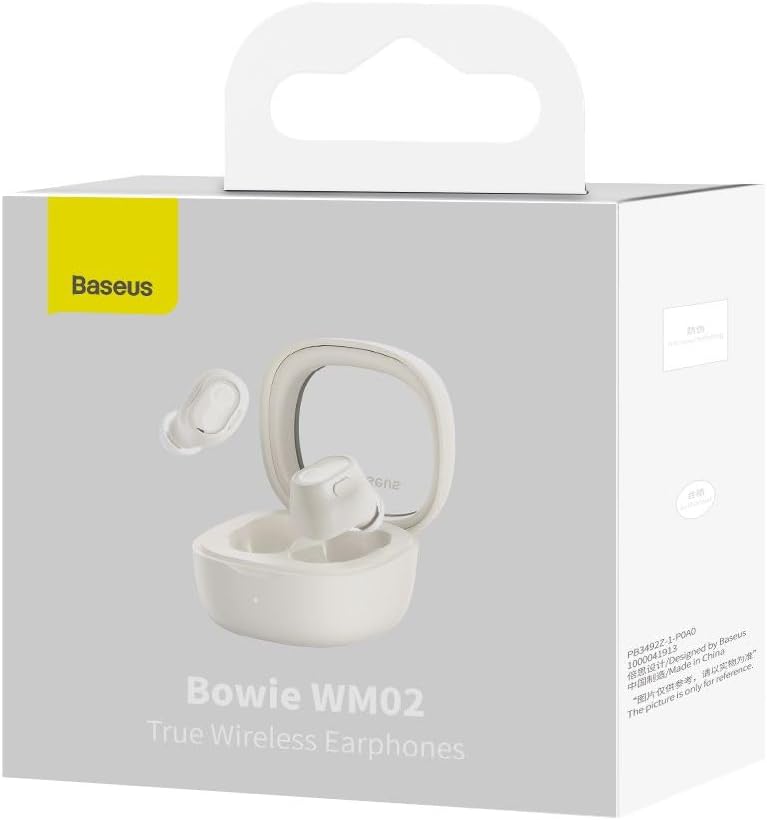
Image: The Baseus Bowie WM02 earbuds, charging case, USB-C cable, and ear tips laid out with the product packaging.
४.१. इअरबड्स आणि केस चार्ज करणे
For optimal performance, fully charge the earbuds and charging case before first use.
- इअरबड्स चार्जिंग केसमध्ये ठेवा. ते त्यांच्या संबंधित स्लॉटमध्ये योग्यरित्या बसले आहेत याची खात्री करा.
- Connect the USB-C charging cable to the charging port on the case and the other end to a USB power source (e.g., computer, wall adapter).
- The indicator light on the charging case will show the charging status. Once fully charged, the light will typically turn solid or turn off.
A 10-minute quick charge provides approximately 2 hours of listening time, and a full charge offers up to 5 hours of continuous use, extending to 25 hours with the charging case.

Image: Graphic illustrating the 25-hour battery life of the Baseus Bowie WM02 earbuds and charging case.
3. ब्लूटूथ पेअरिंग
Follow these steps to pair your earbuds with a Bluetooth-enabled device:
- चार्जिंग केस उघडा. इअरबड्स आपोआप पेअरिंग मोडमध्ये येतील (इंडिकेटर लाईट्स फ्लॅश होतील).
- तुमच्या डिव्हाइसवर (स्मार्टफोन, टॅबलेट, लॅपटॉप), ब्लूटूथ सेटिंग्जमध्ये जा आणि ब्लूटूथ सक्षम करा.
- साठी शोधा available devices and select "Baseus Bowie WM02" from the list.
- Once connected, the earbud indicator lights will typically turn off or show a steady light.
स्थिर आणि कार्यक्षम कनेक्शनसाठी इअरबड्समध्ये ब्लूटूथ 5.3 आहे.

Image: A visual representation of the Wireless 5.3 chip, highlighting fast and smooth connection.
4. Baseus App Integration
Enhance your experience by downloading the official Baseus app. The app allows you to:
- Locate your earbuds.
- Check real-time battery levels.
- स्पर्श नियंत्रणे सानुकूलित करा.
- अतिरिक्त वैशिष्ट्ये आणि अपडेट्स अॅक्सेस करा.

Image: Screenshot of the Baseus app interface, demonstrating features like earbud location and battery status.
ऑपरेटिंग सूचना
२. इअरबड्स घालणे
The Baseus Bowie WM02 earbuds are designed for a comfortable and secure fit, even for smaller ears. They weigh only 3.8g per earbud and have a 108-degree elevation angle for ergonomic wear.
- तुमच्या कानांना सर्वोत्तम सील आणि आराम देणारे कानाचे टोक निवडा.
- प्रत्येक इयरबड तुमच्या कानाच्या नळीत हळूवारपणे घाला आणि त्यांना सुरक्षित करण्यासाठी थोडेसे फिरवा.

Image: A woman demonstrating the comfortable and seamless fit of the Baseus Bowie WM02 earbuds.
2. नियंत्रणांना स्पर्श करा
The earbuds feature intuitive touch controls. You can customize these controls via the Baseus app.
| कृती | नियंत्रण |
|---|---|
| खेळा/विराम द्या | दोन्ही इयरबडवर एकच टॅप करा |
| पुढील ट्रॅक | उजव्या इयरबडवर दोनदा टॅप करा |
| मागील ट्रॅक | डाव्या इयरबडवर दोनदा टॅप करा |
| उत्तर द्या/कॉल संपवा | दोन्ही इयरबडवर एकच टॅप करा |
| कॉल रिजेक्ट करा | दोन्हीपैकी एक इअरबड जास्त वेळ दाबून ठेवा |
| व्हॉइस असिस्टंट सक्रिय करा | दोन्हीपैकी एका इयरबडवर तीनदा टॅप करा |
| Toggle Low Latency Mode (Gaming Mode) | Long press on either earbud (check app for specific gesture) |
3. पॉवर चालू/बंद
- पॉवर चालू: चार्जिंग केस उघडा, आणि इअरबड्स आपोआप चालू होतील आणि शेवटच्या जोडलेल्या डिव्हाइसशी कनेक्ट होतील.
- वीज बंद: इअरबड्स परत चार्जिंग केसमध्ये ठेवा आणि झाकण बंद करा. ते आपोआप डिस्कनेक्ट होतील आणि पॉवर बंद होतील.
५.४. गेमिंग मोड (कमी विलंब)
The Bowie WM02 features a 60ms low-latency mode, ideal for gaming, ensuring instant response and synchronized audio. Activate this mode via the touch controls or the Baseus app for an immersive gaming experience.
देखभाल
७.२. साफसफाई
नियमित स्वच्छता केल्याने आवाजाची गुणवत्ता आणि स्वच्छता राखण्यास मदत होते.
- इअरबड्स आणि चार्जिंग केस पुसण्यासाठी मऊ, कोरडे, लिंट-फ्री कापड वापरा.
- For ear tips, remove them and clean with mild soap and water, then dry thoroughly before reattaching.
- इअरबड्स आणि केस दोन्हीवरील चार्जिंग कॉन्टॅक्ट्स कोरड्या कापसाच्या पुसण्याने हळूवारपणे स्वच्छ करा.
- Avoid using abrasive cleaners, alcohol, or solvents.
2. स्टोरेज
वापरात नसताना, धूळ आणि नुकसानापासून संरक्षण करण्यासाठी इअरबड्स त्यांच्या चार्जिंग केसमध्ये ठेवा.
3. बॅटरी काळजी
- Avoid exposing the earbuds and case to extreme temperatures (hot or cold).
- Do not leave the battery completely drained for extended periods. Charge them regularly.
समस्यानिवारण
If you encounter any issues with your Baseus Bowie WM02 earbuds, please refer to the following common solutions:
| समस्या | संभाव्य उपाय |
|---|---|
| इअरबड्स जोडत नाहीत | Ensure earbuds are charged. Turn off and on your device's Bluetooth. Forget the device in Bluetooth settings and re-pair. |
| एका इअरबडमधून आवाज येत नाही | Check battery level of both earbuds. Place both earbuds back in the case, close the lid, then open again. Re-pair if necessary. |
| चार्जिंग समस्या | चार्जिंग केबल सुरक्षितपणे जोडलेली आहे याची खात्री करा. वेगळा USB पोर्ट किंवा चार्जर वापरून पहा. इयरबड्स आणि केसवरील चार्जिंग कॉन्टॅक्ट स्वच्छ करा. |
| कमी आवाज किंवा खराब आवाजाची गुणवत्ता | Adjust volume on your device. Ensure ear tips provide a good seal. Clean earbud mesh to remove debris. |
| स्पर्श नियंत्रणे प्रतिसाद देत नाहीत | Ensure your fingers are clean and dry. Try resetting the earbuds (refer to Baseus app or online support for specific reset instructions). |
If the problem persists, please contact Baseus customer support.
तपशील
| वैशिष्ट्य | तपशील |
|---|---|
| मॉडेलचे नाव | बोवी WM02 |
| उत्पादक मॉडेल क्रमांक | एनजीटीडब्ल्यू३४०००१ |
| कनेक्टिव्हिटी तंत्रज्ञान | वायरलेस (ब्लूटूथ) |
| वायरलेस कम्युनिकेशन तंत्रज्ञान | ब्लूटूथ 5.3 |
| Earbud Form Factor | इन-इअर |
| ध्वनी नियंत्रण | काहीही नाही |
| उत्पादनाचे वजन | 60 ग्रॅम |
| वारंवारता श्रेणी | २० हर्ट्झ - २०,००० हर्ट्झ |
| प्रतिबाधा | 140 ओम |
| सरासरी बॅटरी लाइफ (इअरबड्स) | 5 तास |
| एकूण बॅटरी लाइफ (केससह) | 25 तासांपर्यंत |
| चार्जिंग वेळ | अंदाजे २ तास (पूर्ण चार्ज करण्यासाठी) |
| चार्जिंग पोर्ट | यूएसबी टाइप-सी |
| विशेष वैशिष्ट्ये | Fast Charging, Low Latency Mode (60ms) |
| सुसंगत साधने | Bluetooth-enabled devices such as smartphones, tablets, laptops, and desktop computers. |
हमी आणि समर्थन
हमी माहिती
The Baseus Bowie WM02 TWS Bluetooth Earbuds come with a 12-month manufacturer's warranty from the official Baseus Brazil store. Please retain your proof of purchase for warranty claims.
ग्राहक समर्थन
For further assistance, technical support, or warranty inquiries, please contact Baseus customer support through the official Baseus website or the Baseus app. You can also visit the अमेझॉनवरील बेसियस स्टोअर अधिक माहितीसाठी.
Ask a question about this manual
Ask about setup, troubleshooting, compatibility, parts, safety, or missing instructions. Manuals+ will review the question and use this page’s manual context to help answer it.