
1. परिचय
Thank you for choosing the Karlsson LED Mirror Alarm Clock. This digital alarm clock features a modern design with a clear LED display integrated into a silver mirror surface, showing time and temperature. This manual provides essential information for the safe and efficient use of your device.
बॉक्समध्ये काय आहे:
- Karlsson LED Mirror Alarm Clock
- यूएसबी पॉवर केबल

आकृती 1: समोर view of the Karlsson LED Mirror Alarm Clock, showing the time (15:08) and temperature (19°C) on its reflective display.
2. सुरक्षितता माहिती
- उपकरणाला पाणी किंवा जास्त आर्द्रतेच्या संपर्कात आणू नका.
- अति तापमान, थेट सूर्यप्रकाश किंवा धुळीचे वातावरण टाळा.
- मुलांच्या आवाक्याबाहेर ठेवा.
- Use only the provided USB cable or a compatible power adapter.
- When inserting batteries, ensure correct polarity (+/-).
- जुन्या आणि नवीन बॅटरी किंवा वेगवेगळ्या प्रकारच्या बॅटरी एकत्र करू नका.
- जर डिव्हाइसचा वापर दीर्घ कालावधीसाठी केला जात नसेल तर बॅटरी काढून टाका.
3. उत्पादन संपलेview
Familiarize yourself with the components and controls of your alarm clock.
समोरचा डिस्प्ले:
- वेळ प्रदर्शन: १२-तास किंवा २४-तास स्वरूपात वर्तमान वेळ दाखवते.
- तापमान प्रदर्शन: Shows ambient temperature in Celsius or Fahrenheit.
मागील नियंत्रणे:
- सेट बटण: Used to enter setting modes (time, alarm).
- यूपी बटण: Used to increase values or navigate menus.
- डाउन बटण: Used to decrease values or navigate menus.
- MODE/V Button: Used to switch display modes or activate voice control (if available).
- रीसेट बटण: फॅक्टरी सेटिंग्जवर डिव्हाइस रीसेट करा.
- DC 5V इनपुट: For connecting the USB power cable.
- बॅटरी कंपार्टमेंट: बॅकअप पॉवरसाठी ३ x AAA बॅटरीज धरते.
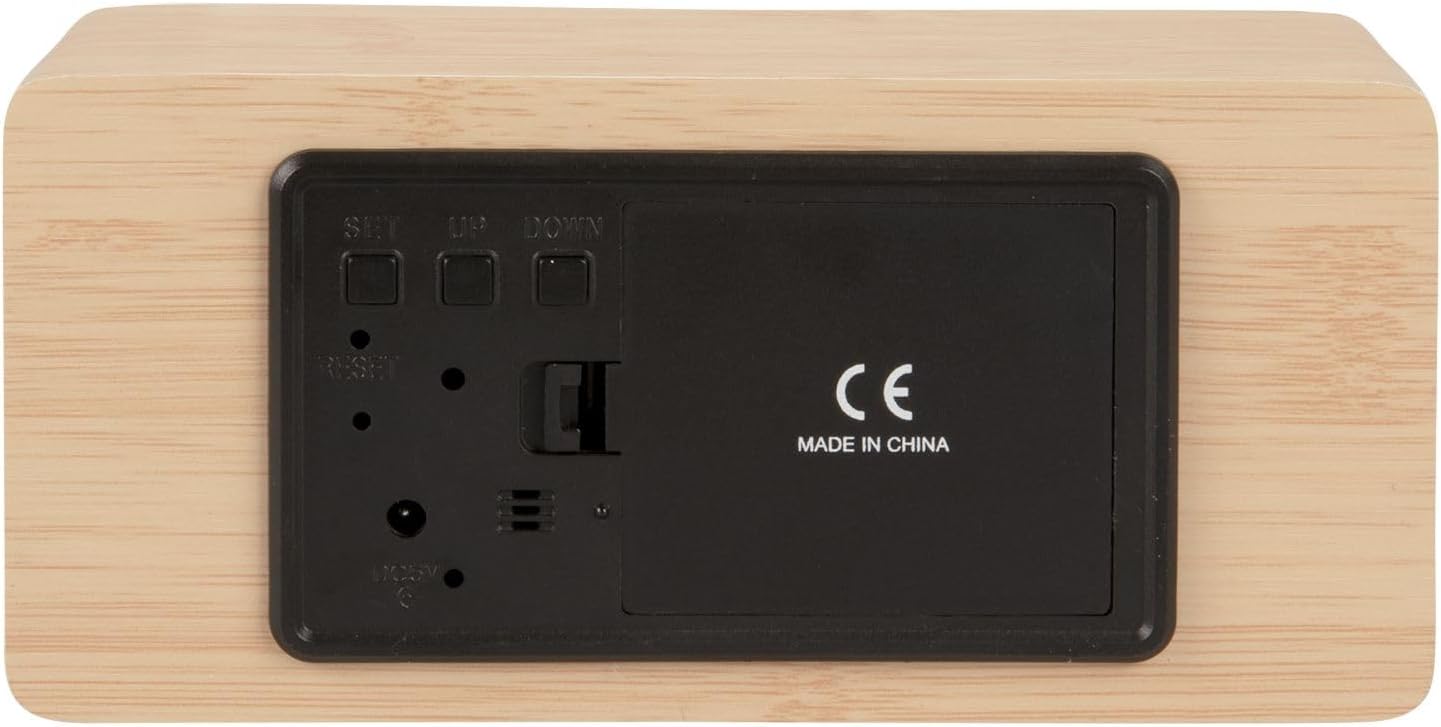
आकृती 2: मागील view of the alarm clock, highlighting the SET, UP, DOWN buttons, power input, and battery compartment.
4. सेटअप
डिव्हाइसला शक्ती देणे:
The alarm clock can be powered via the included USB cable or by 3 x AAA batteries (not included) for backup.
- यूएसबी पॉवर: Connect the small end of the USB cable to the DC 5V input port on the back of the alarm clock. Connect the other end to a USB power adapter (not included) or a powered USB port.
- बॅटरी बॅकअप: Open the battery compartment cover on the back of the clock. Insert 3 x AAA batteries, ensuring correct polarity. Close the cover securely. Batteries are primarily for backup and may not power the display continuously.

आकृती 3: The USB power cable provided for connecting the alarm clock to a power source.
5. ऑपरेटिंग सूचना
वेळ सेट करणे:
- दाबा आणि धरून ठेवा सेट तासाचे अंक चमकू लागेपर्यंत बटण दाबा.
- वापरा UP or खाली तास समायोजित करण्यासाठी बटणे.
- दाबा सेट again to confirm the hour and move to minute setting.
- वापरा UP or खाली मिनिटे समायोजित करण्यासाठी बटणे.
- दाबा सेट मिनिटांची पुष्टी करण्यासाठी आणि वेळ सेटिंग मोडमधून बाहेर पडण्यासाठी.
अलार्म सेट करणे:
- दाबा सेट button once (do not hold) to cycle through display modes until 'AL' or an alarm icon appears.
- दाबा आणि धरून ठेवा सेट button again until the alarm hour digits flash.
- वापरा UP or खाली इच्छित अलार्म तास सेट करण्यासाठी बटणे.
- दाबा सेट to confirm the alarm hour and move to alarm minute setting.
- वापरा UP or खाली इच्छित अलार्म मिनिटे सेट करण्यासाठी बटणे.
- दाबा सेट अलार्म सेटिंग मोडची पुष्टी करण्यासाठी आणि बाहेर पडण्यासाठी.
- अलार्म सक्रिय/निष्क्रिय करण्यासाठी, दाबा UP button while in normal time display mode. An alarm icon will appear/disappear on the display.
Switching Display Modes (12/24 Hour, Temperature Unit):
- सामान्य वेळेच्या प्रदर्शन मोडमध्ये, दाबा UP button to switch between 12-hour and 24-hour formats.
- दाबा खाली सेल्सिअस (°C) आणि फॅरेनहाइट (°F) तापमान युनिट्समध्ये स्विच करण्यासाठी बटण.
6. देखभाल
- Clean the alarm clock with a soft, dry cloth.
- Do not use abrasive cleaners, solvents, or harsh chemicals, as these may damage the mirror surface or casing.
- Ensure the device is unplugged and batteries are removed before cleaning.
7. समस्या निवारण
- प्रदर्शन रिक्त आहे: Check if the USB cable is securely connected to a power source. If using batteries, ensure they are inserted correctly and are not depleted.
- अलार्म वाजत नाही: Verify that the alarm is set and activated (alarm icon visible on display). Check the alarm volume if adjustable (this model may not have adjustable volume).
- Incorrect time/settings: दाबा रीसेट करा button on the back of the unit using a thin object (e.g., a paperclip) to restore factory settings, then re-set the time and alarm.
- तापमान वाचन चुकीचे वाटते: Ensure the clock is placed in a location away from direct heat sources or drafts that could affect ambient temperature readings.
8. तपशील
| मॉडेल क्रमांक | PTG-KA5879WD |
| साहित्य | लाकडी वरवरचा भपका |
| परिमाण (L x W x H) | ३४ सेमी x ३५.५६ सेमी x ६० सेमी (अंदाजे १३.४ x १४ x २३.६ इंच) |
| वजन | ८५७ ग्रॅम (अंदाजे १.८९ पौंड) |
| रंग | Light wood casing, silver mirror display |
| डिस्प्ले प्रकार | डिजिटल एलईडी |
| विशेष वैशिष्ट्य | गजर |
| उर्जा स्त्रोत | USB powered (cable included), 3 x AAA batteries (not included) for backup |
9. हमी आणि समर्थन
This product is manufactured by Karlsson. For any support inquiries, warranty information, or service requests, please refer to the retailer where the product was purchased or visit the official Karlsson website for contact details. Please retain your proof of purchase for warranty claims.