
PALOVUE iSound
PALOVUE Wireless Earbuds User Manual
Model: iSound
Your guide to setting up, operating, and maintaining your PALOVUE iSound Wireless Earbuds.
1. परिचय
The PALOVUE iSound Wireless Earbuds are designed to provide a superior audio experience with advanced features for daily use. Equipped with Qualcomm CSR and Bluetooth 5.0 technology, these earbuds offer a stable and crystal-clear connection, supporting aptX HD sound quality. The CVC 8.0 Noise Cancelling technology with 4 built-in microphones ensures clear calls by effectively reducing ambient noise. Their ergonomic design and multiple ear-tip sizes provide a comfortable and secure fit for extended wear.
The iSound earbuds feature convenient one-step reconnection and intuitive one-touch operation. With up to 24 hours of playtime using the compact charging case, they are ideal for on-the-go listening. Further customization and control are available through the PALOVUE iSound APP.

Image: PALOVUE iSound Wireless Earbuds resting in their open charging case, showcasinत्यांच्या आकर्षक काळ्या डिझाइनचा.
२. बॉक्समध्ये काय आहे?
Upon opening your PALOVUE iSound package, you will find the following components:
- वायरलेस चार्जिंग केस
- PALOVUE iSound Earbuds (Left and Right)
- Ear Tips (multiple sizes for a customizable fit)
- चार्जिंग केबल (USB-C)
- डोरी
- पॅकिंग बॉक्स
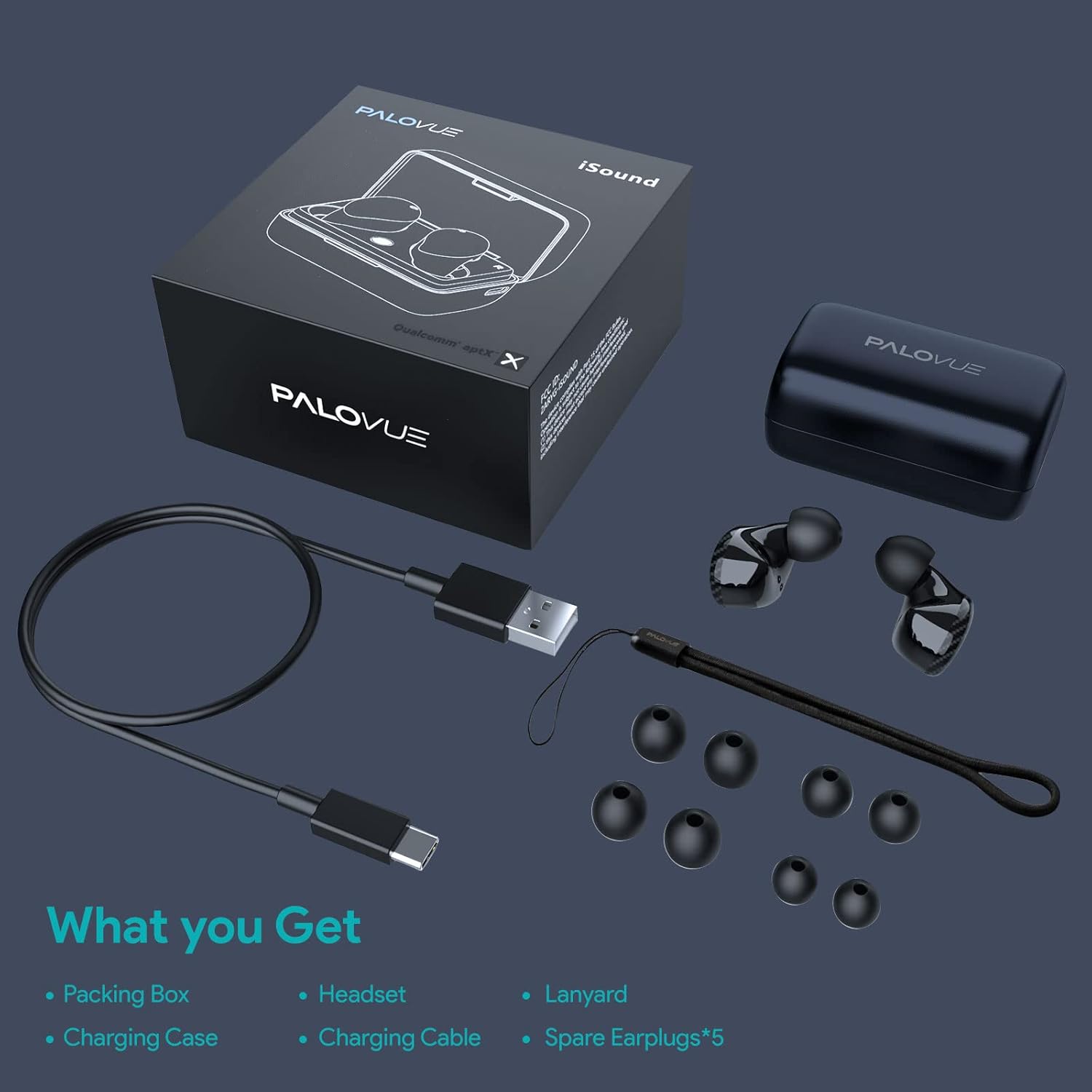
Image: A flat lay showing all items included in the PALOVUE iSound package: the packing box, charging case, earbuds, charging cable, lanyard, and five pairs of spare ear tips.
3. सेटअप मार्गदर्शक
3.1 प्रारंभिक चार्जिंग
Before first use, ensure both the earbuds and the charging case are fully charged. Place the earbuds into the charging case. Connect the provided USB-C cable to the charging case and a power source. The indicator lights on the case will show charging status. A full charge typically takes approximately 2 hours for the case.
४.२ तुमच्या डिव्हाइससोबत पेअरिंग
The PALOVUE iSound earbuds feature one-step reconnection for convenience.
- चार्जिंग केस उघडा. इअरबड्स आपोआप चालू होतील आणि पेअरिंग मोडमध्ये प्रवेश करतील.
- तुमच्या स्मार्टफोन किंवा ब्लूटूथ-सक्षम डिव्हाइसवर, ब्लूटूथ सेटिंग्जवर जा.
- साठी शोधा "PALOVUE iSound" in the list of available devices and select it to connect.
- एकदा कनेक्ट झाल्यावर, तुम्हाला ऐकू येईल असा पुष्टीकरण ऐकू येईल आणि इअरबड्स वापरण्यासाठी तयार होतील.
- For subsequent uses, simply open the charging case, and the earbuds will automatically connect to the last paired device.
Video: A detailed guide demonstrating the connection and operation of the PALOVUE iSound earbuds, including initial pairing steps and touch control functions.
३. तुमचे इअरबड्स चालवणे
4.1 स्पर्श नियंत्रणे
The PALOVUE iSound earbuds feature intuitive touch controls on each earbud. The specific functions can be customized via the PALOVUE iSound APP.
| कृती | डावा इअरबड | उजवा एरबड |
|---|---|---|
| सिंगल टॅप | आवाज कमी करा | आवाज वाढवा |
| डबल टॅप करा | संगीत प्ले करा/थांबवा, कॉल उत्तर द्या/समाप्त करा | संगीत प्ले करा/थांबवा, कॉल उत्तर द्या/समाप्त करा |
| लांब दाबा | Previous Song, Reject Call | Next Song, Reject Call |
Video: A short demonstration of the touch controls for the PALOVUE iSound earbuds, showing how to adjust volume, skip tracks, and manage calls.
4.2 Using the PALOVUE iSound APP
Enhance your experience by downloading the PALOVUE iSound APP. The app allows you to:
- Customize touch control functions (e.g., volume, track control, call management).
- Adjust equalizer (EQ) settings for personalized sound profiles (Male Vocals, Electronic, Jazz, Rock, Classical, Female Vocals, Original, Customize).
- Check battery levels of each earbud.
- Access device information and firmware updates.

Image: A woman wearing PALOVUE iSound earbuds, illustrating their comfortable fit and suitability for daily use.

प्रतिमा: एक स्फोट झाला view diagram of the PALOVUE iSound earbud, detailing its internal structure and emphasizing Qualcomm AptX and Deep Bass sound capabilities.
5. देखभाल
To ensure the longevity and optimal performance of your PALOVUE iSound Wireless Earbuds, follow these maintenance guidelines:
- स्वच्छता: इअरबड्स आणि चार्जिंग केस नियमितपणे मऊ, कोरड्या, लिंट-फ्री कापडाने स्वच्छ करा. अपघर्षक क्लीनर किंवा सॉल्व्हेंट्स वापरू नका. लहान, मऊ ब्रश किंवा कापसाच्या पुसण्याने कानाच्या टोकांवरून आणि स्पीकरच्या जाळीतून कोणताही इअरवॅक्स किंवा कचरा हळूवारपणे काढा.
- स्टोरेज: When not in use, store the earbuds in their charging case to protect them from dust, dirt, and physical damage.
- बॅटरी काळजी: Avoid fully depleting the battery frequently. For long-term storage, charge the earbuds and case to about 50% to preserve battery health.
- पाणी प्रतिकार: The earbuds are rated IPX4 for water resistance, meaning they are protected against splashing water from any direction. They are designed for sports and can withstand sweat and light rain, but they are not suitable for swimming or submersion in water. Ensure the earbuds are dry before placing them back in the charging case.
Video: A short promotional video highlighting the compact size and powerful features of the iSound True Wireless Earbuds, including their IPX4 water resistance.
6. समस्या निवारण
If you encounter issues with your PALOVUE iSound Wireless Earbuds, try the following solutions:
८.२ जोडणी समस्या
- इअरबड्स कनेक्ट होत नाहीत: Ensure Bluetooth is enabled on your device. Place earbuds back in the case, close it, wait a few seconds, then open it again to re-initiate pairing mode.
- फक्त एकच इअरबड काम करत आहे: Try placing both earbuds back in the charging case, closing the lid, and then reopening it. Ensure both earbuds have sufficient charge.
- ब्लूटूथ यादीमध्ये इअरबड्स दिसत नाहीत: Turn off Bluetooth on your device, then turn it back on. Restart your device if necessary.
५.२ ध्वनी गुणवत्तेच्या समस्या
- कमी आवाज: Increase the volume on both your earbuds (via touch control) and your connected device.
- विकृत आवाज: Ensure the earbuds are within Bluetooth range of your device. Check for obstructions between the earbuds and your device.
- खराब कॉल गुणवत्ता: Ensure the microphones are not obstructed. CVC 8.0 Noise Cancelling technology helps, but extreme noise environments can still affect clarity.
6.3 Battery and Charging Issues
- इअरबड्स चार्ज होत नाहीत: Ensure the charging contacts on the earbuds and inside the case are clean and dry. Try a different charging cable or power adapter.
- केस चार्ज होत नाही: चार्जिंग केबल आणि पॉवर सोर्स योग्यरित्या काम करत आहेत का ते तपासा.
6.4 How to Reset Your Earbuds
जर तुम्हाला सतत समस्या येत असतील, तर फॅक्टरी रीसेट केल्याने त्या सोडवता येतील:
- दोन्ही इयरबड चार्जिंग केसमध्ये ठेवा.
- Press and hold the reset button on the charging case (usually located inside or near the charging port) until the indicator lights on the earbuds flash red and green alternately.
- Release the button and wait until only the green light flashes, indicating the reset is complete.
- केसमधून इअरबड्स काढा आणि ते तुमच्या डिव्हाइसशी पुन्हा जोडण्याचा प्रयत्न करा.
Refer to the "PALOVUE iSound Connection operation guide" video in the Setup section for a visual demonstration of the reset process.
7. तपशील
| वैशिष्ट्य | तपशील |
|---|---|
| ब्रँड | चालक |
| मॉडेलचे नाव | iSound |
| कनेक्टिव्हिटी तंत्रज्ञान | वायरलेस (ब्लूटूथ ५.३) |
| वायरलेस कम्युनिकेशन तंत्रज्ञान | ब्लूटूथ |
| चिपसेट | Qualcomm CSR QCC3020 |
| ध्वनी नियंत्रण | CVC 8.0 Noise Cancellation (for calls) |
| मायक्रोफोन | ५०६०० माइक |
| नियंत्रण प्रकार | नियंत्रणाला स्पर्श करा |
| कान प्लेसमेंट | कानात |
| फॉर्म फॅक्टर | कानात |
| बॅटरी लाइफ (इअरबड्स) | ८ तासांपर्यंत (अंदाजे) |
| एकूण खेळण्याचा वेळ (केससह) | 24 तासांपर्यंत |
| चार्जिंग वेळ (केस) | 2 तास |
| ब्लूटूथ श्रेणी | १० मीटर (३० फूट) पर्यंत |
| पाणी प्रतिकार पातळी | IPX4 (स्प्लॅशप्रूफ) |
| साहित्य | Silicone (Ear Tips) |
| आयटम वजन | 1.76 औंस |
| सुसंगत साधने | Smartphones, Tablets, Laptops, Desktops, Smart TVs, Car Audio Systems |
8. हमी आणि समर्थन
PALOVUE products typically come with a manufacturer's warranty. Please refer to the warranty card included in your product packaging for specific terms and conditions, including warranty period and coverage details. For technical support, troubleshooting assistance, or warranty claims, please contact PALOVUE customer service through their official webसाइट किंवा तुमच्या उत्पादन दस्तऐवजीकरणात प्रदान केलेली संपर्क माहिती.
You can also visit the official PALOVUE store on Amazon for more information and support: PALOVUE Amazon Store.
संबंधित कागदपत्रे - iSound
 |
PALOVUE iSound Wireless Earbuds User Guide Official user guide for PALOVUE iSound wireless earbuds, covering setup, pairing, controls, charging, troubleshooting, specifications, and regulatory information. |
 |
PALOVUE iConf ब्लूटूथ कॉन्फरन्स स्पीकर वापरकर्ता मॅन्युअल User manual for the PALOVUE iConf Bluetooth Conference Speaker, providing detailed instructions on setup, connection via USB and Bluetooth, usage, charging, battery status, care, and FCC compliance. |
 |
PALOVUE SportSound User Manual This user manual provides comprehensive instructions for the PALOVUE SportSound wireless earbuds, covering product overview, pairing, wearing, charging, app usage, troubleshooting, and FCC warnings. Available in multiple languages. |
 |
आयसाउंड हाय परफॉर्मन्स पोर्टेबल साउंडबार - वायरलेस स्पीकर आयसाउंड हाय परफॉर्मन्स पोर्टेबल साउंडबार शोधा. ब्लूटूथ, यूएसबी किंवा मायक्रोएसडी द्वारे वायरलेस संगीताचा आनंद घ्या आणि एफएम रेडिओ ऐका. ड्युअल मॅग्नेट स्पीकर्स, रिचार्जेबल बॅटरी आणि कॉलसाठी मायक्रोफोनची सुविधा आहे. वायर्ड कनेक्शनसाठी ऑडिओ केबलचा समावेश आहे. |
 |
Palovue Bluetooth 5.0 Audio Adapter User Manual User manual for the Palovue Bluetooth 5.0 Audio Adapter, providing details on product introduction, specifications, installation, connection, troubleshooting, package contents, and FCC compliance. |
 |
Palovue EarSound User Guide User manual and setup guide for Palovue EarSound wireless earbuds, including pairing instructions, touch controls, specifications, and regulatory compliance. |
Ask a question about this manual
Ask about setup, troubleshooting, compatibility, parts, safety, or missing instructions. Manuals+ will review the question and use this page’s manual context to help answer it.