
अमेझॉन इको शो १० (तिसरी पिढी)
Amazon Echo Show 5 (3rd Gen) वापरकर्ता मॅन्युअल
मॉडेल: इको शो १० (तिसरी पिढी)
1. परिचय
The Amazon Echo Show 5 (3rd Gen) is a smart display designed to integrate seamlessly into your daily life. It features a 5.5-inch screen and enhanced audio capabilities, providing visual and auditory interactions with Alexa. This device is refurbished, tested, and certified to function like a new unit, and comes with the same limited warranty.
The device is constructed with sustainability in mind, utilizing 100% post-consumer recycled polyester yarn for its fabric and 100% recycled aluminum. Its packaging is also 100% recyclable.
२. बॉक्समध्ये काय आहे?
Upon unboxing your Amazon Echo Show 5 (3rd Gen), you should find the following items:
- Echo Show 5 (3rd Gen) device
- Power adapter (22W) and cable (4.9ft)
- द्रुत प्रारंभ मार्गदर्शक
3. सेटअप मार्गदर्शक
Follow these steps to set up your Echo Show 5:
- पॉवर चालू: Connect the included power adapter to your Echo Show 5 and plug it into a wall outlet. The device will automatically power on.
- ऑन-स्क्रीन सूचनांचे अनुसरण करा: The device will guide you through the initial setup process on its 5.5-inch touch screen.
- Wi-Fi शी कनेक्ट करा: Select your Wi-Fi network from the list and enter the password. The Echo Show 5 supports dual-band Wi-Fi (802.11a/b/g/n/ac). It does not support ad-hoc (peer-to-peer) networks.
- Log in to Amazon Account: Enter your Amazon account credentials when prompted.
- वैयक्तिकृत सेटिंग्ज: Configure your time zone, location, and other preferences.
- वैशिष्ट्ये एक्सप्लोर करा: Once setup is complete, you can begin interacting with Alexa and exploring the device's capabilities.
The device utilizes Amazon Wi-Fi Simple Setup technology for an easier connection process to your Wi-Fi network.
4. Operating Your Echo Show 5
The Echo Show 5 allows for various interactions through voice commands and its touch screen.
१. डिस्प्ले वैशिष्ट्ये
The 5.5-inch touch screen provides visual information and controls:
- एका दृष्टीक्षेपात माहिती: View news headlines, weather forecasts, and calendar events.
- फोटो डिस्प्ले: Set the background to a rotating slideshow of your favorite photos. You can invite family and friends to share photos.
- सामग्री Viewing: Stream shows, view song titles, and follow along with recipes.

५. ऑडिओ वैशिष्ट्ये
The device features a full-range 1.75-inch built-in speaker, offering enhanced bass and clearer vocals for audio playback.
- संगीत आणि पॉडकास्ट: Stream audio content from services like Amazon Music and Spotify.
- ब्लूटूथ कनेक्टिव्हिटी: प्रगत ऑडिओ वितरण प्रो ला समर्थन देतेfile (A2DP) for streaming audio from your mobile device to the Echo Show 5, or from the Echo Show 5 to a Bluetooth speaker. Audio/Video Remote Control Profile (AVRCP) allows voice control of connected mobile devices. Bluetooth speakers requiring PIN codes are not supported.


६. कॅमेरा वैशिष्ट्ये
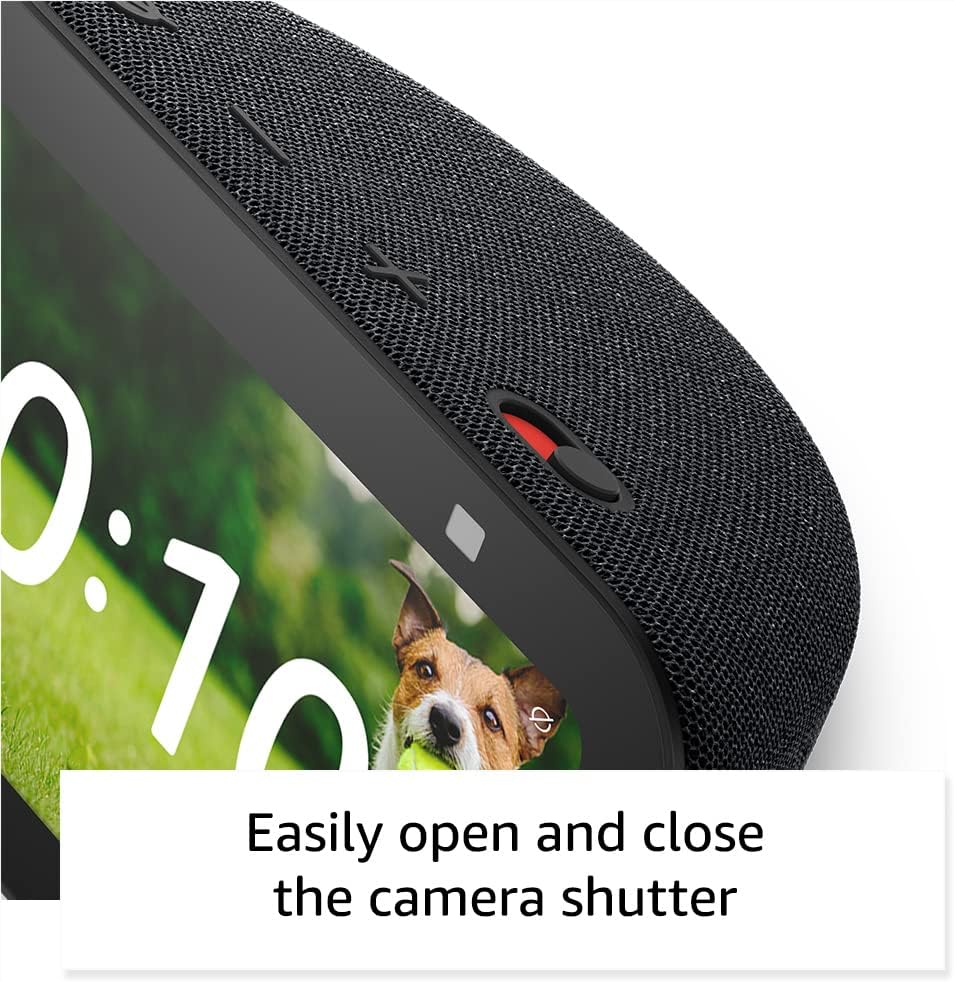
The Echo Show 5 includes a 2 MP camera with a built-in shutter.
- व्हिडिओ कॉलिंग: Use the camera to make video calls to friends and family who have the Alexa app or another Echo device with a screen.
- घराचे निरीक्षण: Check in on your home, family, or pets using the built-in camera. You can also view compatible video doorbells.


4.4. Smart Home Control
Control compatible smart devices such as lights and thermostats using voice commands or the touch screen, even when you are away from home. The device supports Wi-Fi, Bluetooth Low Energy Mesh, and Matter for smart home compatibility.
६.५. गोपनीयता वैशिष्ट्ये
The Echo Show 5 incorporates multiple layers of privacy controls:
- Mic/Camera Off Button: A physical button to electronically disconnect the microphone and camera.
- Built-in Camera Shutter: A physical slider to cover the camera lens.
- वेक वर्ड टेक्नॉलॉजी: The device only begins recording and sending audio to the cloud after detecting the wake word (e.g., "Alexa").
- Streaming Indicators: Visual indicators show when the device is actively streaming to the cloud.
- व्हॉइस रेकॉर्डिंग व्यवस्थापन: करण्याची क्षमता view and delete your voice recordings.
- Ring Video Encryption: सपोर्ट करतो viewing end-to-end encrypted Ring video.
३. प्रवेशयोग्यता वैशिष्ट्ये
The Echo Show 5 includes various accessibility features to personalize Alexa to your abilities. These can be accessed via सेटिंग्ज → प्रवेशयोग्यता.
- Tap to Alexa: Access Alexa via touch through on-screen tiles or a keyboard.
- अनुकूली ऐकणे: अलेक्सा प्रतिसाद देण्यापूर्वी बोलणे पूर्ण करण्यासाठी अधिक वेळ देते.
- पसंतीचा बोलण्याचा दर: Control how fast or slow Alexa speaks.
- Captioning: Alexa Captioning, Call Captioning, and Closed Captioning provide text captions for supported content.
- Show and Tell: Helps users who are blind or visually impaired identify products by saying "Alexa, what am I holding."
- आवाजView स्क्रीन रीडर: Enables access for users who are blind or visually impaired.
- स्क्रीन मॅग्निफायर: Allows zooming in/out and panning around the screen.
- जवळपास असताना सूचित करा: Plays notification sounds when detected near the device.
- किंडल मोठ्याने वाचा: Alexa can read Kindle books aloud.
- Real Time Text: Enables typing live text in a video call.
- Additional features include Color Inversion, Color Correction, and Request Sound.
5. देखभाल
To ensure the longevity and optimal performance of your Echo Show 5, follow these maintenance guidelines:
- स्वच्छता: Use a soft, lint-free cloth to gently wipe the screen and exterior. Avoid abrasive cleaners, solvents, or aerosol sprays.
- प्लेसमेंट: Place the device on a stable, flat surface away from direct sunlight, heat sources, and excessive moisture. Ensure adequate ventilation around the device.
- सॉफ्टवेअर अपडेट्स: The device receives guaranteed software security updates for at least four years after its last availability for purchase as a new unit. Ensure your device is connected to Wi-Fi to receive these updates automatically.
- पॉवर सायकल: If the device becomes unresponsive, unplug it from the power outlet, wait for 10 seconds, and then plug it back in.
6. समस्या निवारण
If you encounter issues with your Echo Show 5, try the following solutions:
- शक्ती नाही: Ensure the power adapter is securely connected to both the device and a working wall outlet. Try a different outlet.
- वाय-फाय कनेक्टिव्हिटी समस्या:
- तुमचा वाय-फाय राउटर योग्यरित्या काम करत आहे का ते तपासा.
- तुमचा राउटर आणि मोडेम रीस्टार्ट करा.
- On the Echo Show 5, go to Settings → Network and try reconnecting to your Wi-Fi network.
- डिव्हाइस तुमच्या वाय-फाय राउटरच्या रेंजमध्ये असल्याची खात्री करा.
- अलेक्सा प्रतिसाद देत नाही:
- Ensure the microphone is not muted (the light ring will be red). Press the mic/camera off button if it is.
- Speak clearly and directly to the device.
- डिव्हाइस अनप्लग करून आणि पुन्हा प्लग करून रीस्टार्ट करण्याचा प्रयत्न करा.
- डिस्प्ले समस्या: If the screen is unresponsive or frozen, try restarting the device.
- आवाज समस्या:
- Check the volume level on the device.
- Ensure no external Bluetooth speakers are connected if you intend to use the internal speaker.
- कॅमेरा काम करत नाही: Ensure the camera shutter is open and the camera is not disabled via the mic/camera off button.
For further assistance, refer to the Amazon support webसाइट किंवा ग्राहक सेवेशी संपर्क साधा.
7. तपशील
| वैशिष्ट्य | तपशील |
|---|---|
| मॉडेल | Echo Show 5 (3rd Gen) - 2023 release |
| परिमाण (W x D x H) | 5.8” x 3.6” x 3.2” (147 मिमी x 91 मिमी x 82 मिमी) |
| वजन | 16.1 औंस (456 ग्रॅम) |
| डिस्प्ले | 5.5" टच स्क्रीन |
| कॅमेरा | 2 MP with built-in shutter |
| प्रोसेसर | MediaTek MT 8169 B |
| वाय-फाय कनेक्टिव्हिटी | Dual-band 802.11a/b/g/n/ac (does not support ad-hoc networks) |
| ब्लूटूथ कनेक्टिव्हिटी | A2DP support for audio streaming, AVRCP for voice control (Bluetooth speakers requiring PIN codes not supported) |
| ऑडिओ | Full range 1.75” built-in speaker |
| स्मार्ट होम सुसंगतता | वाय-फाय, ब्लूटूथ लो एनर्जी मेष, मॅटर |
| भाषा समर्थन | इंग्रजी आणि स्पॅनिश |
8. हमी आणि समर्थन
Your Amazon Echo Show 5 (3rd Gen) comes with a 1-year limited warranty and service. As a refurbished device, it receives the same limited warranty as a new device.
For detailed warranty information and terms of service, please refer to the documentation provided with your device or visit the official Amazon support website. Information regarding software security updates is also available through Amazon's official channels.
संबंधित कागदपत्रे - इको शो 5 (तृतीय जनरल)
 |
अमेझॉन फायर टीव्ही क्यूब (दुसरी पिढी) क्विक स्टार्ट गाइड Get started with your Amazon Fire TV Cube (2nd Gen) using this comprehensive quick start guide. Learn about setup, connections, remote control, and troubleshooting for a seamless streaming experience. |
 |
Amazon Fire TV Stick Quick Start Guide Quick start guide for the Amazon Fire TV Stick, including setup instructions, remote pairing, and troubleshooting tips. |
 |
Amazon Alexa Voice Remote (3rd Gen) Setup and Guide A comprehensive guide to setting up and using the Amazon Alexa Voice Remote (3rd Gen), including pairing instructions, button functions, and troubleshooting tips. |
 |
अमेझॉन इको डॉट (तिसरी पिढी) क्विक स्टार्ट गाइड या क्विक स्टार्ट गाइडसह तुमचा Amazon Echo Dot (3rd Generation) कसा सेट करायचा आणि कसा वापरायचा ते शिका. तुमच्या स्मार्ट स्पीकरसाठी वैशिष्ट्ये, व्हॉइस कमांड आणि कनेक्टिव्हिटी पर्याय शोधा. |
 |
Amazon Echo Show 10 (3rd Gen) Smart Display: Features, Setup, and Manual User guide for the Amazon Echo Show 10 (3rd Gen) smart display. Learn about its features, setup, privacy controls, voice commands, and answers to frequently asked questions. |
 |
इको डॉट (तिसरी पिढी) स्मार्ट स्पीकर: वैशिष्ट्ये, तपशील आणि वापरकर्ता मार्गदर्शक अॅलेक्सा वापरून अमेझॉन इको डॉट (थर्ड जनरेशन) स्मार्ट स्पीकरची वैशिष्ट्ये, स्पेसिफिकेशन, सेटअप आणि व्हॉइस कंट्रोल क्षमता एक्सप्लोर करा. या मार्गदर्शकामध्ये संगीत प्लेबॅक, होम ऑटोमेशन आणि सामान्य वापरकर्त्यांच्या प्रश्नांची उत्तरे दिली आहेत. |
Ask a question about this manual
Ask about setup, troubleshooting, compatibility, parts, safety, or missing instructions. Manuals+ will review the question and use this page’s manual context to help answer it.