
1. परिचय
This manual provides detailed instructions for the operation and maintenance of your Jectse Bluetooth Speaker Alarm Clock. Please read this manual thoroughly before using the product to ensure proper function and longevity.
The Jectse Bluetooth Speaker Alarm Clock is a multi-functional device featuring a digital clock, dual alarm capabilities, an LED mirror display, FM radio, and Bluetooth connectivity for audio playback. It also supports music playback via a memory card.
2. उत्पादन संपलेview
2.1. प्रमुख वैशिष्ट्ये
- ब्लूटूथ 5.0 कनेक्टिव्हिटी: Wirelessly stream audio from compatible devices.
- दुहेरी अलार्म घड्याळ: वेगवेगळ्या जागे होण्याच्या वेळेसाठी दोन स्वतंत्र अलार्म सेट करा.
- LED Mirror Display: Clear digital time display that also functions as a mirror.
- एफएम रेडिओ: Digitally tuned FM radio (87.5MHz-108MHz) for news, music, and weather.
- मेमरी कार्ड प्लेबॅक: Supports music playback from a memory card (up to 32GB, not included).
- अंगभूत रिचार्जेबल बॅटरी: 1600mAh lithium battery for portable use.
- कॉम्पॅक्ट डिझाइन: Product dimensions are approximately 116 x 51 x 33mm (4.6 x 2 x 1.3 inches).
2.2. पॅकेज सामग्री
- 1 x Jectse Alarm Clock Speaker
- 1 x मायक्रो USB चार्जिंग केबल
- १ x वापरकर्ता मॅन्युअल (हे दस्तऐवज)
2.3. उत्पादन आकृती
ओव्हरसाठी खालील चित्र पहा.view of the device's components and controls.
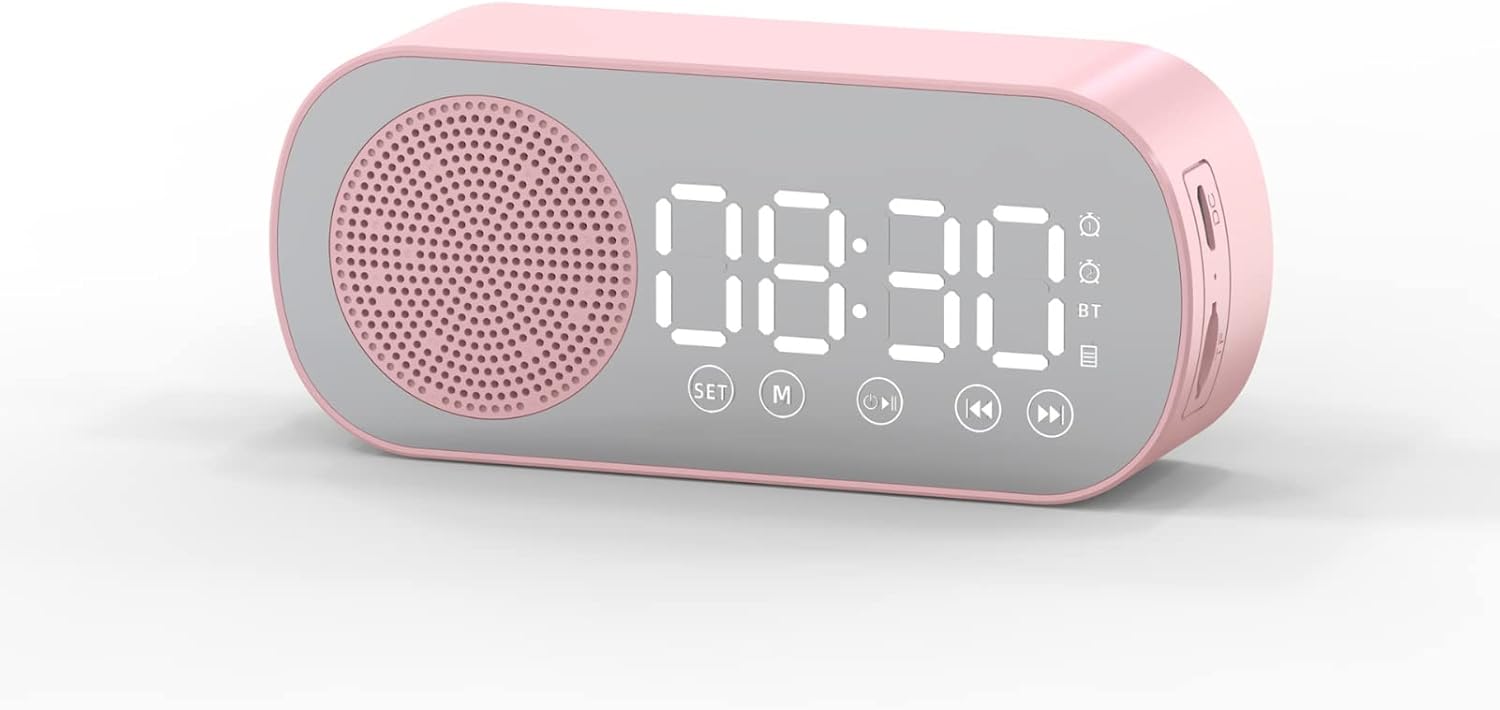
आकृती 1: समोर view of the Jectse Bluetooth Speaker Alarm Clock, showing the speaker grille, LED display, and control buttons (SET, M, Play/Pause, Previous, Next).

आकृती 2: बाजू view of the alarm clock with dimensions: 116mm (4.6in) length, 51mm (2in) height, and 33mm (1.3in) depth.
3. सेटअप
१. सुरुवातीचे चार्जिंग
Before first use, fully charge the device. Connect the provided Micro USB charging cable to the charging port on the side of the alarm clock and the other end to a standard USB power adapter (not included).

आकृती 3: The alarm clock and its Micro USB charging cable.
The battery indicator on the LED display will show charging status. A full charge typically takes a few hours.
4. ऑपरेटिंग सूचना
4.1. पॉवर चालू/बंद
दाबा आणि धरून ठेवा Power/Mode (M) डिव्हाइस चालू किंवा बंद करण्यासाठी बटण.
4.2. वेळ सेट
- घड्याळ मोडमध्ये, दाबा आणि धरून ठेवा सेट तासाचे अंक चमकू लागेपर्यंत बटण दाबा.
- वापरा Previous (◀◀) आणि Next (▶▶) तास समायोजित करण्यासाठी बटणे.
- दाबा सेट button again to switch to minute adjustment. Use the Previous (◀◀) आणि Next (▶▶) मिनिटे समायोजित करण्यासाठी बटणे.
- दाबा सेट वेळ सेटिंग मोडची पुष्टी करण्यासाठी आणि बाहेर पडण्यासाठी तिसऱ्यांदा बटण दाबा.
4.3. Setting Alarms (Dual Alarm Function)
The device supports two independent alarms. Follow these steps for each alarm:

आकृती 4: The alarm clock illustrating the dual alarm feature with two distinct alarm settings.
- In clock mode, short press the सेट button once to enter Alarm 1 setting mode. The alarm icon and hour digits will flash.
- वापरा Previous (◀◀) आणि Next (▶▶) तास समायोजित करण्यासाठी बटणे.
- दाबा सेट again to adjust minutes. Use Previous (◀◀) आणि Next (▶▶) समायोजित करण्यासाठी.
- दाबा सेट a third time to select the alarm sound (e.g., buzzer, FM radio). Use Previous (◀◀) आणि Next (▶▶) पर्यायांमधून सायकल चालवणे.
- दाबा सेट a fourth time to confirm Alarm 1 settings.
- To set Alarm 2, repeat steps 1-5, but short press the सेट button twice to enter Alarm 2 setting mode.
- To enable/disable an alarm, short press the सेट button until the desired alarm icon flashes, then press the Play/Pause (▶▌▌) ते चालू किंवा बंद टॉगल करण्यासाठी बटण.
Note: The alarm volume is independent of the main speaker volume and may be fixed or adjustable within the alarm settings. If the alarm sound is too loud, check if there's an option to adjust it during the alarm setup process.
4.4. ब्लूटूथ मोड
- दाबा Power/Mode (M) button repeatedly until "BT" appears on the display, indicating Bluetooth mode.
- On your mobile device, enable Bluetooth and search for "Jectse Speaker" or a similar device name.
- जोडण्यासाठी डिव्हाइस निवडा. यशस्वी जोडणी झाल्याचे पुष्टीकरण आवाजाने सूचित होईल.
- You can now play audio from your device through the speaker. Use the Play/Pause (▶▌▌), Previous (◀◀), आणि Next (▶▶) प्लेबॅक नियंत्रित करण्यासाठी बटणे.
4.5. FM रेडिओ मोड

आकृती 5: The alarm clock functioning as an FM radio on a bedside table.
- दाबा Power/Mode (M) डिस्प्लेवर "FM" दिसेपर्यंत बटण वारंवार दाबा.
- दाबा Play/Pause (▶▌▌) उपलब्ध एफएम स्टेशन स्वयंचलितपणे स्कॅन करण्यासाठी आणि जतन करण्यासाठी बटण.
- वापरा Previous (◀◀) आणि Next (▶▶) सेव्ह केलेल्या स्टेशन्समध्ये स्विच करण्यासाठी बटणे.
- For better reception, ensure the device is not obstructed and try repositioning it.
4.6. Memory Card Playback
Insert a memory card (Micro SD card, up to 32GB, not included) into the designated slot on the device. The device will automatically switch to memory card mode and begin playing audio files वापरा Play/Pause (▶▌▌), Previous (◀◀), आणि Next (▶▶) प्लेबॅक नियंत्रित करण्यासाठी बटणे.
4.7. व्हॉल्यूम समायोजन
In any audio playback mode (Bluetooth, FM, Memory Card), press and hold the Previous (◀◀) button to decrease volume or the Next (▶▶) आवाज वाढवण्यासाठी बटण.
4.8. LED Mirror Display

आकृती 6: The alarm clock's LED display also functions as a mirror.
The front panel of the device features an LED display that shows the time and other information. When not actively displaying information, the surface can be used as a mirror.

आकृती 7: The LED display showing multiple functions and indicators, including time, battery level, and Bluetooth status.
5. देखभाल
- स्वच्छता: उपकरण स्वच्छ करण्यासाठी मऊ, कोरडे कापड वापरा. अपघर्षक क्लीनर किंवा सॉल्व्हेंट्स वापरू नका.
- स्टोरेज: थेट सूर्यप्रकाश आणि अति तापमानापासून दूर थंड, कोरड्या जागी डिव्हाइस साठवा.
- बॅटरी काळजी: बॅटरीचे आयुष्य वाढवण्यासाठी, बॅटरी वारंवार पूर्णपणे डिस्चार्ज करणे टाळा. डिव्हाइस नियमितपणे चार्ज करा, जरी ते जास्त काळ वापरात नसले तरीही.
- पाणी एक्सपोजर: हे उपकरण जलरोधक नाही. पाण्याच्या संपर्कात येणे किंवा जास्त आर्द्रता टाळा.
6. समस्या निवारण
| समस्या | संभाव्य कारण | उपाय |
|---|---|---|
| डिव्हाइस चालू होत नाही. | कमी बॅटरी. | प्रदान केलेली USB केबल वापरून डिव्हाइस चार्ज करा. |
| ब्लूटूथ द्वारे पेअर करू शकत नाही. | Bluetooth not enabled on device or phone; device not in pairing mode. | Ensure the alarm clock is in Bluetooth mode ("BT" displayed) and your phone's Bluetooth is on and searching. Move devices closer. |
| एफएम रेडिओ रिसेप्शन खराब आहे. | कमकुवत सिग्नल; अडथळा. | Reposition the device. Avoid placing near other electronic devices that may cause interference. |
| Alarm is too loud/quiet. | Alarm volume not adjusted during setup. | Re-enter alarm setting mode and check if there is an option to adjust alarm volume. Some models may have a fixed alarm volume. |
| डिस्प्ले वाचणे कठीण आहे. | Lighting conditions; display brightness setting. | Adjust ambient lighting. Check if there is a display brightness setting (refer to specific model instructions if available, not detailed in general description). |
7. तपशील
| वैशिष्ट्य | तपशील |
|---|---|
| मॉडेल | Jectsesb81t679n01182 |
| साहित्य | ABS (Acrylonitrile Butadiene Styrene) |
| उत्पादनाचा आकार | अंदाजे ६० x ५० x २२ मिमी (२.४ x २.० x ०.९ इंच) |
| बॅटरी प्रकार | Lithium Battery (Built-in) |
| बॅटरी क्षमता | 1600mAh |
| ब्लूटूथ आवृत्ती | 5.0 |
| प्ले मोड | Bluetooth, Memory Card (Max 32G, not included) |
| घड्याळ मोड | Digital Clock, Dual Alarm Clock, FM Radio |
| एफएम रेडिओ फ्रिक्वेन्सी | 87.5 मेगाहर्ट्ज -108 मेगाहर्ट्झ |
| कनेक्टिव्हिटी तंत्रज्ञान | ब्लूटूथ, यूएसबी |
| आयटम वजन | 5.3 औंस |
8. हमी आणि समर्थन
वॉरंटी माहिती आणि ग्राहक समर्थनासाठी, कृपया खरेदीच्या वेळी प्रदान केलेले दस्तऐवज पहा किंवा तुमच्या किरकोळ विक्रेत्याशी संपर्क साधा. खरेदीचा पुरावा म्हणून तुमची खरेदी पावती ठेवा.