
अमेझॉन इको डॉट (चौथी पिढी)
अमेझॉन इको डॉट (चौथी पिढी) स्मार्ट स्पीकर वापरकर्ता मॅन्युअल
मॉडेल: इको डॉट (चौथी पिढी)
1. परिचय
This manual provides essential information for the safe and effective use of your Amazon Echo Dot (5th Gen) smart speaker. Please read these instructions thoroughly before operating the device and retain them for future reference.

Image: Amazon Echo Dot (5th Gen) in Glacier White on a wooden surface, highlighting its compact size and capabilities.
२. बॉक्समध्ये काय आहे?
सर्व वस्तू पॅकेजिंगमध्ये आहेत याची खात्री करा:
- Echo Dot (5th Gen) Device
- ग्लेशियर व्हाइट पॉवर अडॅप्टर (१५ वॅट)
- द्रुत प्रारंभ मार्गदर्शक
3. उत्पादन संपलेview
The Amazon Echo Dot (5th Gen) is a compact smart speaker designed to deliver an enhanced audio experience and integrate seamlessly with your smart home ecosystem. It features a spherical design with a fabric finish and an LED light ring at the base.

Image: Amazon Echo Dot (5th Gen) in Glacier White, front view with glowing light ring.
प्रमुख वैशिष्ट्ये:
- Improved Audio: Features a 1.73” (44 mm) front-firing speaker for clearer vocals, deeper bass, and vibrant sound.
- Alexa Voice Assistant: Provides hands-free control for music, information, timers, and smart home devices.
- गोपनीयता नियंत्रणे: Includes a microphone off button and the ability to view and delete voice recordings.
- स्मार्ट होम हब: Supports WiFi, Bluetooth Low Energy Mesh, and Matter for compatible smart home device control.
- तापमान सेन्सर: Built-in sensor for triggering smart home routines.
- Tap Controls: Tap the top of the device to snooze alarms or pause music.
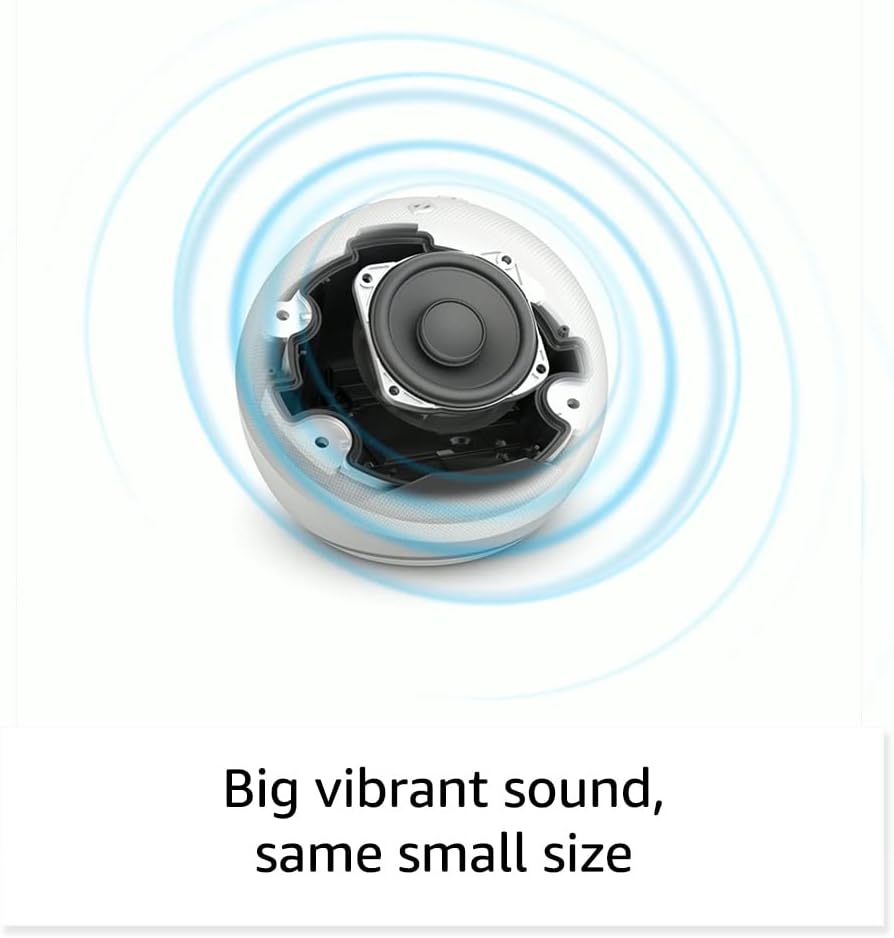
प्रतिमा: अंतर्गत view of the Amazon Echo Dot (5th Gen) speaker components, illustrating its audio design.
4. सेटअप
तुमचा इको डॉट (चौथी पिढी) सेट करण्यासाठी या पायऱ्या फॉलो करा:
- तुमचा इको डॉट प्लग इन करा: समाविष्ट केलेले पॉवर अॅडॉप्टर तुमच्या इको डॉटला आणि नंतर पॉवर आउटलेटला जोडा. लाईट रिंग निळा होईल, नंतर नारिंगी होईल, जो सेटअपसाठी तयार असल्याचे दर्शवेल.
- अलेक्सा अॅप डाउनलोड करा: On your mobile device, download and install the Amazon Alexa app from your device's app store (compatible with Fire OS, Android, and iOS devices).
- तुमचे डिव्हाइस जोडा: Open the Alexa app. If prompted, sign in with your Amazon account. Tap the 'Devices' icon at the bottom, then the '+' icon in the top right corner. Select 'Add Device', then 'Amazon Echo', and choose 'Echo Dot'.
- ऑन-स्क्रीन सूचनांचे अनुसरण करा: The app will guide you through connecting your Echo Dot to your Wi-Fi network. Ensure your Wi-Fi network supports 802.11a/b/g/n/ac (2.4 and 5 GHz). Ad-hoc networks are not supported.
- प्लेसमेंट: Place your Echo Dot in a central location within your room, away from walls or other objects that might obstruct sound.
३. तुमचा इको डॉट चालवणे
Voice Commands with Alexa:
To interact with your Echo Dot, simply say the wake word "Alexa," followed by your command or question. The light ring will turn blue to indicate Alexa is listening.
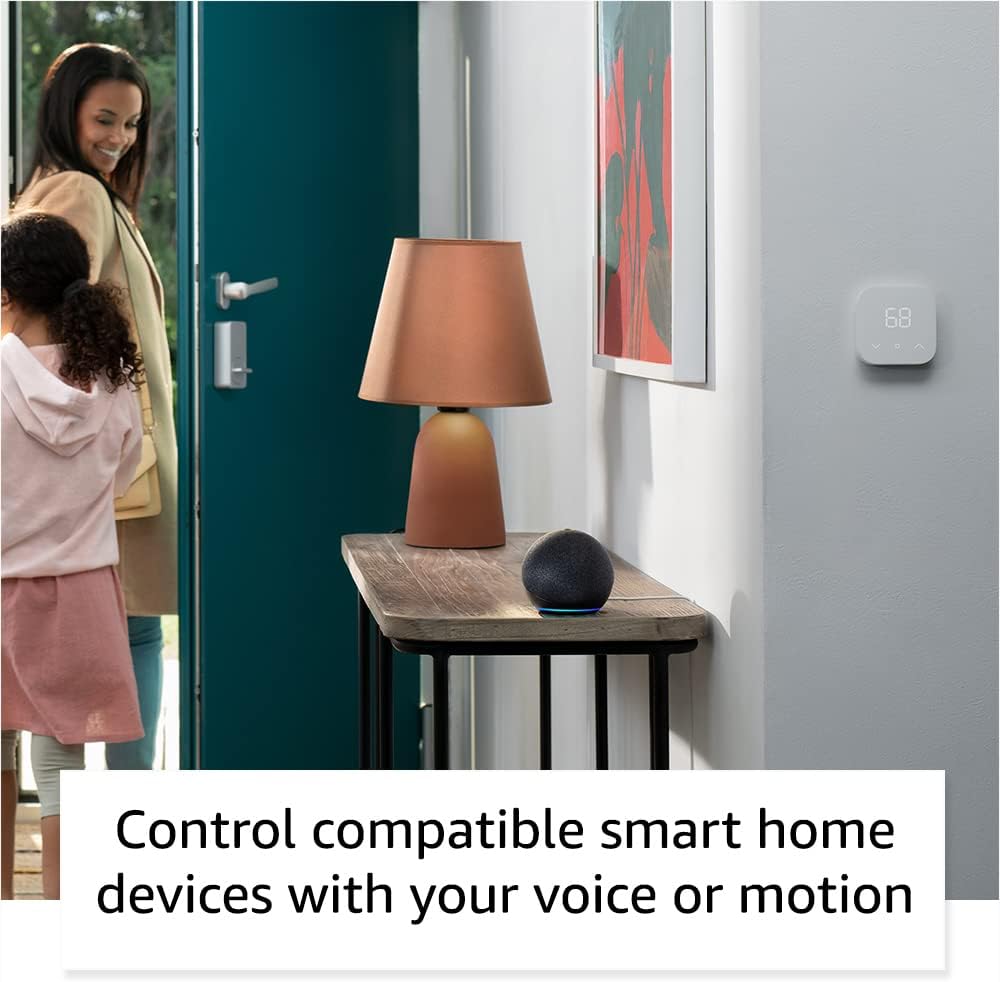
Image: Amazon Echo Dot (5th Gen) in Deep Sea Blue on a kitchen counter, demonstrating a user asking Alexa for the weather.
सामान्य आज्ञा:
- "अलेक्सा, संगीत वाजवा."
- "अलेक्सा, हवामान कसे आहे?"
- "अलेक्सा, १० मिनिटांसाठी टायमर सेट कर."
- "अलेक्सा, मला एक विनोद सांग."
- "अलेक्सा, आवाज वाढव."
Tap Controls:
The top surface of your Echo Dot is touch-sensitive for quick actions:
- Tap to Snooze: When an alarm sounds, tap the top of the device to snooze it.
- Tap to Pause/Resume: Tap to pause or resume music playback.

Image: A hand tapping the top of the Amazon Echo Dot (5th Gen) in Glacier White, demonstrating the tap-to-snooze or pause music function.
३. स्मार्ट होम इंटिग्रेशन
Your Echo Dot can control compatible smart home devices using voice commands or routines. It supports WiFi, Bluetooth Low Energy Mesh, and Matter protocols.
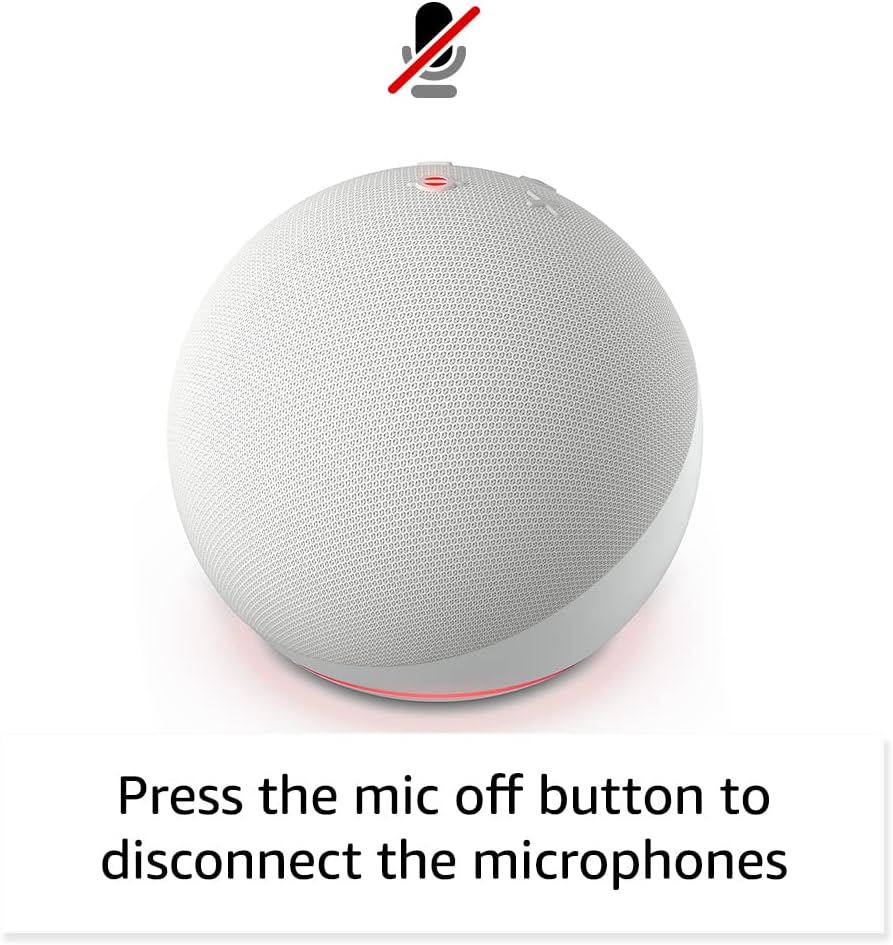
Image: Amazon Echo Dot (5th Gen) in a living space, illustrating its use for controlling compatible smart home devices.
तापमान सेन्सर वापरणे:
The built-in temperature sensor allows you to create routines in the Alexa app. For example, you can set a routine to automatically turn on a fan if the room temperature exceeds a specified comfort zone.
अमेझॉन फूटपाथ:
Amazon Sidewalk uses Echo and Ring devices to securely keep other devices connected and help find lost items. It can enable supported devices to remain connected even when Wi-Fi is lost or they are outside the range of their home Wi-Fi. Sidewalk uses a small portion of your internet bandwidth. You can manage Sidewalk settings in the Alexa app.
eero Built-in:
If you have a compatible eero router, your Echo Dot can extend Wi-Fi coverage. This feature requires linking your eero and Amazon accounts and managing it through the eero mobile application. eero Built-in compatible Echo devices support up to 1,000 sq. ft. of additional coverage, speeds up to 100 Mbps, and 10 or fewer connected devices in the 5 GHz band.
६.५. गोपनीयता वैशिष्ट्ये
Amazon Echo devices are designed with multiple layers of privacy controls:
- मायक्रोफोन बंद बटण: Press the microphone off button on the top of your Echo Dot to electronically disconnect the microphones. The light ring will turn red to indicate the microphones are off.
- Voice Recordings: You have the ability to view, listen to, and delete your voice recordings through the Alexa app or your Amazon account settings.
- वेक वर्ड टेक्नॉलॉजी: The device only begins recording and sending audio to the cloud after it detects the wake word (e.g., "Alexa").
Image: Amazon Echo Dot (5th Gen) with a red light indicating the microphone is off, showing the privacy control feature.
३. प्रवेशयोग्यता वैशिष्ट्ये
The Alexa app provides various accessibility features to personalize your experience. Access these settings by navigating to 'Settings' → 'Accessibility' in the Alexa App.
- अनुकूली ऐकणे: अलेक्सा प्रतिसाद देण्यापूर्वी बोलणे पूर्ण करण्यासाठी अधिक वेळ देते.
- पसंतीचा बोलण्याचा दर: "अॅलेक्सा, हळू बोला" किंवा "अॅलेक्सा, जलद बोला" असे बोलून अलेक्सा किती वेगाने किंवा हळू बोलते ते नियंत्रित करा.
- विनंतीचा आवाज: जेव्हा तुम्ही अलेक्साशी बोलता तेव्हा व्हिज्युअल इंडिकेटर व्यतिरिक्त ऐकू येईल असा टोन वाजवतो. "अलेक्सा, स्टार्ट ऑफ रिक्वेस्ट साउंड चालू करा" असे बोलून ते सक्षम करा.
- किंडल मोठ्याने वाचा: अलेक्सा तुमची किंडल पुस्तके मोठ्याने वाचू शकते.
- जवळपास असताना सूचित करा: तुमच्या इको डिव्हाइसजवळ तुम्हाला आढळल्यास सूचनांचे आवाज वाजवते.
9. देखभाल
To ensure the longevity and optimal performance of your Echo Dot:
- स्वच्छता: उपकरण स्वच्छ करण्यासाठी मऊ, कोरडे, लिंट-फ्री कापड वापरा. अपघर्षक क्लीनर किंवा स्प्रे वापरू नका.
- प्लेसमेंट: थेट सूर्यप्रकाशात, उष्णतेच्या स्रोतांजवळ किंवा जास्त आर्द्र वातावरणात उपकरण ठेवणे टाळा.
- सॉफ्टवेअर अपडेट्स: Your Echo Dot automatically receives software security updates. Ensure it remains connected to Wi-Fi for these updates.
10. समस्या निवारण
सामान्य समस्या आणि उपाय:
- डिव्हाइस प्रतिसाद देत नाही:
- Ensure the microphone is not muted (red light ring indicates mute).
- Check if the device is plugged in and powered on.
- Restart the device by unplugging it from the power outlet for 30 seconds and then plugging it back in.
- Wi-Fi शी कनेक्ट करू शकत नाही:
- तुमचा वाय-फाय पासवर्ड बरोबर आहे का ते पडताळून पहा.
- Ensure your router is working and other devices can connect.
- इको डॉट तुमच्या वाय-फाय राउटरच्या जवळ हलवा.
- तुमचा राउटर आणि मोडेम रीस्टार्ट करा.
- खराब ऑडिओ गुणवत्ता:
- Adjust the volume using voice commands or the Alexa app.
- Ensure the device is not placed in an enclosed space that might muffle sound.
- स्पीकरभोवती कोणतेही भौतिक अडथळे आहेत का ते तपासा.
- अलेक्साला आदेश समजत नाहीत:
- Speak clearly and at a normal pace.
- पार्श्वभूमीचा आवाज कमी करा.
- Ensure you are within hearing range of the device.
11. तपशील
| वैशिष्ट्य | तपशील |
|---|---|
| आकार | 3.9” x 3.9” x 3.5” (100mm x 100mm x 89 mm) |
| वजन | 10.7 औंस (304 ग्रॅम) |
| ऑडिओ | १.९५” (४९.५ मिमी) फ्रंट-फायरिंग स्पीकर, लॉसलेस हाय डेफिनेशन |
| वाय-फाय कनेक्टिव्हिटी | ड्युअल-बँड वाय-फाय ८०२.११a/b/g/n/ac (२.४ आणि ५ GHz) नेटवर्कना सपोर्ट करते. अॅड-हॉक नेटवर्कना सपोर्ट करत नाही. |
| ब्लूटूथ कनेक्टिव्हिटी | ऑडिओ स्ट्रीमिंगसाठी A2DP सपोर्ट, कनेक्टेड मोबाईल डिव्हाइसेसच्या व्हॉइस कंट्रोलसाठी AVRCP. पिन कोड आवश्यक असलेले ब्लूटूथ स्पीकर्स सपोर्ट करत नाहीत. |
| स्मार्ट होम डिव्हाइस सुसंगतता | WiFi, Bluetooth Low Energy Mesh, and Matter |
| सिस्टम आवश्यकता | Alexa app compatible with Fire OS, Android, and iOS devices. Web browser access also available. |
| पिढी | इको डॉट (चौथी पिढी) - २०२० रिलीज |
| भाषा | अलेक्सा इंग्रजी आणि स्पॅनिश बोलते. |
12. हमी आणि समर्थन
हमी माहिती:
Your Echo Dot (5th Gen) comes with a 90-day limited warranty and service. Optional 1-year, 2-year, and 3-year extended warranties are available for U.S. customers and are sold separately. Use of the Echo Dot is subject to specific terms and conditions.
सॉफ्टवेअर सुरक्षा अद्यतने:
This device is guaranteed to receive software security updates for at least four years after it is last available for purchase as a new unit on Amazon websites. For more information on software security updates or to manage your device, visit the Amazon webसाइट
ग्राहक समर्थन:
For further assistance, please refer to the Amazon Alexa app or visit the Amazon support website. You can also find information specific to your device by visiting 'Manage Your Content and Devices' on Amazon.
Ask a question about this manual
Ask about setup, troubleshooting, compatibility, parts, safety, or missing instructions. Manuals+ will review the question and use this page’s manual context to help answer it.