
1. परिचय
The Energizer Connect Smart WiFi Plug allows you to control your electronic devices remotely using a mobile application or voice commands. This smart plug connects directly to your home's 2.4GHz Wi-Fi network, eliminating the need for a separate hub. It is compatible with Amazon Alexa, Google Assistant, and Siri for convenient voice control. This manual provides detailed instructions for setting up, operating, maintaining, and troubleshooting your smart plug.
2. सुरक्षितता माहिती
Please read and understand all safety instructions before using this product. Failure to follow these instructions may result in electric shock, fire, or property damage.
- फक्त घरातील वापरासाठी.
- 15 च्या कमाल भारापेक्षा जास्त नाही Amps (120 Volts).
- Do not immerse the plug in water or expose it to moisture.
- डिव्हाईस वेगळे करण्याचा किंवा बदलण्याचा प्रयत्न करू नका.
- मुलांच्या आवाक्याबाहेर ठेवा.
- वॉल आउटलेटमध्ये प्लग पूर्णपणे घातला असल्याची खात्री करा.
- Unplug the device from the outlet before cleaning.
3. पॅकेज सामग्री
- 1 x Energizer Connect Smart WiFi Plug
- १ x वापरकर्ता मॅन्युअल (हे दस्तऐवज)
4. उत्पादन संपलेview
The Energizer Connect Smart WiFi Plug features a compact design that allows access to the second outlet. It includes a power button and an LED indicator for status.

प्रतिमा १: The Energizer Connect Smart WiFi Plug shown with its retail packaging, highlighting key features like 15 Amps of power, grouping, voice control, and Wi-Fi connectivity. The plug itself is white and compact.

प्रतिमा १: जवळून समोरचा फोटो view of the Energizer Connect Smart WiFi Plug, showing the standard Type B electrical outlet configuration (two vertical slots and a round ground hole).

प्रतिमा १: This image displays the compact dimensions of the Energizer Connect Smart WiFi Plug. The side view shows a depth of 1.0625 inches, and the front view indicates a diameter of 1.125 inches, illustrating its mini size.
4.1. घटक
- पॉवर बटण: Press to manually turn the connected device on or off. Press and hold for 5 seconds to initiate pairing mode (LED will blink rapidly).
- एलईडी निर्देशक:
- घन निळा: डिव्हाइस चालू आहे.
- बंद: डिव्हाइस बंद आहे.
- Rapidly Blinking Blue: जोडणी मोड.
- हळू हळू लुकलुकणारा निळा: Wi-Fi वरून डिस्कनेक्ट झाले.
४. सेटअप सूचना
Follow these steps to set up your Energizer Connect Smart WiFi Plug.
5.1. सिस्टम आवश्यकता
- A stable 2.4GHz Wi-Fi network (5GHz networks are not supported).
- A smartphone or tablet running iOS 10.0 or higher, or Android 6.0 or higher.
- Access to the Apple App Store or Google Play Store.
३. अॅप डाउनलोड आणि इन्स्टॉलेशन
- डाउनलोड करा एनर्जायझर कनेक्ट अॅप Apple App Store किंवा Google Play Store वरून. साठी शोधा "Energizer Connect".
- ॲप उघडा आणि खाते तयार करण्यासाठी किंवा लॉग इन करण्यासाठी ऑन-स्क्रीन सूचनांचे अनुसरण करा.

प्रतिमा १: A smartphone displaying the Energizer Connect App interface, showing the smart plug in an "ON" state. The image also includes the physical smart plug and icons for downloading the app from the App Store and Google Play.
5.3. Pairing the Smart Plug
- Plug the Energizer Connect Smart WiFi Plug into a standard 120V wall outlet.
- The LED indicator on the plug should begin blinking rapidly, indicating it is in pairing mode. If not, press and hold the power button on the side of the plug for 5 seconds until it blinks rapidly.
- Open the Energizer Connect App.
- नवीन डिव्हाइस जोडण्यासाठी "+" चिन्हावर (किंवा "डिव्हाइस जोडा") टॅप करा.
- Select "Electrical Outlet" or "Smart Plug" from the device list.
- Confirm that the indicator light is blinking rapidly in the app.
- Enter your 2.4GHz Wi-Fi network name and password. Ensure your phone is connected to the same 2.4GHz network.
- The app will attempt to connect to the smart plug. This may take a few moments.
- Once successfully paired, the LED indicator on the plug will turn solid blue, and the app will confirm the connection.
- You can then rename your smart plug within the app for easier identification (e.g., "Living Room Lamp," "Coffee Maker").

प्रतिमा १: A visual guide showing the three easy steps for setting up the Energizer Connect Smart WiFi Plug: download the app, install the device, and set up and control via the app or voice assistants. The image also features the Energizer bunny mascot.
6. ऑपरेटिंग सूचना
Control your smart plug using the Energizer Connect App or compatible voice assistants.
6.1. मॅन्युअल नियंत्रण
कनेक्ट केलेले डिव्हाइस मॅन्युअली चालू किंवा बंद करण्यासाठी स्मार्ट प्लगच्या बाजूला असलेले पॉवर बटण दाबा.
6.2. ॲप नियंत्रण
- चालू/बंद: Open the Energizer Connect App, select your smart plug, and tap the power icon to toggle its state.
- शेड्युलिंग: Set custom schedules for your plug to turn on or off automatically at specific times or days. This is useful for lights, coffee makers, or other appliances.
- टाइमर: Set countdown timers for the plug to turn off after a set duration.
- दूरस्थ प्रवेश: Control your smart plug from anywhere with an internet connection, even when you are away from home.
- गटबद्ध करणे: Group multiple Energizer Connect smart plugs together to control them simultaneously with a single command.
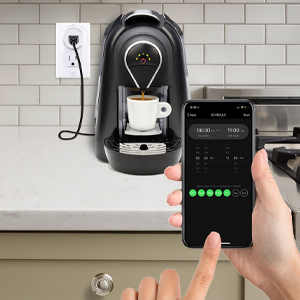
प्रतिमा १: A hand holding a smartphone displaying the Energizer Connect App's scheduling interface, set to turn on a coffee maker at a specific time. The smart plug is visible in the background, connected to the coffee machine.

प्रतिमा १: A person using a smartphone to remotely control a smart plug, demonstrating the ability to turn devices on or off from any location. The image shows a split view of the person and a living room with a lamp connected to a smart plug.
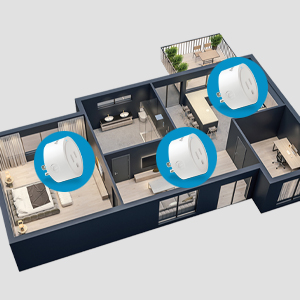
प्रतिमा १: An overhead diagram of a home showing multiple Energizer Connect Smart WiFi Plugs placed in different rooms, illustrating the concept of grouping and controlling several devices simultaneously.
6.3. आवाज नियंत्रण
The Energizer Connect Smart WiFi Plug is compatible with Amazon Alexa, Google Assistant, and Siri. To enable voice control:
- Ensure your smart plug is successfully paired with the Energizer Connect App.
- Open your Amazon Alexa, Google Home, or Apple Home app.
- Follow the app's instructions to link the "Energizer Connect" skill or service. You will need to log in with your Energizer Connect account credentials.
- एकदा लिंक झाल्यावर, तुम्ही व्हॉइस कमांड वापरू शकता जसे की:
- "Alexa, turn on [Plug Name]."
- "Hey Google, turn off [Plug Name]."
- "Hey Siri, turn on [Plug Name]." (Requires setting up Siri Shortcuts in the Energizer Connect App)

प्रतिमा १: A living room scene demonstrating voice control capabilities. The image shows a smart plug connected to a fan, with icons for Google Assistant, Alexa, and Siri Shortcuts, indicating compatibility with these voice assistants.
7. देखभाल
To ensure optimal performance and longevity of your smart plug:
- स्वच्छता: स्वच्छ करण्यापूर्वी स्मार्ट प्लग पॉवर आउटलेटपासून डिस्कनेक्ट करा. पृष्ठभाग पुसण्यासाठी मऊ, कोरड्या कापडाचा वापर करा. द्रव क्लीनर किंवा एरोसोल वापरू नका.
- स्टोरेज: When not in use, store the smart plug in a cool, dry place away from direct sunlight and moisture.
- पर्यावरणीय परिस्थिती: Avoid exposing the plug to extreme temperatures or humidity.
8. समस्या निवारण
If you encounter issues with your Energizer Connect Smart WiFi Plug, refer to the following solutions:
| समस्या | संभाव्य कारण | उपाय |
|---|---|---|
| Plug not connecting to Wi-Fi / LED blinking slowly | Incorrect Wi-Fi password, 5GHz network selected, plug too far from router, network interference. |
|
| App cannot find the plug during pairing | Plug not in pairing mode, incorrect app used, network issues. |
|
| व्हॉइस कंट्रोल काम करत नाही | Voice assistant not linked, incorrect device name, internet connectivity issues. |
|
| Plug unresponsive | शक्ती outage, device malfunction. |
|
9. तपशील
| वैशिष्ट्य | तपशील |
|---|---|
| मॉडेल क्रमांक | B0929DFGZY |
| UPC | 805106871352 |
| इनपुट व्हॉल्यूमtage | 120 व्होल्ट |
| कमाल लोड चालू | 15 Amps |
| वाय-फाय वारंवारता | २.४GHz (IEEE ८०२.११ b/g/n) |
| सुसंगतता | Amazon Alexa, Google Assistant, Siri (via Shortcuts) |
| प्रमाणपत्रे | FCC Certified, ETL Certified |
| साहित्य | प्लास्टिक, रबर |
| रंग | पांढरा |
| आयटम वजन | 2.89 औंस |
| Dimensions (Approx. Plug Body) | 1.125" (Diameter) x 1.0625" (Depth from outlet face) |
10. हमी आणि समर्थन
For warranty information and technical support, please contact the manufacturer or seller directly. The manufacturer of this product is Jem Accessories, and the brand is Energizer Connect (distributed by XTREME DIGITAL LIFESTYLE ACCESSORIES).
कृपया वॉरंटी दाव्यांसाठी तुमचा खरेदीचा पुरावा ठेवा.
For further assistance, visit the Energizer Connect webसाइटला भेट द्या किंवा तुमच्या उत्पादन पॅकेजिंगसह प्रदान केलेली संपर्क माहिती पहा.