
ALFAJR CW-15
ALFAJR CW-15 Automatic Islamic Azan Prayer Clock User Manual
Model: CW-15 | Brand: ALFAJR
परिचय
This manual provides comprehensive instructions for setting up and operating your ALFAJR CW-15 Automatic Islamic Azan Prayer Clock. Designed for both wall mounting and table placement, this digital clock automatically calculates and plays the Azan five times a day based on your set location. Please read this manual carefully to ensure proper use and to fully utilize all features of your new clock.
पॅकेज सामग्री
कृपया सर्व वस्तू पॅकेजमध्ये आहेत का ते तपासा:
- 1 x ALFAJR CW-15 Azan Clock
- 4 x AA बॅटरीज
- १ x सूचना पुस्तिका (हे दस्तऐवज)
उत्पादन वैशिष्ट्ये
- Automatic Azan for all five daily prayers.
- Multiple Azan reciters (Makkah, Madina, Egypt, AlQuds, Riyadh).
- Automatic Azan time adjustment after initial city/time setup.
- Gregorian and Hijri calendar display.
- सेल्सिअस किंवा फारेनहाइटमध्ये तापमानाचे प्रदर्शन.
- Daylight Saving Time (DST) option.
- English and Arabic display languages.
- Wall-mountable or table-standing design.
- Dimensions: Approximately 9 inches (width) x 8.5 inches (height).
- Powered by 4 AA batteries (included) or USB-C (cable not included).
सेटअप मार्गदर्शक
1. बॅटरी इन्स्टॉलेशन
The ALFAJR CW-15 clock operates on 4 AA batteries. These are included in your package.
- घड्याळाच्या मागील बाजूस बॅटरीचा डबा शोधा.
- बॅटरी कंपार्टमेंट कव्हर उघडा.
- योग्य ध्रुवीयता (+ आणि -) सुनिश्चित करून, २ AA बॅटरी घाला.
- बॅटरी कंपार्टमेंट कव्हर सुरक्षितपणे बंद करा.
Alternatively, the clock can be powered via a USB-C cable (not included) connected to a compatible power adapter.
2. Initial Power On and Display Overview
Upon inserting batteries or connecting USB-C power, the clock will power on. The display will show the current time, date, and temperature. Familiarize yourself with the buttons on the side/back of the clock: UP, सेट, आणि खाली.

आकृती 1: समोर view of the ALFAJR CW-15 clock, showing the digital display with time, date, and temperature. The speaker grilles are visible at the bottom.
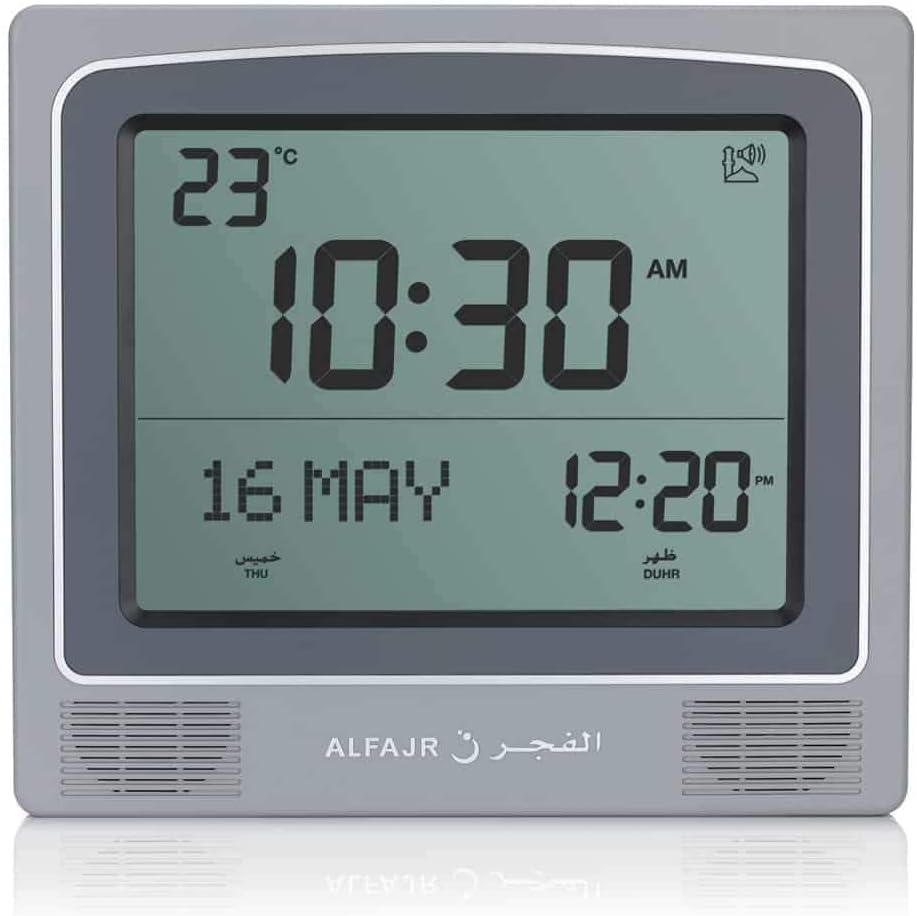
आकृती 2: समोर view of the ALFAJR CW-15 clock, similar to Figure 1, but with the ALFAJR brand logo visible at the bottom center.
५. वेळ आणि तारीख निश्चित करणे
- दाबा आणि धरून ठेवा सेट button for approximately 3 seconds until the time display starts flashing.
- वापरा UP आणि खाली तास समायोजित करण्यासाठी बटणे. दाबा सेट पुष्टी करण्यासाठी आणि मिनिटांवर हलविण्यासाठी.
- वापरून मिनिटे समायोजित करा UP आणि खाली, नंतर दाबा सेट.
- Continue this process to set the year, month, and day.
- तारीख सेट केल्यानंतर, दाबा सेट to exit the time/date setting mode.
4. Setting Location (City or Coordinates)
Accurate Azan times depend on correct location settings. You can select a pre-programmed city or enter latitude/longitude.
- दाबा सेट button once (short press) to enter the main menu.
- वापरा UP or खाली to navigate to the "CITY" or "LOCATION" setting.
- दाबा सेट to enter the location setting.
- Option A: Select Pre-programmed City: वापरा UP or खाली to scroll through the list of cities. Once your city is displayed, press सेट पुष्टी करण्यासाठी.
- Option B: Enter Latitude/Longitude: If your city is not listed, select the option to enter coordinates. Use UP आणि खाली to adjust the values for latitude, longitude, and time zone offset (GMT). Press सेट प्रत्येक मूल्यानंतर.
- After confirming your location, the clock will automatically calculate the Azan times.
5. Azan Calculation Method
The clock supports various Azan calculation methods. Consult local Islamic authorities for the recommended method in your region.
- From the main menu (short press सेट), navigate to "CALC. METHOD".
- दाबा सेट प्रविष्ट करणे.
- वापरा UP or खाली to select the desired calculation method (e.g., Muslim World League, Umm Al-Qura, Egyptian General Authority of Survey, etc.).
- दाबा सेट पुष्टी करण्यासाठी.
6. डेलाइट सेव्हिंग टाइम (DST)
If your region observes Daylight Saving Time, enable this feature.
- From the main menu, navigate to "DST".
- दाबा सेट.
- वापरा UP or खाली to toggle between "ON" and "OFF".
- दाबा सेट पुष्टी करण्यासाठी.
7. तापमान एकक
You can choose to display temperature in Celsius or Fahrenheit.
- From the main menu, navigate to "TEMP UNIT".
- दाबा सेट.
- वापरा UP or खाली to select "C" (Celsius) or "F" (Fahrenheit).
- दाबा सेट पुष्टी करण्यासाठी.
8. Calendar Display
The clock can display either the Gregorian or Hijri calendar.
- From the main menu, navigate to "CALENDAR".
- दाबा सेट.
- वापरा UP or खाली to select "GREGORIAN" or "HIJRI".
- दाबा सेट पुष्टी करण्यासाठी.
ऑपरेटिंग सूचना
1. Adjusting Azan Volume
The clock features adjustable Azan volume. The volume buttons are typically located on the side or back of the unit.
- During an Azan, press the UP or खाली आवाज वाढवण्यासाठी किंवा कमी करण्यासाठी बटणे.
- Alternatively, some models may have a dedicated volume switch or buttons on the back. Refer to the physical clock for exact button placement.
2. Changing Azan Reciter
You can select from five different Azan reciters.
- From the main menu (short press सेट), navigate to "AZAN VOICE" or "RECITER".
- दाबा सेट प्रविष्ट करणे.
- वापरा UP or खाली to cycle through the available reciters (Makkah, Madina, Egypt, AlQuds, Riyadh).
- दाबा सेट आपल्या निवडीची पुष्टी करण्यासाठी.
3. Daily Alarms
The clock includes daily alarm functions in addition to the Azan. These can be set for specific times.
- From the main menu, navigate to "DAILY ALARM".
- दाबा सेट.
- वापरा UP or खाली to set the desired alarm time (hour and minute).
- दाबा सेट to confirm and enable the alarm.
- To disable, navigate back to "DAILY ALARM" and set the time to "OFF" or a similar option.
4. प्रदर्शन मोड
The clock typically cycles through different display information or allows manual switching.
- The default display shows time, date, and temperature.
- लहान दाबून UP or खाली buttons outside of menu mode may cycle through additional information like next prayer time or Qibla direction (if available on this model).
माउंटिंग पर्याय
The ALFAJR CW-15 clock is designed for versatile placement, either on a wall or a flat surface.
1. वॉल माउंटिंग
To mount the clock on a wall:
- Locate the keyhole slot on the back of the clock.
- Choose a suitable location on a wall.
- Install a screw (not included) into the wall, leaving a small portion protruding. Ensure the screw head fits into the keyhole slot.
- Carefully hang the clock onto the screw, ensuring it is securely seated.
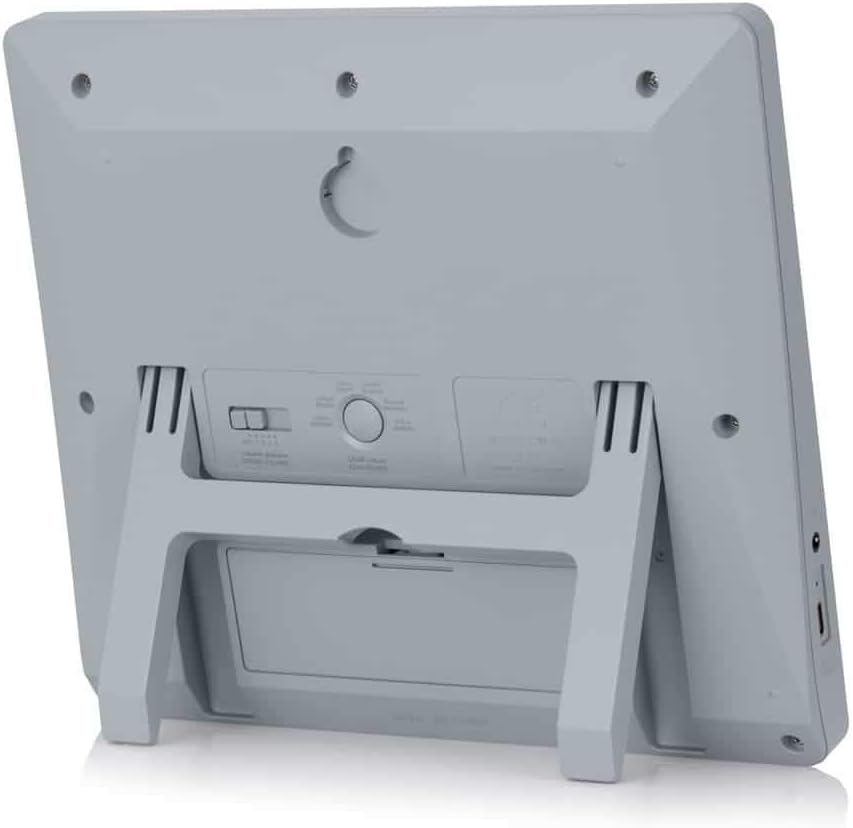
आकृती 3: मागील view of the ALFAJR CW-15 clock, highlighting the keyhole for wall mounting and the battery compartment.
2. Table Placement
For table or desk placement:
- Locate the integrated stand on the back of the clock.
- Pull out the stand until it locks into position.
- घड्याळ एका सपाट, स्थिर पृष्ठभागावर ठेवा.

आकृती 4: बाजू view of the ALFAJR CW-15 clock, showing the integrated kickstand extended for stable table placement.
देखभाल
७.२. साफसफाई
तुमच्या घड्याळाचे स्वरूप आणि कार्यक्षमता राखण्यासाठी:
- घड्याळाचा पृष्ठभाग मऊ, कोरड्या कापडाने पुसून टाका.
- Do not use abrasive cleaners, solvents, or chemical sprays, as these can damage the display or casing.
- Avoid getting moisture into the clock's openings.
2. बॅटरी बदलणे
When the display dims or the clock functions become erratic, it's time to replace the batteries.
- घड्याळाच्या मागील बाजूस असलेल्या बॅटरीचा डबा उघडा.
- जुन्या AA बॅटरी काढा.
- योग्य ध्रुवीयता निरीक्षण करून, चार नवीन AA बॅटरी घाला.
- बॅटरी कंपार्टमेंट बंद करा.
- You may need to re-enter the time and location settings after battery replacement.
समस्यानिवारण
| समस्या | संभाव्य कारण | उपाय |
|---|---|---|
| घड्याळ चालू होत नाही. | Batteries are dead or incorrectly inserted. No USB-C power. | Check battery polarity. Replace with new batteries. Ensure USB-C cable (if used) is connected and power source is active. |
| Azan times are incorrect. | Incorrect city/location settings. Wrong calculation method. DST setting incorrect. | Verify city, latitude, longitude, and GMT offset. Select the correct Azan calculation method for your region. Check DST setting. |
| Azan sound is too low or too high. | आवाज सेटिंगमध्ये समायोजन आवश्यक आहे. | Adjust the volume using the dedicated buttons or through the menu. |
| डिस्प्ले मंद किंवा चमकत आहे. | कमी बॅटरी पॉवर. | सर्व ५ AA बॅटरी नवीन बॅटरीने बदला. |
| Clock resets unexpectedly. | Intermittent power loss or very low batteries. | Ensure batteries are fresh and securely seated. If using USB-C, check the connection and power source stability. |
तपशील
- मॉडेल: सीडब्ल्यू -15
- ब्रँड: अल्फाजर
- डिस्प्ले प्रकार: डिजिटल
- रंग: राखाडी
- साहित्य: प्लास्टिक
- उत्पादन परिमाणे: 8.5 इंच (W) x 9 इंच (H)
- आयटम वजन: 3 औंस
- उर्जा स्त्रोत: 4 AA batteries (included) or USB-C (cable not included)
- माउंटिंग प्रकार: वॉल माउंट / टेबल स्टँड
- विशेष वैशिष्ट्ये: Automatic Azan, Multiple Azan Reciters, Gregorian/Hijri Calendar, Temperature Display, Daylight Saving Time
- भाषा: इंग्रजी, अरबी
हमी आणि समर्थन
मर्यादित वॉरंटी
The ALFAJR CW-15 Azan Clock comes with a limited warranty. Please refer to the warranty card included in your original packaging for specific terms, conditions, and duration. This warranty typically covers manufacturing defects under normal use.
ग्राहक समर्थन
For technical assistance, troubleshooting not covered in this manual, or warranty claims, please contact ALFAJR customer support through their official website or the retailer from whom you purchased the product. Please have your model number (CW-15) and purchase date available when contacting support.
Ask a question about this manual
Ask about setup, troubleshooting, compatibility, parts, safety, or missing instructions. Manuals+ will review the question and use this page’s manual context to help answer it.