
परिचय
खरेदी केल्याबद्दल धन्यवाद.asing the Power Dynamics PV240BT 4-Zone HiFi Stereo Amplifier. This manual provides essential information for the safe and efficient operation of your amplifier. Please read this manual thoroughly before using the device to ensure proper setup and to maximize its performance. Keep this manual for future reference.
सुरक्षितता सूचना
Always observe the following safety precautions to avoid electric shock, fire, or damage to the unit.
- युनिटला पाऊस किंवा ओलावा उघड करू नका.
- क उघडू नका.asing. आत वापरण्यायोग्य भाग नाहीत. सर्व सर्व्हिसिंग पात्र कर्मचाऱ्यांना द्या.
- युनिटभोवती योग्य वायुवीजन सुनिश्चित करा. वायुवीजन उघडण्यांना अडथळा आणू नका.
- युनिट एका स्थिर, समतल पृष्ठभागावर ठेवा.
- Disconnect the power cord from the mains before cleaning or when not in use for extended periods.
- फक्त निर्दिष्ट वीज पुरवठा वापरा.
- Keep the unit away from heat sources, direct sunlight, and excessive dust.
पॅकेज सामग्री
अनपॅक करताना, कृपया खाली सूचीबद्ध केलेल्या सर्व वस्तू उपलब्ध आहेत आणि चांगल्या स्थितीत आहेत याची खात्री करा:
- पॉवर डायनॅमिक्स PV240BT Ampलाइफायर युनिट
- सूचना पुस्तिका
- रिमोट कंट्रोल
- पॉवर केबल
उत्पादन वैशिष्ट्ये
पॉवर डायनॅमिक्स PV240BT amplifier offers a range of features designed for versatile audio applications:
- Multi-zone HiFi stereo amplifier with 4x 100W output across four separate zones, each with independent volume control.
- Built-in Bluetooth 4.2 receiver for reliable wireless audio streaming from smartphones, tablets, or laptops.
- Integrated USB/SD MP3 player and FM radio with digital LCD display.
- बाह्य ऑडिओ उपकरणे जोडण्यासाठी AUX इनपुट.
- Dual microphone inputs with separate volume dials and echo effect, plus talkover function.
- Optical/coaxial ports, dual RCA in/out, and subwoofer output for comprehensive connectivity.
- सोयीस्कर ऑपरेशनसाठी रिमोट कंट्रोल समाविष्ट आहे.
उत्पादन संपलेview

आकृती 1: समोर view of the Power Dynamics PV240BT ampलाइफायर, शोकasing त्याचे नियंत्रणे आणि प्रदर्शन.

आकृती 2: The 400W amplifier features four independent zones, each with its own volume control for multiroom audio distribution.
सेटअप
1. प्लेसमेंट
ठेवा amplifier on a flat, stable surface with adequate ventilation. Ensure there is enough space around the unit for heat dissipation. Avoid placing it near heat sources or in direct sunlight.
2. वीज जोडणी
Connect the supplied power cable to the AC IN socket on the rear panel of the amplifier and then to a suitable mains power outlet. Ensure the power switch on the front panel is in the OFF position before connecting.
६.२. स्पीकर कनेक्शन
Connect your speakers to the corresponding speaker terminals on the rear panel. The PV240BT features four speaker output zones. Ensure correct polarity (+ to + and - to -) for each speaker. Use appropriate gauge speaker wire for optimal performance.

आकृती 3: ओव्हरview च्या amplifier's front and back panels, highlighting various input and output connections including speaker terminals.
ऑपरेटिंग सूचना
1. पॉवर चालू/बंद
दाबा पॉवर चालू करण्यासाठी समोरील पॅनलवरील बटण amplifier on or off. The display will illuminate when the unit is powered on.
2. इनपुट स्रोत निवड
वापरा मोड button on the front panel or remote control to cycle through available input sources: Bluetooth, USB, SD, FM, AUX, Optical, Coaxial.
3. आवाज नियंत्रण
द amplifier features independent volume controls for each of the four zones (VOLUME 1-4). Adjust these knobs to set the desired output level for each connected speaker zone. The main संगीत व्हॉल knob controls the overall music volume.
4. टोन नियंत्रण
समायोजित करा बास आणि त्रासदायक knobs to fine-tune the low and high frequencies of your audio output. The ECHO knob controls the echo effect for microphone inputs.

आकृती 4: Close-up of the tone control section, showing knobs for Treble, Bass, Music Volume, and Echo.
5. ब्लूटूथ स्ट्रीमिंग
ब्लूटूथद्वारे कनेक्ट करण्यासाठी:
- Select "Bluetooth" as the input source using the मोड बटण
- On your Bluetooth-enabled device (smartphone, tablet, etc.), search for available devices.
- Select "PV240BT" from the list to pair. Once paired, you can stream audio wirelessly.

आकृती 5: द amplifier supports Bluetooth 4.2 for seamless wireless audio streaming from compatible devices.
6. USB/SD Media Player
Insert a USB drive or SD card into the respective slot on the front panel. The ampलाइफायर आपोआप USB/SD मोडवर स्विच होईल आणि सुसंगत ऑडिओ प्ले करण्यास सुरुवात करेल files (e.g., MP3). Use the playback controls (खेळा/विराम द्या, पूव, पुढे) to navigate your media.

आकृती 6: The integrated media player features USB and SD card slots for direct playback of audio files.
7. एफएम रेडिओ
Select "FM" as the input source. Use the पूव आणि पुढे buttons to tune to radio stations. The digital LCD display will show the current frequency.
8. Microphone Inputs
मायक्रोफोन कनेक्ट करा MIC 1 or MIC 2 inputs. Adjust the individual एमआयसी व्हीओएल knobs for each microphone. The बोलणारा function automatically lowers the music volume when a microphone is in use.
देखभाल
आपल्या दीर्घायुष्य आणि चांगल्या कामगिरीची खात्री करण्यासाठी ampलिफायर, या देखभाल मार्गदर्शक तत्त्वांचे पालन करा:
- स्वच्छता: Disconnect the power before cleaning. Use a soft, dry cloth to wipe the exterior of the unit. Do not use liquid cleaners or aerosols.
- वायुवीजन: Regularly check that the ventilation openings are clear of dust and debris to prevent overheating.
- स्टोरेज: जर युनिट जास्त काळ साठवून ठेवत असाल, तर ते वीज बंद करा आणि थंड, कोरड्या जागी, थेट सूर्यप्रकाश आणि अति तापमानापासून दूर ठेवा.
समस्यानिवारण
जर तुम्हाला तुमच्या amplifier, refer to the following table for common problems and their solutions:
| समस्या | संभाव्य कारण | उपाय |
|---|---|---|
| शक्ती नाही | Power cable not connected; Power switch off; Power outlet faulty. | Ensure power cable is securely connected. Turn power switch ON. Test power outlet with another device. |
| आवाज आउटपुट नाही | Incorrect input source selected; Volume too low; Speakers not connected or faulty; Mute function active. | Select correct input source. Increase master and zone volumes. Check speaker connections and ensure speakers are functional. Deactivate mute if applicable. |
| ब्लूटूथ कनेक्ट होत नाही | Amplifier not in Bluetooth mode; Device too far; Device already connected to another unit. | खात्री करा ampलाइफायर ब्लूटूथ मोडमध्ये आहे. डिव्हाइस जवळ हलवा amplifier. Disconnect from other Bluetooth devices. |
| USB/SD वाजत नाहीये. | अयोग्य file format; USB/SD card faulty or empty; Amplifier not in USB/SD mode. | खात्री करा files are compatible (e.g., MP3). Try another USB/SD card. Select USB/SD input mode. |
| विकृत आवाज | Volume too high; Incorrect impedance speakers; Poor cable connections. | आवाज कमी करा. स्पीकर्स जुळत असल्याची खात्री करा. amplifier impedance. Check all audio cable connections. |
या उपाययोजना वापरूनही समस्या कायम राहिल्यास, कृपया ग्राहक समर्थनाशी संपर्क साधा.
तपशील
| वैशिष्ट्य | तपशील |
|---|---|
| मॉडेल क्रमांक | PV240BT |
| आउटपुट पॉवर | २ x १० वॅट्स (एकूण २० वॅट्स) |
| झोन | 4 independent zones with volume control |
| ब्लूटूथ आवृत्ती | 4.2 |
| मीडिया प्लेयर | USB/SD MP3 player, FM Radio |
| इनपुट्स | AUX/RCA, Optical, Coaxial, 2x Microphone (6.3mm jack) |
| आउटपुट | RCA Line Out, Subwoofer Out, Speaker Terminals (4 zones) |
| परिमाण (L x W x H) | 38.5 x 30.6 x 14 सेमी |
| वजन | 4.6 किलो |
| वीज पुरवठा | 220-240VAC 50Hz |
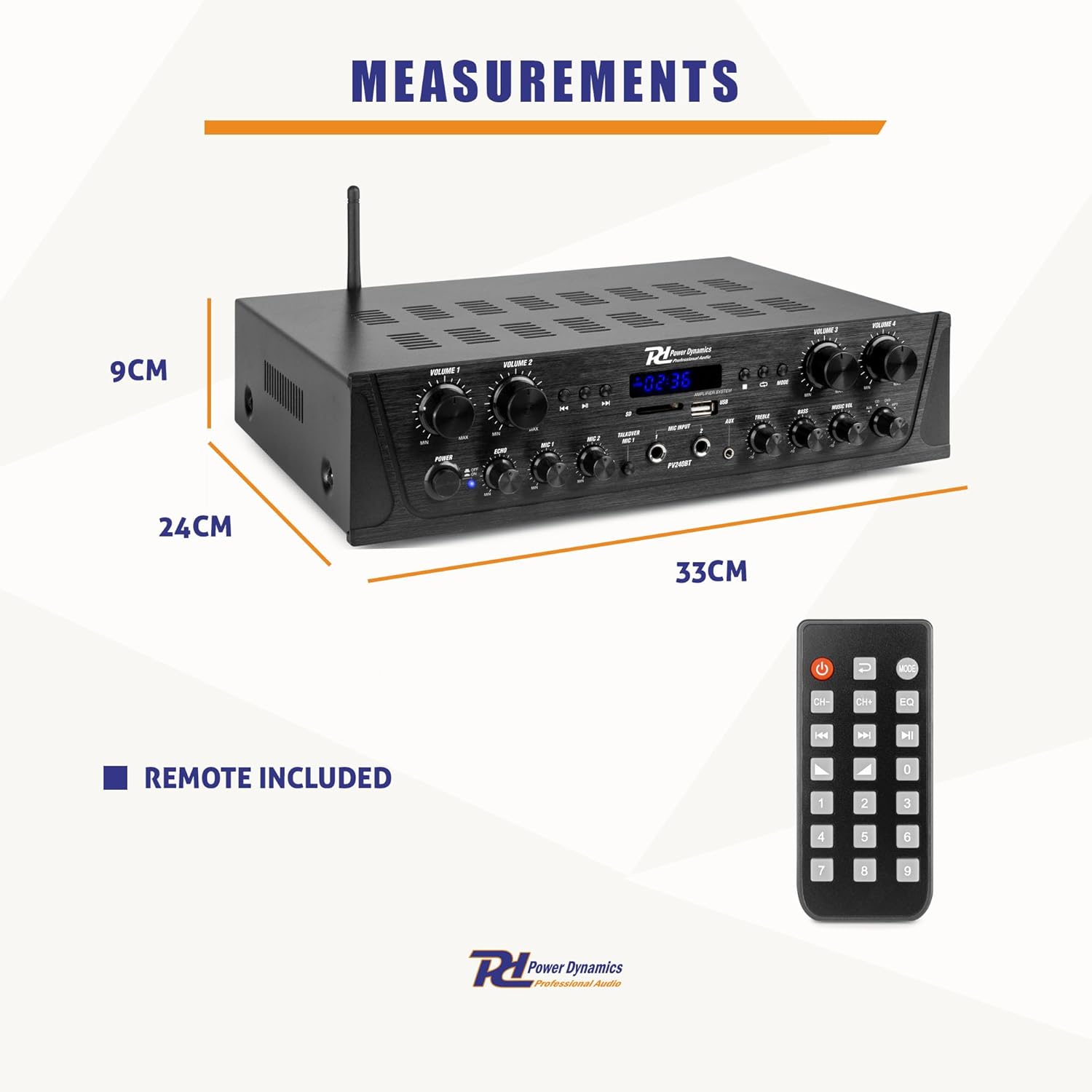
आकृती 7: Physical dimensions of the amplifier and the included remote control.
हमी आणि समर्थन
This Power Dynamics PV240BT amplifier comes with a standard manufacturer's warranty. Please refer to the warranty card included in your package for specific terms and conditions. For technical support, service, or warranty claims, please contact your retailer or the Power Dynamics customer service department. Keep your proof of purchase for warranty validation.
For further assistance, visit the official Power Dynamics webसाइटवर किंवा त्यांच्या सपोर्ट चॅनेलशी संपर्क साधा.