
परिचय
The Clean Remote CR3HOME is a universal TV remote control designed for simplicity and ease of use. It features a nonporous, sealed membrane surface for easy cleaning and enhanced hygiene. This remote is compatible with nearly all TV brands and cable boxes, offering a streamlined control experience without unnecessary buttons.
This manual provides instructions for setting up, operating, maintaining, and troubleshooting your CR3HOME remote control.
उत्पादन संपलेview
The Clean Remote CR3HOME features a basic key layout, focusing on essential functions for TV and cable box control. It is designed to be user-friendly for all ages.

प्रतिमा: समोर view of the Clean Remote CR3HOME, highlighting its simple key layout and absence of input, menu, or guide buttons.
मुख्य वैशिष्ट्यांचा समावेश आहे:
- Universal compatibility with most TV brands and cable boxes.
- Nonporous, sealed membrane surface for easy cleaning.
- Simplified button layout: No Input, Menu, or Guide buttons.
- Large, easy-to-press buttons.
सेटअप सूचना
1. बॅटरी इन्स्टॉलेशन
- रिमोट कंट्रोलच्या मागील बाजूस बॅटरी कंपार्टमेंट शोधा.
- उघडण्यासाठी बॅटरी कव्हर खाली सरकवा.
- कंपार्टमेंटमध्ये दर्शविल्याप्रमाणे योग्य ध्रुवीयता (+ आणि -) सुनिश्चित करून, दोन (2) AAA बॅटरी घाला.
- Replace the battery cover by sliding it back into place until it clicks.
2. TV Pairing
The CR3HOME remote is designed for quick setup with most televisions.
- For Samsung and LG TVs: The remote instantly replaces and works with these brands without any setup required. Simply point and use.
- For All Other TV Brands (One-Touch Setup):
- Ensure your TV is turned ON.
- Point the CR3HOME remote at your TV.
- दाबा आणि धरून ठेवा सेटअप button until the red indicator light on the remote turns on and stays lit.
- धारण करताना सेटअप बटण, दाबा टीव्ही पॉवर button once. The red light will blink.
- Release both buttons. The remote will now attempt to find the correct code for your TV. Test the remote by pressing the टीव्ही पॉवर button. If the TV turns off, the setup is complete.
- If the TV does not turn off, repeat steps 3-5. The remote cycles through codes quickly, so you may need to try a few times.
3. Cable Box Setup
The CR3HOME remote offers simple setup for cable boxes.
- Ensure your cable box is turned ON.
- Point the CR3HOME remote at your cable box.
- दाबा आणि धरून ठेवा सेटअप button until the red indicator light on the remote turns on and stays lit.
- धारण करताना सेटअप बटण, दाबा CBL button once. The red light will blink.
- Release both buttons. The remote will now attempt to find the correct code for your cable box. Test the remote by pressing the CH+ or CH- buttons. If the channel changes, the setup is complete.
- If the channel does not change, repeat steps 3-5.
ऑपरेटिंग सूचना
The Clean Remote CR3HOME is designed for straightforward operation with its essential buttons.
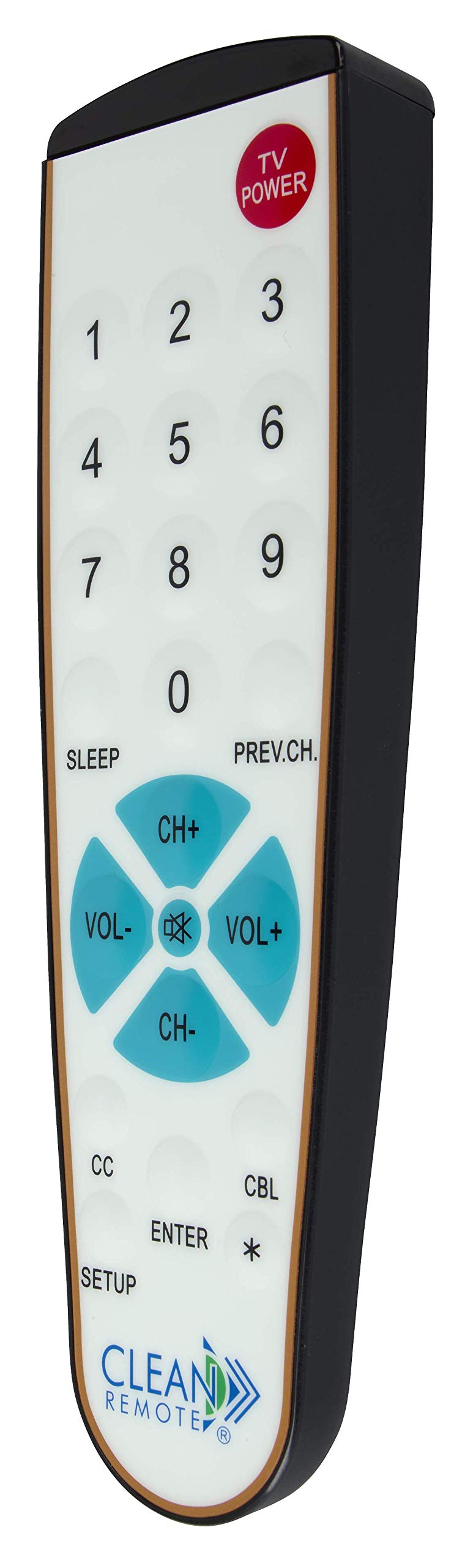
प्रतिमा: तपशीलवार view of the Clean Remote CR3HOME, illustrating the layout of its power, number, volume, and channel buttons.
- टीव्ही पॉवर: Turns your television on or off.
- संख्या बटणे (0-9): Used to directly enter channel numbers.
- VOL+ / VOL-: आवाज वाढवतो किंवा कमी करतो.
- CH+ / CH-: चॅनेल वर किंवा खाली बदलते.
- PREV.CH: पूर्वीच्या कडे परत येतो viewएड चॅनेल.
- झोप: Activates the TV's sleep timer function (if supported by your TV).
- CC (Closed Captioning): Toggles closed captioning on or off (if supported by your TV).
- प्रविष्ट करा: Confirms selections or channel entries.
- *: May function as a dash or special character depending on the TV/cable box.
टीप: This remote intentionally omits Input, Menu, and Guide buttons to prevent accidental changes to TV settings, making it ideal for environments where simplicity is key.
देखभाल
The Clean Remote CR3HOME is designed for easy maintenance due to its spill-proof and sealed construction.
- स्वच्छता: To clean the remote, simply wipe its nonporous, sealed membrane surface with a damp cloth or a mild disinfectant wipe. Avoid using abrasive cleaners or submerging the remote in liquid.
- बॅटरी बदलणे: Replace batteries when the remote's indicator light becomes dim or the remote becomes unresponsive. Always use fresh AAA batteries.
- स्टोरेज: Store the remote in a dry place away from extreme temperatures.
समस्यानिवारण
- रिमोट प्रतिसाद देत नाही:
- बॅटरी योग्यरित्या घातल्या आहेत का आणि त्या संपल्या नाहीत का ते तपासा. आवश्यक असल्यास बदला.
- Ensure there is a clear line of sight between the remote and the TV/cable box. Remove any obstructions.
- Make sure you are within the effective range of the remote (typically up to 20 feet).
- Remote not controlling TV/Cable Box after setup:
- Repeat the TV Pairing or Cable Box Setup steps carefully. The remote cycles through codes, and sometimes it may require multiple attempts to find the correct one.
- Ensure the TV/cable box is powered on during the setup process.
- काही बटणे काम करत नाहीत:
- Verify that the button functionality is supported by your specific TV or cable box model.
- Remember that the CR3HOME intentionally does not have Input, Menu, or Guide buttons.
तपशील
| ब्रँड | स्वच्छ रिमोट |
| मॉडेल क्रमांक | CR3HOME |
| विशेष वैशिष्ट्य | Spillproof, Universal |
| सुसंगत साधने | Television, Cable Box |
| कनेक्टिव्हिटी तंत्रज्ञान | इन्फ्रारेड |
| कंट्रोलर प्रकार | बटण नियंत्रण |
| उर्जा स्त्रोत | 2 x AAA बॅटरी (समाविष्ट नाही) |
| UPC | 816466021271 |
हमी माहिती
Clean Remote products are typically covered by a limited manufacturer's warranty. Please refer to the packaging or the official Clean Remote website for specific warranty terms and conditions, including duration and coverage details. Keep your proof of purchase for warranty claims.
ग्राहक समर्थन
For further assistance, technical support, or inquiries regarding your Clean Remote CR3HOME, please visit the official Clean Remote webवेबसाइटवर किंवा त्यांच्या ग्राहक सेवा विभागाशी संपर्क साधा. संपर्क माहिती सहसा उत्पादन पॅकेजिंगवर किंवा उत्पादकाच्या webसाइट