
1. परिचय
Thank you for choosing the CREATE SILKAIR CONNECT 3-in-1 Mobile Air Conditioner. This versatile appliance is designed to provide cooling, dehumidification, and fan functions for your living space. With its Wi-Fi connectivity, you can conveniently control the unit via a mobile application. Please read this manual thoroughly before operation to ensure safe and efficient use.
मॉडेल: १३५३_१२३२७८
ब्रँड: तयार करा
2. सुरक्षितता माहिती
आग, विजेचा धक्का आणि दुखापत होण्याचा धोका कमी करण्यासाठी विद्युत उपकरणे वापरताना नेहमीच मूलभूत सुरक्षा खबरदारी पाळा.
- वीज पुरवठा व्हॉल्यूमशी जुळत असल्याची खात्री कराtage रेटिंग लेबलवर निर्दिष्ट केले आहे.
- युनिट खराब झालेल्या कॉर्ड किंवा प्लगने चालवू नका.
- युनिट उष्णतेच्या स्त्रोतांपासून आणि थेट सूर्यप्रकाशापासून दूर ठेवा.
- एअर इनलेट किंवा आउटलेट ब्लॉक करू नका.
- साफसफाई किंवा देखभाल करण्यापूर्वी नेहमी युनिट अनप्लग करा.
- हे उपकरण R290 रेफ्रिजरंट वापरते. रेफ्रिजरंट सर्किटला पंक्चर करू नका.
- मुलांवर लक्ष ठेवा आणि ते उपकरणाशी खेळत नाहीत याची खात्री करा.
3. पॅकेज सामग्री
Carefully unpack your air conditioner and check that all items are present and in good condition.
- CREATE SILKAIR CONNECT Mobile Air Conditioner Unit
- एक्झॉस्ट नळी
- Window Sealing Kit (Adjustable window slider, hose adapter)
- रिमोट कंट्रोल
- वापरकर्ता मॅन्युअल

Figure 1: The CREATE SILKAIR CONNECT Mobile Air Conditioner unit shown alongside a smartphone displaying its control application interface.
4. उत्पादन संपलेview
4.1 नियंत्रण पॅनेल

Figure 2: Close-up of the top-mounted control panel, featuring an LED display and touch-sensitive buttons for various functions such as power, mode selection, fan speed, and timer.
२.२ घटक आणि परिमाणे
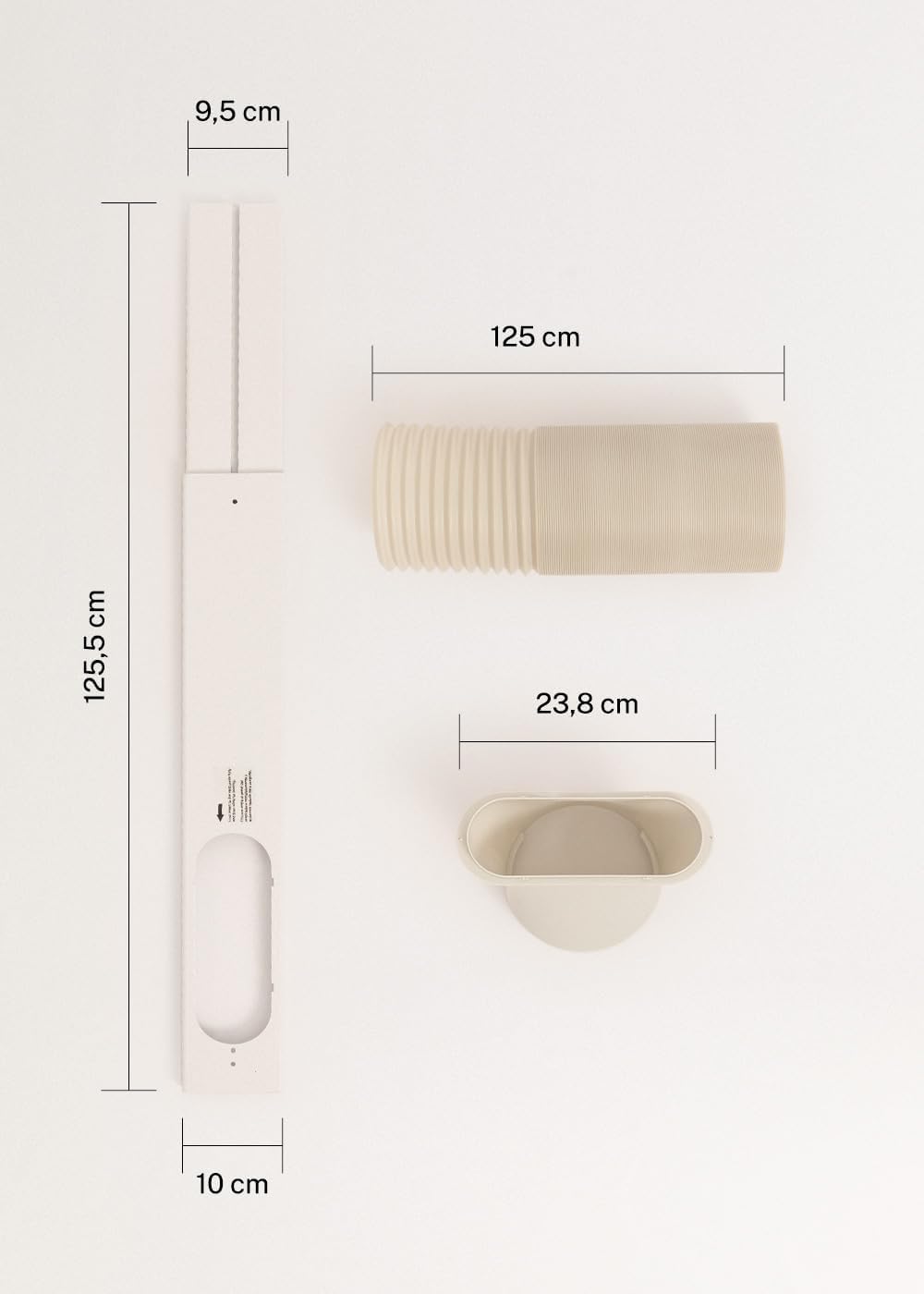
Figure 3: Detailed diagram illustrating the dimensions of the window sealing plate (125.5 cm length, 10 cm width, 9.5 cm adjustable width) and the exhaust hose (125 cm length) with its adapter (23.8 cm diameter).
5. सेटअप आणि स्थापना
Proper installation is crucial for the efficient operation of your mobile air conditioner.
5.1 युनिटची स्थिती
- युनिट सपाट, स्थिर पृष्ठभागावर ठेवा.
- Ensure there is at least 30 cm of space around the unit for proper airflow.
- Position the unit near a window or opening for the exhaust hose.
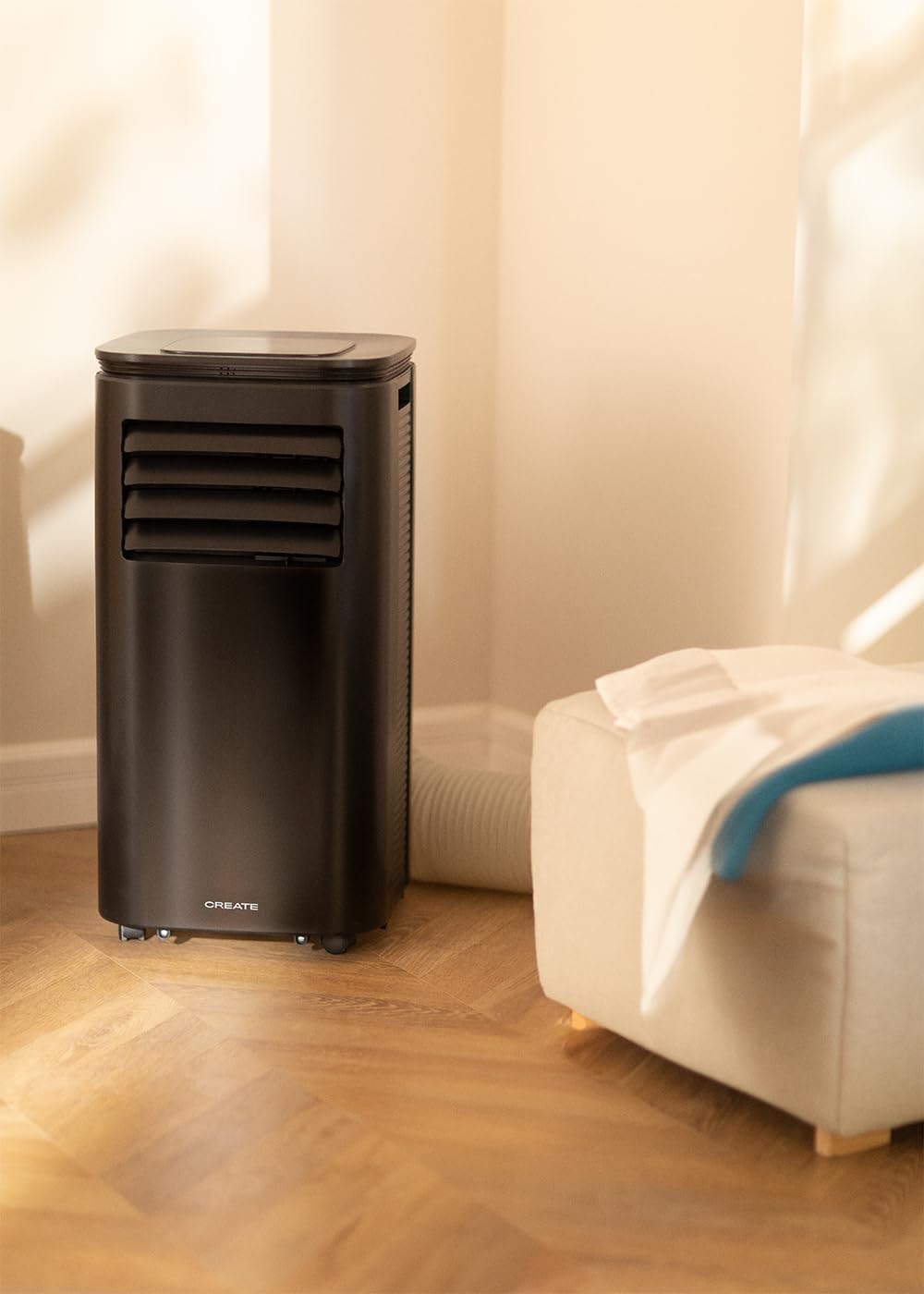
Figure 4: The air conditioner unit positioned in a room, demonstrating the typical setup with the exhaust hose directed towards a window for heat expulsion.
5.2 Installing the Exhaust Hose and Window Kit
- एक्झॉस्ट होजच्या एका टोकाला होज अॅडॉप्टर जोडा.
- Connect the other end of the exhaust hose to the air outlet on the back of the unit.
- Install the adjustable window sealing kit in your window opening. Extend it to fit the window frame.
- Insert the hose adapter into the opening of the window sealing kit.

Figure 5: Illustrates the secure connection of the flexible exhaust hose to the designated port at the rear of the air conditioning unit.
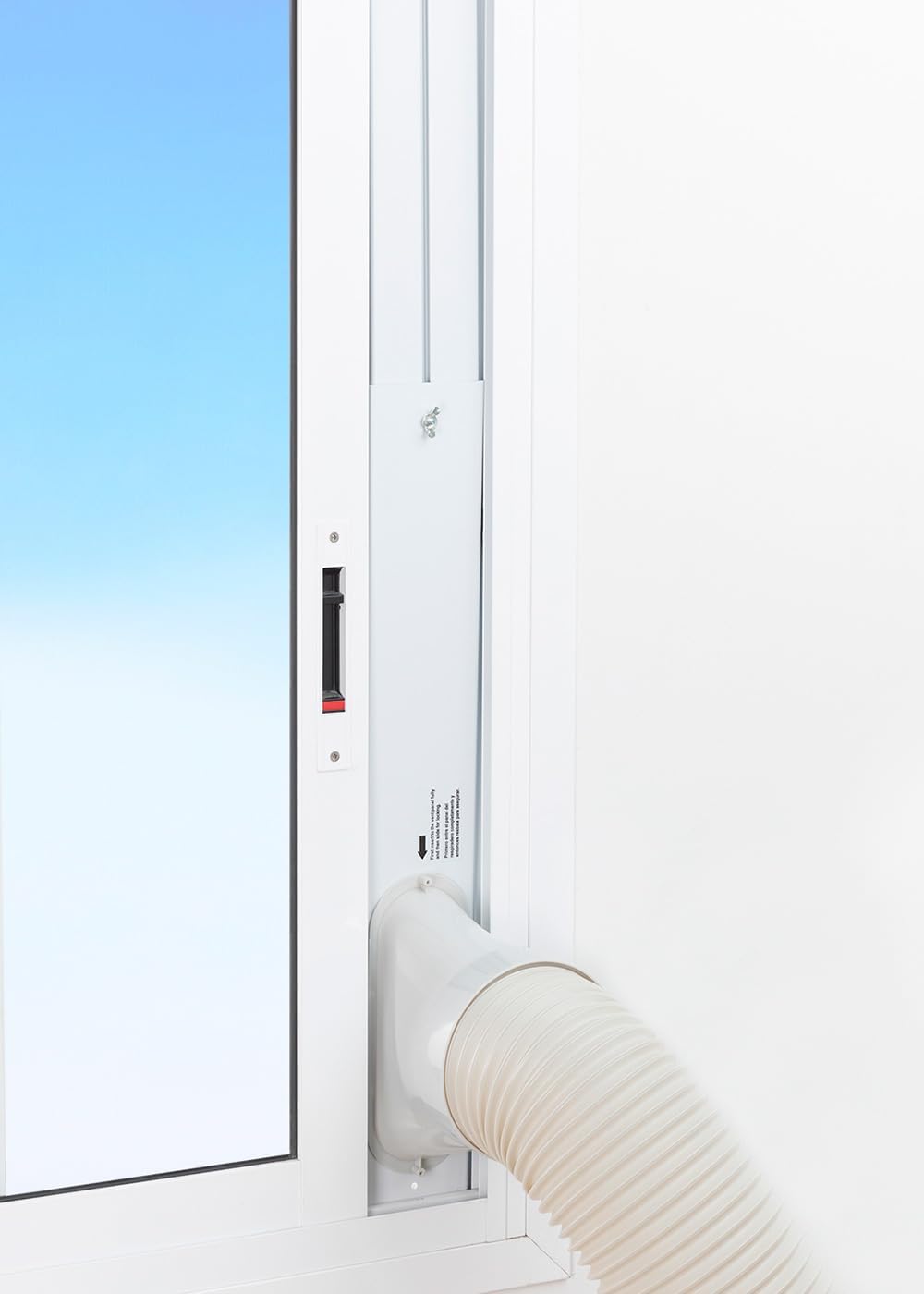
Figure 6: The window sealing kit is shown properly installed in a window frame, with the exhaust hose securely fitted into the kit's opening to vent hot air outside.
6. ऑपरेटिंग सूचना
6.1 नियंत्रण पॅनेल वापरणे
The control panel on top of the unit allows direct operation.
- पॉवर बटण: युनिट चालू किंवा बंद करण्यासाठी दाबा.
- मोड बटण: Cycle through Cooling, Fan, and Dehumidifier modes.
- फॅन स्पीड बटण: Adjust fan speed (Low, High).
- Temperature Buttons (+/-): Adjust desired temperature in Cooling mode.
- टाइमर बटण: Set the auto-on or auto-off timer (up to 24 hours).
- स्लीप मोड बटण: रात्रीच्या वापरासाठी शांत ऑपरेशन मोड सक्रिय करते.
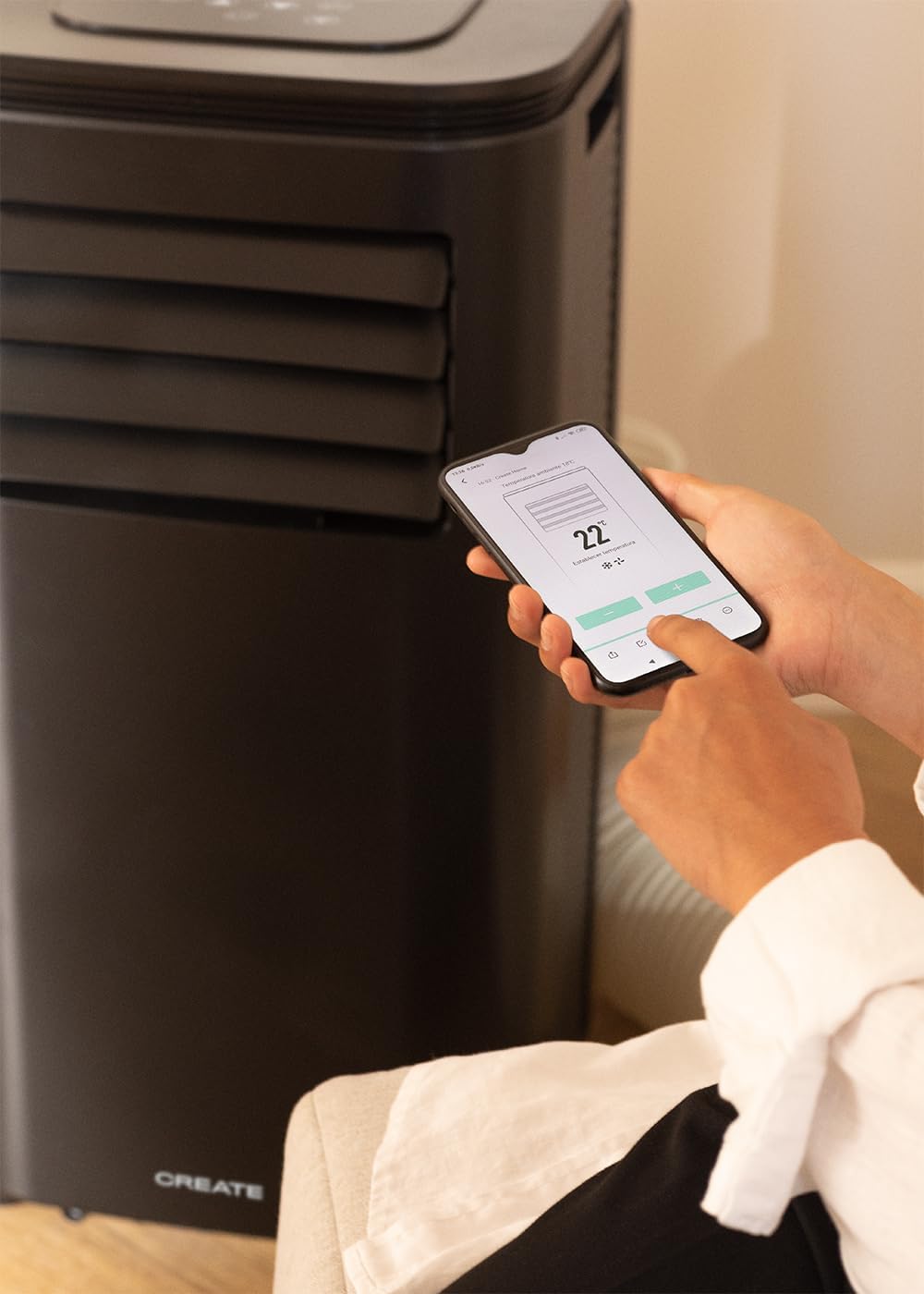
Figure 7: A user's hand interacting with the touch-sensitive control panel located on the top surface of the air conditioner, demonstrating direct manual operation.
6.2 रिमोट कंट्रोल वापरणे
रिमोट कंट्रोल दूरवरून सोयीस्कर ऑपरेशन प्रदान करतो.

Figure 8: A hand holding the dedicated remote control for the air conditioner, illustrating its use for convenient operation from a distance.
४.३ वाय-फाय आणि अॅप नियंत्रण
Download the CREATE Home app from your smartphone's app store. Follow the in-app instructions to connect your air conditioner to your home Wi-Fi network. Once connected, you can control all functions of the unit from your smartphone, including mode selection, temperature adjustment, fan speed, and timer settings.
Figure 9: A user interacting with the mobile application on a smartphone to remotely control the air conditioner, showcasing the Wi-Fi connectivity feature.
7. देखभाल
नियमित देखभालीमुळे इष्टतम कामगिरी सुनिश्चित होते आणि तुमच्या युनिटचे आयुष्य वाढते.
7.1 एअर फिल्टर साफ करणे
वापर आणि हवेच्या गुणवत्तेनुसार एअर फिल्टर दर दोन आठवड्यांनी किंवा त्याहून अधिक वेळा स्वच्छ केले पाहिजे.
- युनिट बंद करा आणि पॉवर आउटलेटमधून अनप्लग करा.
- Locate the air filter panel on the back of the unit.
- हळूवारपणे फिल्टर काढा.
- Clean the filter with warm, soapy water or a vacuum cleaner. Rinse thoroughly and allow it to air dry completely before reinserting.

Figure 10: Demonstrates the process of removing the air filter from the rear of the air conditioner unit for cleaning or replacement.
५.२ पाणी काढून टाकणे
In Dehumidifier mode or high humidity conditions, the internal water tank may fill up. The unit will stop operating when the tank is full. Drain the water from the drainage port at the bottom rear of the unit.
8. समस्या निवारण
| समस्या | संभाव्य कारण | उपाय |
|---|---|---|
| युनिट चालू होत नाही | No power; Power cord not plugged in; Water tank full. | Check power outlet; Plug in power cord; Drain water tank. |
| युनिट प्रभावीपणे थंड होत नाही | एअर फिल्टर घाणेरडा; एक्झॉस्ट नळी व्यवस्थित बसवलेली नाही; खोली खूप मोठी आहे; दरवाजे/खिडक्या उघड्या आहेत. | Clean air filter; Ensure hose is sealed; Use in recommended room size (14-25 m²); Close doors/windows. |
| मोठा आवाज | युनिट सपाट पृष्ठभागावर नाही; पंख्यामध्ये अडथळा. | Place on flat surface; Check for obstructions. |
| वाय-फाय कनेक्शन समस्या | चुकीचा वाय-फाय पासवर्ड; राउटर खूप दूर आहे; अॅप समस्या. | Verify password; Move unit closer to router; Restart app/unit. |
9. तपशील
| वैशिष्ट्य | तपशील |
|---|---|
| मॉडेल क्रमांक | १३५३_१२३२७८ |
| कूलिंग क्षमता | 9000 BTU / 2270 Watt |
| डेहूमिडिफिकेशन क्षमता | १२ लिटर/दिवस |
| वायुप्रवाह | ६४० चौरस मीटर/तास पर्यंत |
| शिफारस केलेल्या खोलीचा आकार | 14-25 m² |
| आवाज पातळी | 65 dB |
| रेफ्रिजरंट | R290 (ECO-friendly) |
| खंडtage | 240 व्होल्ट |
| वाटtage | ३०० वॅट |
| परिमाण (L x W x H) | 35.5 x 36.5 x 71.3 सेमी |
| साहित्य | ABS |
| ऊर्जा कार्यक्षमता वर्ग | A |

Figure 11: The energy efficiency label for the CREATE SILKAIR CONNECT, indicating an A-class energy rating, 2.6 kW cooling capacity, and a noise level of 65 dB. More details can be found at eprel.ec.europa.eu/qr/1580267.
10. हमी आणि समर्थन
For warranty information and technical support, please refer to the warranty card included with your product or visit the official CREATE webसाइट. खरेदीचा पुरावा म्हणून तुमची खरेदी पावती ठेवा.
निर्माता: तयार करा
संपर्क: Refer to CREATE's official support channels.