
1. परिचय
This manual provides detailed instructions for the installation, operation, and maintenance of the Fafeicy TM626 DIN Rail Mount AC220V Power Timer Switch. This digital timer is designed for precise time control of electrical appliances and systems, offering programmable on/off cycles for various applications.
The TM626 is suitable for controlling street lights, factory equipment, advertising signs, production machinery, radio and television equipment, stage lighting, and other power equipment that requires regular automated switching.
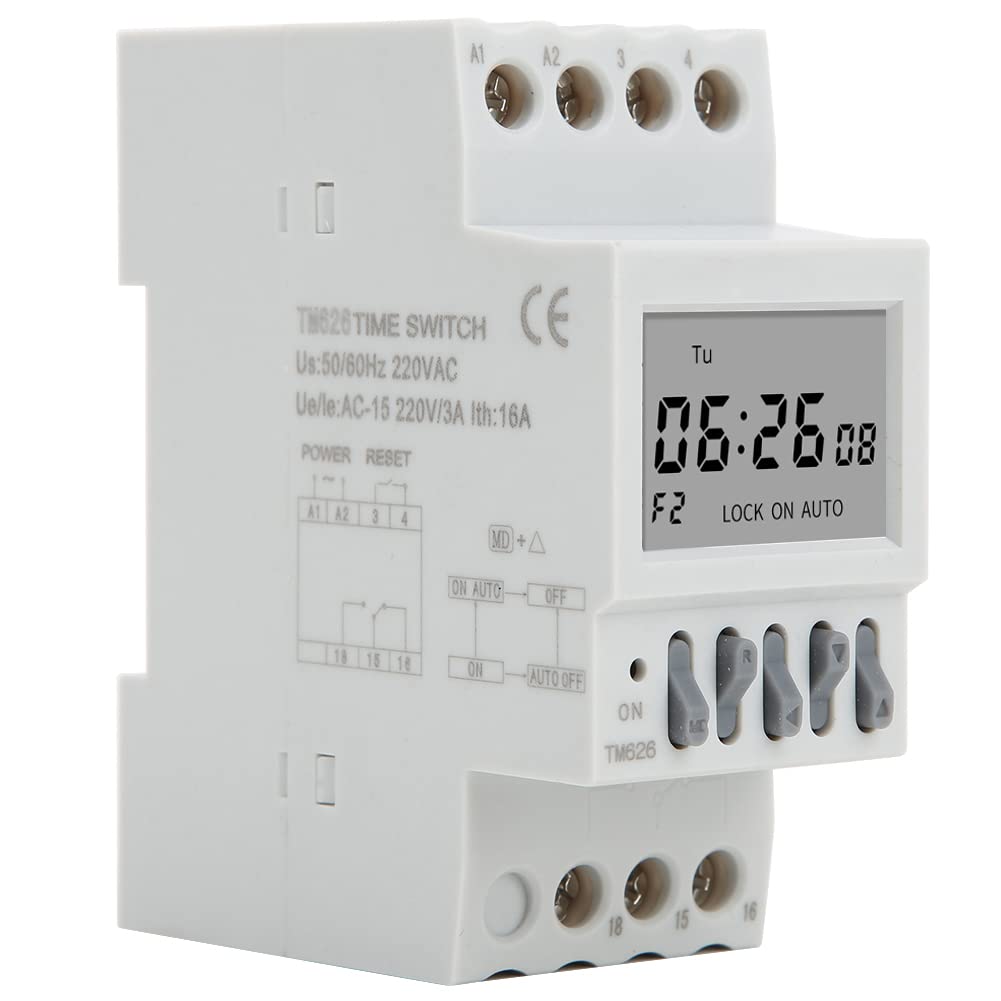
प्रतिमा ४.२: कोन view of the Fafeicy TM626 Power Timer Switch, showing the display and terminal connections.

Image 1.2: The TM626 timer switch is ideal for automating various applications, including street lighting, industrial equipment, and advertising displays.
2. सुरक्षितता माहिती
हे उपकरण स्थापित करण्यापूर्वी किंवा चालवण्यापूर्वी कृपया सर्व सुरक्षा सूचना वाचा आणि समजून घ्या. या सूचनांचे पालन न केल्यास विजेचा धक्का, आग किंवा गंभीर दुखापत होऊ शकते.
- Ensure the power supply is disconnected before any installation or maintenance work.
- स्थापना केवळ पात्र इलेक्ट्रिशियननेच करावी.
- निर्दिष्ट व्हॉलपेक्षा जास्त करू नकाtage (AC220V) and current (16A) ratings.
- उपकरणाला पाणी आणि उच्च आर्द्रता असलेल्या वातावरणापासून दूर ठेवा.
- स्वतः डिव्हाइस उघडण्याचा किंवा दुरुस्त करण्याचा प्रयत्न करू नका. सेवेसाठी पात्र कर्मचाऱ्यांशी संपर्क साधा.
3. उत्पादन संपलेview
The Fafeicy TM626 is a compact digital timer switch designed for DIN rail mounting. It features a clear LCD display for time and program settings, along with intuitive control buttons.
3.1 घटक
- एलसीडी डिस्प्ले: वर्तमान वेळ, दिवस आणि प्रोग्रामिंग स्थिती दर्शविते.
- नियंत्रण बटणे: Used for setting time, programming, and manual override.
- टर्मिनल ब्लॉक्स: For connecting power input and load output.
- DIN Rail Clips: For secure mounting on a standard DIN rail.

प्रतिमा 3.1: समोर view of the TM626 timer switch, highlighting the LCD display and control buttons.

प्रतिमा ४.२: बाजू view of the TM626, illustrating the integrated DIN rail mounting clips.
4. तपशील
| वैशिष्ट्य | तपशील |
|---|---|
| ब्रँड | फेफिसी |
| मॉडेल क्रमांक | TM626 (Fafeicy txusog0m3i) |
| संचालन खंडtage | AC220V (50/60Hz) |
| रेट केलेले वर्तमान | 16A |
| स्क्रीन आकार | 1.6 इंच |
| यांत्रिक जीवन | ≥ 30,000 वेळा |
| विद्युत जीवन | ≥ 10,000 वेळा |
| परिमाण (अंदाजे) | Width: 35mm (1.4in), Height: 82mm (3.2in), Depth: 68mm (2.7in) |
| आरोहित | डीआयएन रेल |
| मूळ देश | चीन |

Image 4.1: Dimensional drawing of the TM626 timer switch, showing key measurements.

Image 4.2: The TM626 timer switch, illustrating its robust design for long mechanical and electrical life.
5. सेटअप आणि स्थापना
Follow these steps for proper installation and initial setup of your TM626 timer switch.
5.1 माउंटिंग
- Ensure the main power supply is OFF before mounting.
- Locate a standard 35mm DIN rail within your electrical panel.
- Align the DIN rail clips on the back of the TM626 with the DIN rail.
- Press the timer firmly onto the rail until it clicks into place.
5.2 वायरिंग
Refer to the wiring diagram on the device and below for correct connections. Incorrect wiring can damage the device or cause electrical hazards.

प्रतिमा ४.२: बाजू view of the TM626 showing the wiring terminals and a simplified internal diagram. Terminals A1 and A2 are for power input (AC220V). Terminals 15, 16, 18 are for load output (15: Common, 16: Normally Closed, 18: Normally Open).
- Connect the AC220V power supply to terminals A1 आणि A2.
- Connect the common wire of your load to terminal 15.
- For normally open operation (load turns ON when timer activates), connect the load's live wire to terminal 18.
- For normally closed operation (load turns OFF when timer activates), connect the load's live wire to terminal 16.
- सर्व कनेक्शन सुरक्षित आणि इन्सुलेटेड असल्याची खात्री करा.
५.१ प्रारंभिक पॉवर-अप
After wiring, restore power. The display should light up. If the display is blank, check power connections. The timer may require an initial charge if it has been stored for a long time; allow it to be powered for a few minutes.
6. ऑपरेटिंग सूचना
The TM626 timer switch allows you to set the current time and program multiple on/off cycles.
४.२ वर्तमान वेळ आणि दिवस सेट करणे
- दाबा घड्याळ button (if available, or a similar button for time setting).
- वापरा D+ (Day), H+ (Hour), and M+ (Minute) buttons to adjust the current day, hour, and minute.
- दाबा घड्याळ पुन्हा जतन आणि बाहेर पडण्यासाठी.
6.2 Programming On/Off Cycles
The TM626 typically supports multiple ON/OFF programs. The exact number may vary, but common models support 8-16 programs.
- दाबा प्रो button. The display will show "1 ON".
- वापरा D+ to select the day(s) for this ON event (e.g., Mon-Fri, Sat-Sun, every day, specific days).
- वापरा H+ आणि M+ इच्छित चालू वेळ सेट करण्यासाठी.
- दाबा प्रो पुन्हा. डिस्प्ले "१ बंद" दर्शवेल.
- वापरा D+, H+, आणि M+ पहिल्या कार्यक्रमासाठी इच्छित बंद वेळ सेट करण्यासाठी.
- Repeat steps 1-5 for additional ON/OFF programs (e.g., "2 ON", "2 OFF", etc.).
- सर्व इच्छित प्रोग्राम सेट केल्यानंतर, दाबा घड्याळ button to exit programming mode and save settings.
6.3 मॅन्युअल ओव्हरराइड
द मॅन्युअल or चालू/ऑटो/बंद button allows you to manually override the programmed settings.
- Pressing this button cycles through modes: ON (नेहमी चालू), ऑटो (follows programs), बंद (नेहमी बंद).
- निवडा ऑटो for the timer to execute its programmed schedules.
6.4 रिसेट फंक्शन
To clear all settings and return the timer to its factory default state, locate the small रीसेट करा button (often recessed) and press it using a pointed object (e.g., a pen tip). This will erase all time and program settings.
7. देखभाल
The Fafeicy TM626 timer switch requires minimal maintenance to ensure long-term reliable operation.
- स्वच्छता: Use a soft, dry cloth to wipe the exterior of the device. Do not use abrasive cleaners or solvents.
- तपासणी: वायरिंग कनेक्शन घट्ट आहेत का आणि झीज किंवा नुकसान झाल्याच्या खुणा आहेत का ते वेळोवेळी तपासा.
- बॅटरी बॅकअप: The device typically includes an internal battery for retaining settings during power outages. This battery is usually non-replaceable by the user and recharges when the device is powered.
8. समस्या निवारण
If you encounter issues with your TM626 timer switch, refer to the following common problems and solutions:
| समस्या | संभाव्य कारण | उपाय |
|---|---|---|
| प्रदर्शन रिक्त आहे. | वीजपुरवठा नाही; अंतर्गत बॅटरी डिस्चार्ज झाली आहे. | Check power connections to A1/A2. Allow device to be powered for several minutes to charge the internal battery. |
| Load does not turn ON/OFF as programmed. | Incorrect programming; timer in manual ON/OFF mode; incorrect wiring; faulty load. | Verify program settings. Ensure the timer is in ऑटो mode. Check wiring connections (15, 16, 18). Test the load independently. |
| वेळ चुकीची आहे. | Time not set correctly; power interruption (though internal battery should prevent this). | Reset and re-set the current time and day. Ensure the internal battery is charged. |
| बटणे प्रतिसाद देत नाहीत. | Device malfunction; temporary software glitch. | Perform a full reset using the recessed RESET button. If the issue persists, contact support. |
9. हमी आणि समर्थन
For warranty information or technical support, please refer to the documentation provided with your purchase or contact Fafeicy customer service through their official channels. Keep your purchase receipt as proof of purchase.
सामान्य चौकशीसाठी, तुम्ही येथे भेट देऊ शकता Fafeicy Brand Store.