
1. परिचय
The Prolink PRO901ES is a 1000VA/900W Pure Sine Wave Online Uninterruptible Power Supply (UPS) designed to provide reliable power backup and protection for critical electronic equipment. This UPS features true double-conversion technology, ensuring a consistent and clean power supply. It is suitable for various applications including data centers, medical equipment, office workstations, ATMs, and kiosk machines.

Figure 1: Prolink PRO901ES 1000VA/900W Online UPS, Tower Type.
2. उत्पादन संपलेview
2.1 प्रमुख वैशिष्ट्ये
- True Double-Conversion Online Technology: Provides consistent, high-quality AC power regardless of input fluctuations.
- शुद्ध साइन वेव्ह आउटपुट: Ensures compatibility with sensitive electronic equipment.
- High Input Power Factor Correction: Improves efficiency and reduces overall power losses.
- Programmable Power Management Outlets: Allows for flexible control over connected devices.
- Emergency Power Off (EPO) Function: Provides an immediate shutdown mechanism for safety.
- प्रगत खंडtagई नियमन (AVR): Regulates output voltage within 1% tolerance, protecting devices from voltage spikes or sags.
- देखरेख क्षमता: Status can be monitored via the LCD display or PC programs.
2.2 मागील पॅनेलचे वर्णन
The rear panel of the PRO901ES UPS features essential connection ports for power input, output, and communication.
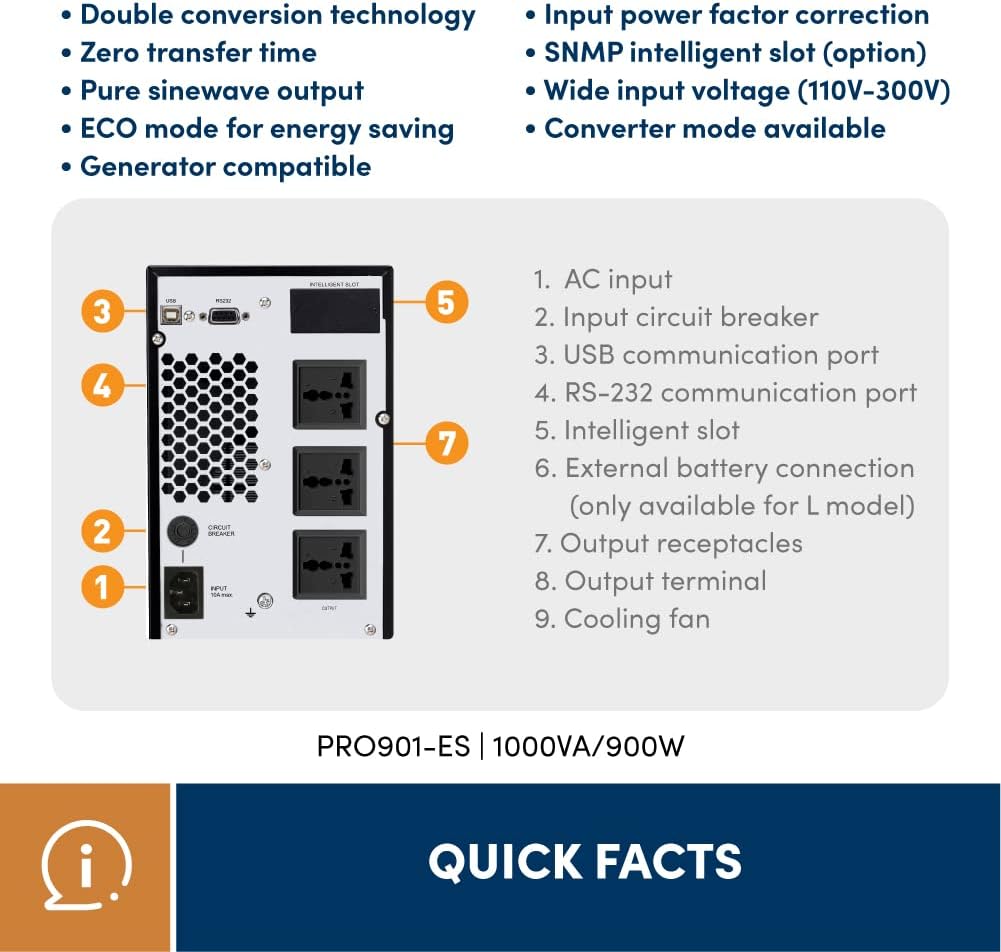
Figure 2: Rear Panel Layout of PRO901ES.
- AC इनपुट: Connects the UPS to the main power supply.
- इनपुट सर्किट ब्रेकर: Provides overcurrent protection for the input.
- यूएसबी कम्युनिकेशन पोर्ट: For connecting to a computer for monitoring and management.
- RS-232 Communication Port: Another port for computer communication.
- Intelligent Slot: For optional network management cards (e.g., SNMP).
- बाह्य बॅटरी कनेक्शन: (Only available for 'L' models) For connecting external battery packs to extend runtime.
- आउटपुट रिसेप्टकल्स: Three universal sockets for connecting protected devices.

Figure 3: Typical applications for the Prolink PRO901ES UPS.
४. सेटअप सूचना
Follow these steps for initial setup of your Prolink PRO901ES UPS:
- अनपॅक करणे: Carefully remove the UPS from its packaging and inspect for any damage. Retain packaging for future transport.
- प्लेसमेंट: Place the UPS in a clean, dry, and well-ventilated area, away from direct sunlight or heat sources. Ensure adequate clearance for airflow.
- प्रारंभिक चार्जिंग: Before connecting any devices, plug the UPS into a standard AC power outlet using the provided power cord. Allow the unit to charge for at least 8 hours to ensure optimal battery performance.
- कनेक्टिंग डिव्हाइसेस: Once the UPS is fully charged, connect your critical electronic devices (e.g., computers, monitors, network equipment) to the output receptacles on the rear panel. Do not overload the UPS beyond its rated capacity (900W).
- Communication Setup (Optional): For advanced monitoring and management, connect the UPS to a computer using a USB or RS-232 cable. Install the necessary software (if provided) to enable communication features.
- पॉवर चालू: Press the power button on the front panel to turn on the UPS. The LCD display will illuminate, indicating the operational status.
4. ऑपरेटिंग सूचना
4.1 पॉवरिंग चालू/बंद
- चालू करण्यासाठी: Press and hold the power button on the front panel until the UPS powers on.
- पॉवर ऑफ करण्यासाठी: Press and hold the power button until the UPS powers off. Ensure all connected devices are safely shut down before powering off the UPS.
५.२ एलसीडी डिस्प्ले समजून घेणे
The front panel LCD provides real-time information about the UPS status, including input/output voltage, बॅटरी पातळी, लोड टक्केवारीtage, and various operational modes.

Figure 4: Monitoring status from the LCD display.
4.3 आणीबाणी पॉवर ऑफ (EPO)
The EPO function allows for an immediate and complete shutdown of the UPS and all connected equipment in an emergency. Refer to the detailed wiring diagram in the full user manual for proper EPO connection.

Figure 5: Zero transfer time ensures continuous operation during power events.

Figure 6: The UPS provides clean power output, mitigating various power issues.

Figure 7: High-Precision AVR regulates output voltage within 1% tolerance.
5. देखभाल
- बॅटरी काळजी: The UPS uses Lead Acid batteries. To prolong battery life, avoid frequent deep discharges and operate the UPS within recommended temperature ranges. Periodically perform a battery self-test if available through the monitoring software.
- स्वच्छता: Keep the UPS clean and free from dust. Use a soft, dry cloth to wipe the exterior. Do not use liquid or aerosol cleaners. Ensure ventilation openings are not blocked.
- स्टोरेज: If storing the UPS for an extended period, ensure it is fully charged and then recharge it every 3 months to prevent battery degradation.
6. समस्या निवारण
This section addresses common issues you might encounter with your UPS. For more complex problems, contact customer support.
- यूपीएस चालू होत नाही: Check if the AC input cable is securely connected and if the input circuit breaker has tripped. Ensure the battery is sufficiently charged.
- कमी बॅटरी रनटाइम: This may indicate aging batteries or an overloaded UPS. Reduce the connected load or consider battery replacement if the unit is old.
- पंख्याचा मोठा आवाज: Some users have reported noticeable fan noise. While often normal for cooling, ensure the ventilation is not obstructed. If the noise is excessive or unusual, contact support.
- Connected Devices Not Receiving Power: Verify that the UPS is on and not in a fault state. Check the output receptacles and ensure devices are properly plugged in.
7. तपशील
| वैशिष्ट्य | तपशील |
|---|---|
| ब्रँड | प्रोलिंक |
| मॉडेल क्रमांक | PRO901-ES (USP-PRO901ES-3U) |
| क्षमता | 1000VA / 900W |
| बॅटरी सेल रचना | लीड ऍसिड |
| खंडtage | 240V |
| आउटपुट व्हॉल्यूमtage | 240 व्होल्ट (AC) |
| Ampवय | 7 Amps |
| फॉर्म फॅक्टर | टॉवर |
| पॉवर प्लग प्रकार | G टाइप करा |
| कनेक्टर प्रकार | USB, RS-232 |
| आउटलेटची संख्या | 3 (Universal sockets) |
| संलग्न साहित्य | धातू |
| रंग | काळा |
| विशिष्टता भेटली | EN 62040-2:2006, CE |
| मूळ देश | चीन |
8. हमी आणि समर्थन
The Prolink PRO901ES UPS comes with a २ वर्षांची स्थानिक वॉरंटी. For technical assistance or warranty claims, please refer to the contact information below.
Figure 8: Prolink Official Store information.
तांत्रिक समर्थन:
- ईमेल: support@prolink2u.com
- फोन: (०३) ९७६३ ०९६२