
1. परिचय
Thank you for choosing the Kungfuking Surge Protector Power Strip with USB Ports. This device is designed to provide convenient power access and surge protection for your electronic devices. It features two AC outlets and two USB ports, along with a 6.56 ft extension cord and a flat plug for versatile placement. This manual provides essential information for safe installation, operation, and maintenance of your power strip.

Figure 1: Kungfuking Surge Protector Power Strip (Model: Kungfuking 2AC+2USB)
2. महत्त्वाच्या सुरक्षितता सूचना
हे उत्पादन वापरण्यापूर्वी कृपया सर्व सुरक्षा सूचना वाचा आणि समजून घ्या. या सूचनांचे पालन न केल्यास विजेचा धक्का, आग किंवा गंभीर दुखापत होऊ शकते.
- करू नका exceed the electrical ratings of 120V, 12A, 60Hz, and 2.1A for USB ports.
- करू नका use in wet environments or near water.
- करू नका disassemble or modify the device.
- करू नका use with aquariums or other water-related products.
- करू नका दुसर्या स्थलांतर करण्यायोग्य पॉवर टॅपमध्ये प्लग करा.
- करू नका use if the cord or plug is damaged.
- मुलांच्या आवाक्याबाहेर ठेवा.
- वॉल आउटलेटमध्ये प्लग पूर्णपणे घातला असल्याची खात्री करा.
- हे उत्पादन केवळ घरातील वापरासाठी आहे.
3. उत्पादनाची वैशिष्ट्ये
The Kungfuking Surge Protector Power Strip is designed for convenience and safety, offering multiple power options in a compact form factor.
- 2 AC आउटलेट: Provides standard power for electronic devices.
- २ यूएसबी-ए पोर्ट: Delivers 5V/2.1A for charging smartphones, tablets, and other USB-powered devices.
- 6.56 FT Extension Cord: Offers flexibility in placement, reaching distant outlets.
- फ्लॅट प्लग डिझाइन: Minimizes obstruction and allows furniture to be placed closer to the wall.
- लाट संरक्षण: कनेक्ट केलेल्या उपकरणांना पॉवर सर्ज आणि स्पाइकपासून संरक्षण करते.
- टिकाऊ बांधकाम: Built with fireproof ABS+PC materials for enhanced safety.
- माउंट करण्यायोग्य डिझाइन: Can be easily mounted on or under desks, walls, or other surfaces.

आकृती २: प्रमुख वैशिष्ट्ये आणि तपशील

Figure 3: All-in-One Charging Station in use
4. सेटअप आणि स्थापना
The power strip can be installed in various locations to suit your needs. Mounting screws are included for secure installation.
4.1 माउंटिंग पर्याय
The power strip offers flexible mounting options:
- Under Desk/Table: Mount horizontally or vertically under a desk or table to keep surfaces clear.
- वॉल माउंट: Secure to a wall for convenient access, such as near a TV or bedside.
- Side of Cabinets/Headboards: Install vertically on the side of furniture for discreet power access.

Figure 4: Installation Options and Dimensions
4.2 स्थापना चरण
- एक स्थान निवडा: Select a flat, stable surface for mounting, ensuring it is within reach of a wall outlet and your devices.
- मार्क स्क्रू होल्स: Place the power strip in the desired position and mark the locations for the mounting screws using a pencil.
- पायलट होल ड्रिल करा (पर्यायी): For wood surfaces, you may pre-drill small pilot holes to prevent wood splitting.
- Secure the Power Strip: Use the provided screws to firmly attach the power strip to the surface. Ensure it is securely fastened before use.
- पॉवरशी कनेक्ट करा: Plug the power strip's flat plug into a standard 120V wall outlet. The flat plug design allows for placement behind furniture.
4.3 उदाample प्रतिष्ठापन
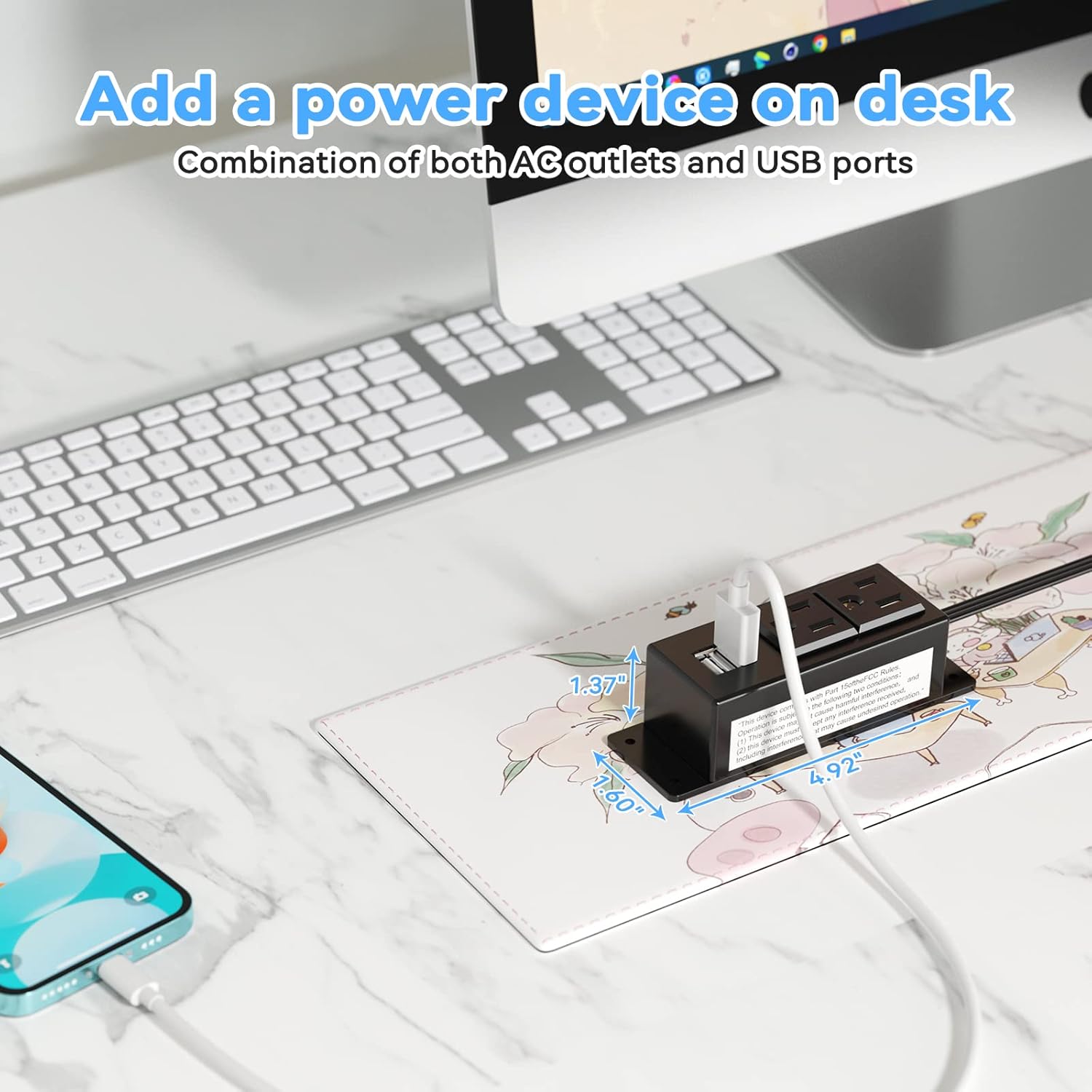
Figure 5: Desk Surface Installation

Figure 6: Under-Desk Installation

Figure 7: Wall-Mounted for TV

Figure 8: Nightstand Installation

Figure 9: Kitchen Cabinet Installation

Figure 10: Flat Plug for Space-Saving Placement
5. ऑपरेटिंग सूचना
Using your Kungfuking Surge Protector Power Strip is straightforward:
- वॉल आउटलेटमध्ये प्लग इन करा: Ensure the power strip's flat plug is securely connected to a grounded 120V AC wall outlet.
- Connect AC Devices: Insert the power cords of your electronic devices into the two AC outlets.
- USB डिव्हाइसेस कनेक्ट करा: Plug your USB charging cables into the two USB-A ports to charge compatible devices.
- पॉवर चालू: The power strip is designed for continuous operation once plugged in. There is no on/off switch.
- वापराचे निरीक्षण करा: Avoid overloading the power strip by ensuring the total power consumption of connected devices does not exceed the rated capacity (12A, 120V).
6. समस्या निवारण
जर तुम्हाला तुमच्या पॉवर स्ट्रिपमध्ये समस्या येत असतील, तर खालील सामान्य समस्या आणि उपाय पहा:
| समस्या | संभाव्य कारण | उपाय |
|---|---|---|
| No power from AC outlets or USB ports. |
|
|
| USB उपकरणे चार्ज होत नाहीत. |
|
|
| Power strip feels hot. |
|
|
7. तपशील
| वैशिष्ट्य | तपशील |
|---|---|
| मॉडेल | Kungfuking 2AC+2USB |
| एसी आउटलेट्स | 2 |
| यूएसबी पोर्ट्स | 2 (USB-A) |
| इनपुट व्हॉल्यूमtage | 120V AC |
| एसी वर्तमान रेटिंग | 12A |
| वारंवारता | 60Hz |
| यूएसबी आउटपुट | 5V / 2.1A (Total) |
| कॉर्डची लांबी | 6.56 FT (2 meters) |
| प्लग प्रकार | फ्लॅट प्लग |
| साहित्य | अग्निरोधक ABS+PC |
| परिमाण (अंदाजे) | 4.92 x 3.74 x 1.37 इंच (L x W x H) |
| वजन (अंदाजे) | 10.5 औंस |
| विशेष वैशिष्ट्ये | Surge Protection, Mountable Design |
8. देखभाल
योग्य देखभाल तुमच्या पॉवर स्ट्रिपचे दीर्घायुष्य आणि सुरक्षित ऑपरेशन सुनिश्चित करते:
- स्वच्छता: साफसफाई करण्यापूर्वी भिंतीच्या आउटलेटपासून पॉवर स्ट्रिप डिस्कनेक्ट करा. बाहेरील भाग पुसण्यासाठी कोरड्या, मऊ कापडाचा वापर करा. लिक्विड क्लीनर किंवा स्प्रे वापरू नका.
- तपासणी: Periodically inspect the power cord, plug, and housing for any signs of damage, such as cuts, fraying, or cracks. If damage is found, discontinue use immediately.
- स्टोरेज: जास्त काळ वापरात नसताना, पॉवर स्ट्रिप थेट सूर्यप्रकाश आणि आर्द्रतेपासून दूर थंड, कोरड्या जागी ठेवा.
9. हमी आणि समर्थन
Kungfuking products are designed for reliability and performance. For warranty information, technical support, or any questions regarding your product, please refer to the contact information provided at the point of purchase or visit the official Kungfuking webसाइट
कृपया वॉरंटी दाव्यांसाठी तुमचा खरेदीचा पुरावा ठेवा.