
1. परिचय आणि ओव्हरview
This manual provides comprehensive instructions for the setup, operation, maintenance, and troubleshooting of your SHARP 4T-C55BJ3EF2NB 55-inch 4K UHD Smart LED TV. Please read this manual thoroughly before using your television to ensure proper functionality and safety.
The SHARP 4T-C55BJ3EF2NB is a 55-inch 4K Ultra HD Smart LED TV, offering a resolution of 3840 x 2160 pixels. It features Active Motion 400, HDR10, HLG, Aquos UltraClear, and Aquos Motion technologies for smooth and clear image movements. The integrated Harman/Kardon speaker system, with 2 x 10W output, Dolby Digital, Dolby Digital Plus, DTS-HD, DTS Studio Sound, and Sound Equalizer, delivers an immersive audio experience. This TV also includes a Triple Tuner for satellite, cable, and antenna reception, along with a range of pre-installed smart applications.

आकृती 1.1: समोर view of the Sharp 4T-C55BJ3EF2NB 55-inch 4K UHD Smart LED TV, displaying colorful content and smart app logos.
2. सुरक्षितता माहिती
आग, विजेचा धक्का आणि दुखापतीचा धोका कमी करण्यासाठी हे टेलिव्हिजन वापरताना नेहमीच मूलभूत सुरक्षा खबरदारी पाळा.
- टीव्हीला पाऊस किंवा ओलावा दाखवू नका.
- वायुवीजन उघडण्यास अडथळा आणू नका.
- पॉवर कॉर्ड चालू नाही किंवा पिंच केलेली नाही याची खात्री करा.
- वीज पडताना किंवा बराच काळ वापरात नसताना टीव्ही अनप्लग करा.
- सर्व सेवांचा संदर्भ पात्र सेवा कर्मचाऱ्यांना द्या.
3. पॅकेज सामग्री
तुमचा टेलिव्हिजन काळजीपूर्वक अनपॅक करा आणि खालील सर्व वस्तू समाविष्ट आहेत का ते तपासा:
- 1 x SHARP 4T-C55BJ3EF2NB 55-inch 4K UHD Smart LED TV
- 1 x Remote Control (including 2 x AAA batteries)
- 1 x TV Stand with Installation Package (screws, etc.)
- 1 x द्रुत प्रारंभ मार्गदर्शक
- १ x वापरकर्ता मॅन्युअल (हे दस्तऐवज)
4. सेटअप
२.२ भौतिक सेटअप (स्टँड किंवा वॉल माउंट)
You can either install the TV on its included stand or mount it on a wall. Ensure the TV is placed on a stable, level surface if using the stand.
स्टँड स्थापना:
- नुकसान टाळण्यासाठी टीव्ही स्क्रीन मऊ, सपाट पृष्ठभागावर खाली ठेवा.
- Attach the stand components to the bottom of the TV using the provided screws from the installation package.
- सर्व स्क्रू सुरक्षितपणे घट्ट केल्याची खात्री करा.
वॉल माउंटिंग:
The TV supports VESA standard mounting 400 x 200 mm. Use a compatible wall mount bracket (not included) and follow the instructions provided with the wall mount. Ensure the wall can support the TV's weight (approximately 21.4 kg).
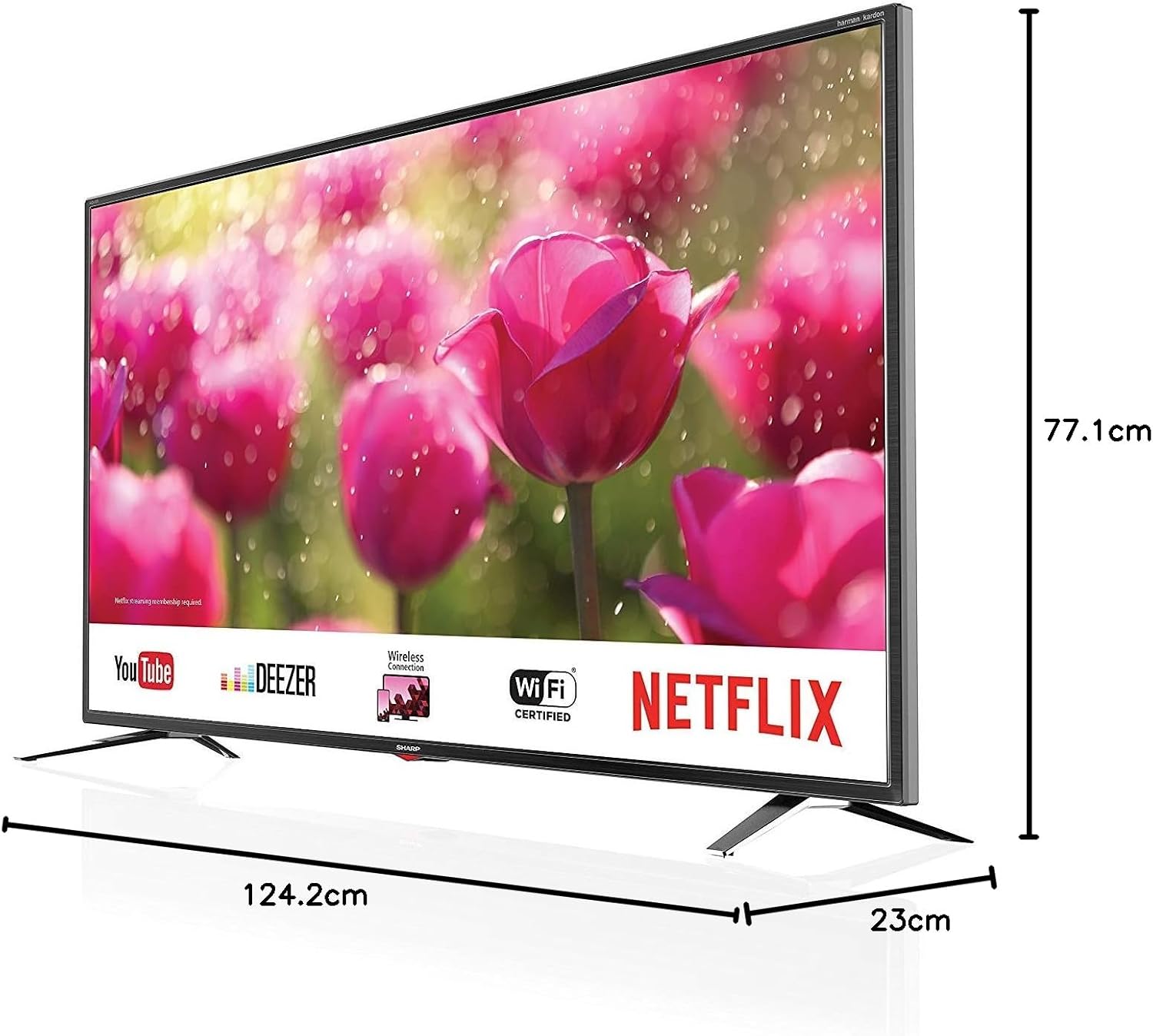
Figure 4.1: Product dimensions of the Sharp 4T-C55BJ3EF2NB 55-inch 4K UHD Smart LED TV.
4.2 कनेक्शन
Connect your external devices to the TV using the appropriate ports located on the rear panel.

आकृती 4.2: मागील view showing connection ports.
- एचडीएमआयः Connect up to 3 HDMI devices (e.g., Blu-ray player, game console).
- USB: Connect USB storage devices for media playback (3 ports available).
- अँटेना/केबल/उपग्रह: Connect your antenna, cable, or satellite feed to the Triple Tuner input.
- लॅन (आरजे-४५): वायर्ड इंटरनेट कनेक्शनसाठी.
- डिजिटल ऑप्टिकल ऑडिओ आउटपुट: बाह्य ऑडिओ सिस्टमशी कनेक्ट करण्यासाठी.
- Audio/Headphone (3.5 mm jack): हेडफोन किंवा बाह्य स्पीकर्ससाठी.
- CI+ स्लॉट: For Conditional Access Modules (CAM) for encrypted channels.
- SD कार्ड स्लॉट: एसडी कार्डवरून मीडिया प्लेबॅकसाठी.
३.१ पहिल्यांदाच सेटअप
After connecting all necessary cables and plugging in the power cord, press the power button on the remote control or TV. The TV will guide you through the initial setup process, including language selection, network connection (Wi-Fi or LAN), channel scanning, and time zone settings.
5. ऑपरेटिंग
5.1 मूलभूत ऑपरेशन
- पॉवर चालू/बंद: रिमोट कंट्रोलवरील पॉवर बटण दाबा.
- आवाज नियंत्रण: VOL +/- बटणे वापरा.
- चॅनल निवड: Use the CH +/- buttons or number buttons.
- इनपुट स्रोत: Press the SOURCE button to select between HDMI, TV (Tuner), USB, etc.
- मेनू नेव्हिगेशन: Use the arrow keys and OK button to navigate menus.
४.२ स्मार्ट टीव्ही वैशिष्ट्ये
Your SHARP TV is equipped with smart functionalities, allowing access to various online content and applications via the Sharp Aquos Net+ App Store.
- पूर्व-स्थापित अॅप्स: Access popular services like YouTube, Deezer, Rakuten TV, Chili, Netflix, Eurosport Player, Joyn, and Prime Video directly from the home screen.
- Web ब्राउझर: तुमच्या टीव्हीवर थेट इंटरनेट ब्राउझ करा.
- Wireless Connection (WLAN): इंटरनेट अॅक्सेससाठी तुमच्या घरातील वाय-फाय नेटवर्कशी कनेक्ट करा.
३.३ चित्र आणि ध्वनी सेटिंग्ज
आपले सानुकूलित करा viewटीव्हीच्या सेटिंग्ज मेनूद्वारे डाउनलोड आणि ऐकण्याचा अनुभव.
- चित्र मोड: Select from various preset picture modes (e.g., Standard, Movie, Game) or customize brightness, contrast, color, and sharpness.
- HDR समर्थन: The TV supports HDR10 and HLG for enhanced contrast and color with compatible content.
- ध्वनी मोड: Choose from preset sound modes or adjust bass, treble, and balance. The Harman/Kardon speaker system provides high-quality audio.
- ध्वनी समतुल्य: Fine-tune audio frequencies for a personalized sound profile.
४.५ ट्रिपल ट्यूनर ऑपरेशन
The integrated Triple Tuner supports DVB-T/T2 (terrestrial), DVB-C (cable), and DVB-S/S2 (satellite) signals. After initial channel scanning, you can access digital channels directly.
- चॅनल सूची: View and manage your scanned channels.
- इलेक्ट्रॉनिक कार्यक्रम मार्गदर्शक (EPG): Access program information and schedules.
6. देखभाल
6.1 स्वच्छता
- स्क्रीन: मऊ, लिंट-फ्री कापडाने स्क्रीन हळूवारपणे पुसून टाका. हट्टी डागांसाठी, टीव्हीसाठी विशेषतः डिझाइन केलेले स्क्रीन क्लिनिंग सोल्यूशन वापरा, जे थेट स्क्रीनवर न लावता कापडावर लावा.
- कपाट: टीव्ही कॅबिनेट मऊ, कोरड्या कापडाने पुसून टाका. अपघर्षक क्लीनर किंवा सॉल्व्हेंट्स वापरू नका.
6.2 सॉफ्टवेअर अद्यतने
Periodically check for software updates to ensure optimal performance and access to the latest features. Updates can typically be performed via the TV's settings menu when connected to the internet.
7. समस्या निवारण
जर तुम्हाला तुमच्या टीव्हीमध्ये समस्या येत असतील, तर खालील सामान्य समस्या आणि उपाय पहा:
| समस्या | संभाव्य उपाय |
|---|---|
| शक्ती नाही | पॉवर कॉर्ड टीव्ही आणि वॉल आउटलेटमध्ये सुरक्षितपणे प्लग इन केले आहे का ते तपासा. वेगळे आउटलेट वापरून पहा. |
| चित्र नाही, पण आवाज आहे. | योग्य इनपुट स्रोत निवडला आहे याची खात्री करा. बाह्य उपकरणांशी केबल कनेक्शन तपासा. |
| आवाज नाही, पण चित्र आहे. | आवाज पातळी आणि म्यूट स्थिती तपासा. ऑडिओ केबल कनेक्शनची पडताळणी करा. टीव्ही ऑडिओ आउटपुट सेटिंग्ज तपासा. |
| रिमोट कंट्रोल काम करत नाही | बॅटरी बदला. रिमोट आणि टीव्हीच्या आयआर सेन्सरमध्ये कोणतेही अडथळे नाहीत याची खात्री करा. |
| Wi-Fi शी कनेक्ट करू शकत नाही | वाय-फाय पासवर्ड तपासा. तुमचा राउटर रीस्टार्ट करा. टीव्ही वाय-फाय सिग्नलच्या रेंजमध्ये असल्याची खात्री करा. |
For more complex issues, consult the full user manual (if available in print) or contact Sharp customer support.
8. तपशील
| वैशिष्ट्य | वर्णन |
|---|---|
| मॉडेल क्रमांक | 4T-C55BJ3EF2NB |
| ब्रँड | तीक्ष्ण |
| स्क्रीन आकार | 55 इंच (139 सेमी) |
| प्रदर्शन तंत्रज्ञान | एलईडी |
| ठराव | 4K अल्ट्रा HD (3840 x 2160 पिक्सेल) |
| रीफ्रेश दर | 60 Hz |
| HDR समर्थन | HDR10, HLG |
| मोशन तंत्रज्ञान | Active Motion 400, Aquos UltraClear, Aquos Motion |
| ध्वनी प्रणाली | Harman/Kardon, 2 x 10W (8 Ohm), Dolby Digital, Dolby Digital Plus, DTS-HD, DTS Studio Sound, Sound Equalizer |
| ट्यूनर्स | Triple Tuner (DVB-T/T2/C/S/S2) with HEVC/H.265 (10-bit), MPEG4/H.264, VP9 support |
| कनेक्टिव्हिटी | 3x HDMI 4K, 3x USB, Audio/Headphone (3.5 mm jack), Digital Optical Audio Output, LAN (RJ-45), WLAN (2.412 GHz – 2.472 GHz), 1x SD Card Slot, CI+ Slot |
| स्मार्ट वैशिष्ट्ये | Web Browser, Sharp Aquos Net+ App Store, Pre-installed apps (YouTube, Netflix, Deezer, Prime Video, etc.) |
| उत्पादनाचे परिमाण (स्टँडसह) | 124.2 x 77.1 x 23 सेमी (W x H x D) |
| उत्पादनाचे वजन (स्टँडसह) | 21.4 किलो |
| VESA माउंटिंग मानक | 400 x 200 मिमी |
| उत्पादक | तीक्ष्ण |
| प्रथम उपलब्ध तारीख | 15 जानेवारी 2020 |
9. हमी आणि समर्थन
वॉरंटी माहितीसाठी, कृपया तुमच्या उत्पादनासोबत असलेले वॉरंटी कार्ड पहा किंवा अधिकृत शार्पला भेट द्या website. For technical support, troubleshooting assistance beyond this manual, or service requests, please contact Sharp customer service.
ऑनलाइन समर्थन: www.sharp.eu