
1. परिचय
This manual provides instructions for the proper setup, operation, and maintenance of your Acer B247Y 23.8-inch LED LCD Monitor. Please read this manual thoroughly before using your monitor to ensure optimal performance and to prevent damage.
The Acer B247Y is a 23.8-inch Full HD (1920 x 1080) monitor featuring an IPS panel for wide viewing angles, an anti-glare display, and a frameless design on three sides. It includes multiple connectivity options and an ergonomic stand for comfortable viewing
2. पॅकेज सामग्री
तुमच्या पॅकेजमध्ये सर्व वस्तू आहेत का ते तपासा. जर काही वस्तू गहाळ किंवा खराब झाल्या असतील तर तुमच्या किरकोळ विक्रेत्याशी संपर्क साधा.
- Acer B247Y 23.8-inch LED LCD Monitor
- मॉनिटर स्टँड (बेस आणि नेक)
- Power Adapter (Internal) and Power Cable
- व्हीजीए केबल
- डिस्प्लेपोर्ट 1.2 केबल
- HDMI केबल
- Audio-in Cable (if included)
- Audio-out Cable (if included)
- वापरकर्ता मॅन्युअल (हा दस्तऐवज)
3. सेटअप
४.१ मॉनिटर स्टँड असेंबल करणे
The monitor comes with a detachable foot stand. Follow these steps to assemble:
- पॅकेजिंगमधून मॉनिटर आणि स्टँडचे घटक काळजीपूर्वक काढा.
- स्टँड नेक मॉनिटर पॅनलला जोडा. ते सुरक्षितपणे जागी क्लिक करत असल्याची खात्री करा.
- Attach the stand base to the stand neck. Tighten any screws if provided, usually located on the underside of the base.
- एकत्रित मॉनिटर एका स्थिर, सपाट पृष्ठभागावर ठेवा.
टीप: The monitor also supports VESA mount (100 x 100 mm) for wall or arm mounting. Refer to your VESA mount kit instructions for installation.
3.2 मॉनिटर कनेक्ट करणे
योग्य केबल्स वापरून मॉनिटरला तुमच्या कॉम्प्युटरशी किंवा इतर डिव्हाइसेसशी कनेक्ट करा.
- व्हिडिओ कनेक्शन:
- डिस्प्लेपोर्ट केबलचे एक टोक तुमच्या संगणकावरील डिस्प्लेपोर्ट आउटपुटशी आणि दुसरे टोक मॉनिटरवरील डिस्प्लेपोर्ट इनपुटशी जोडा.
- Alternatively, connect an HDMI cable from your computer's HDMI output to the monitor's HDMI input.
- For older systems, connect a VGA cable from your computer's VGA output to the monitor's VGA input.
- ऑडिओ कनेक्शन:
- If using VGA or DisplayPort without audio, connect an audio cable from your computer's audio output to the monitor's audio-in port for integrated speakers.
- To connect external speakers or headphones, use the monitor's audio-out port.
- वीज कनेक्शन:
- पॉवर केबलला मॉनिटरच्या पॉवर इनपुटशी जोडा, नंतर दुसरे टोक ग्राउंड केलेल्या इलेक्ट्रिकल आउटलेटमध्ये प्लग करा.

Figure 3.2.1: Acer B247Y Monitor with Stand. This image illustrates the overall appearance of the monitor when fully assembled on its stand.
4. ऑपरेटिंग सूचना
4.1 पॉवरिंग चालू/बंद
Press the power button, usually located on the bottom right or rear of the monitor, to turn the monitor on or off. The power indicator light will illuminate when the monitor is on.
4.2 Adjusting Monitor Settings (OSD)
The monitor features an On-Screen Display (OSD) menu for adjusting various settings. Use the control buttons (typically located near the power button) to navigate and select options within the OSD menu.
सामान्य OSD सेटिंग्जमध्ये हे समाविष्ट आहे:
- चित्र: Brightness, Contrast, Color Temperature, Gamma, Acer eColor Management modes (e.g., Dark Room, Eco).
- ऑडिओ: Volume control for integrated speakers or audio-out.
- इनपुट: Select the active video input source (VGA, DisplayPort, HDMI).
- ओएसडी: OSD timeout, language.
- व्यवस्थापन: फॅक्टरी डीफॉल्टवर रीसेट करा.
४.३ अर्गोनॉमिक समायोजने
The Acer B247Y monitor stand offers several ergonomic adjustments to optimize your viewअनुभव:
- टिल्ट: Adjust the screen angle from -5 degrees to 25 degrees (forward/backward).
- फिरवणे: Rotate the monitor horizontally up to +/- 45 degrees.
- उंची समायोजन: स्क्रीनची उंची ११० मिमी पर्यंत समायोजित करा.
- पिव्होट: पोर्ट्रेटसाठी स्क्रीन ९० अंश फिरवा viewing
5. देखभाल
योग्य देखभाल तुमच्या मॉनिटरचे दीर्घायुष्य आणि इष्टतम कामगिरी सुनिश्चित करते.
- स्क्रीन साफ करणे: मऊ, लिंट-फ्री कापडाने स्क्रीन हळूवारपणे पुसून टाका. हट्टी खुणा असल्यास, dampen the cloth with a small amount of water or a non-abrasive screen cleaner. Do not spray liquid directly onto the screen.
- सी साफ करणेasing: मॉनिटर स्वच्छ करण्यासाठी मऊ, कोरडे कापड वापरा casing. मजबूत डिटर्जंट किंवा अपघर्षक क्लीनर वापरणे टाळा.
- वायुवीजन: जास्त गरम होण्यापासून रोखण्यासाठी मॉनिटरवरील वायुवीजन छिद्रे बंद केलेली नाहीत याची खात्री करा.
- वीज बंद: Always turn off the monitor and unplug it from the power outlet before cleaning or when not in use for extended periods.
6. समस्या निवारण
जर तुम्हाला तुमच्या मॉनिटरमध्ये समस्या येत असतील, तर खालील सामान्य समस्यानिवारण चरणांचा संदर्भ घ्या:
- No Power / Monitor Does Not Turn On:
- पॉवर केबल मॉनिटर आणि कार्यरत इलेक्ट्रिकल आउटलेटशी सुरक्षितपणे जोडलेली आहे याची खात्री करा.
- दुसरे उपकरण प्लग इन करून पॉवर आउटलेट कार्यरत आहे का ते तपासा.
- पॉवर बटण घट्टपणे दाबा.
- No Image / "No Signal" Message:
- Check that the video cable (DisplayPort, HDMI, or VGA) is securely connected to both the monitor and your computer.
- तुमचा संगणक स्लीप मोडमध्ये नसून चालू असल्याची खात्री करा.
- Use the OSD menu to manually select the correct input source.
- उपलब्ध असल्यास वेगळी व्हिडिओ केबल किंवा पोर्ट वापरून पहा.
- प्रतिमा विकृत किंवा अस्पष्ट आहे:
- तुमच्या संगणकावरील डिस्प्ले रिझोल्यूशन मॉनिटरच्या मूळ रिझोल्यूशनवर (१९२० x १०८०) सेट केले आहे याची खात्री करा.
- Adjust brightness, contrast, and other picture settings via the OSD menu.
- स्क्रीन किंवा केबल्सना कोणतेही भौतिक नुकसान झाले आहे का ते तपासा.
- स्पीकर्समधून आवाज येत नाही:
- Increase the volume using the OSD menu or your computer's sound settings.
- Ensure the audio cable (if used) is properly connected.
- तुमच्या संगणकाच्या ध्वनी सेटिंग्जमध्ये योग्य ऑडिओ आउटपुट डिव्हाइस निवडले आहे याची पडताळणी करा.
7. तपशील
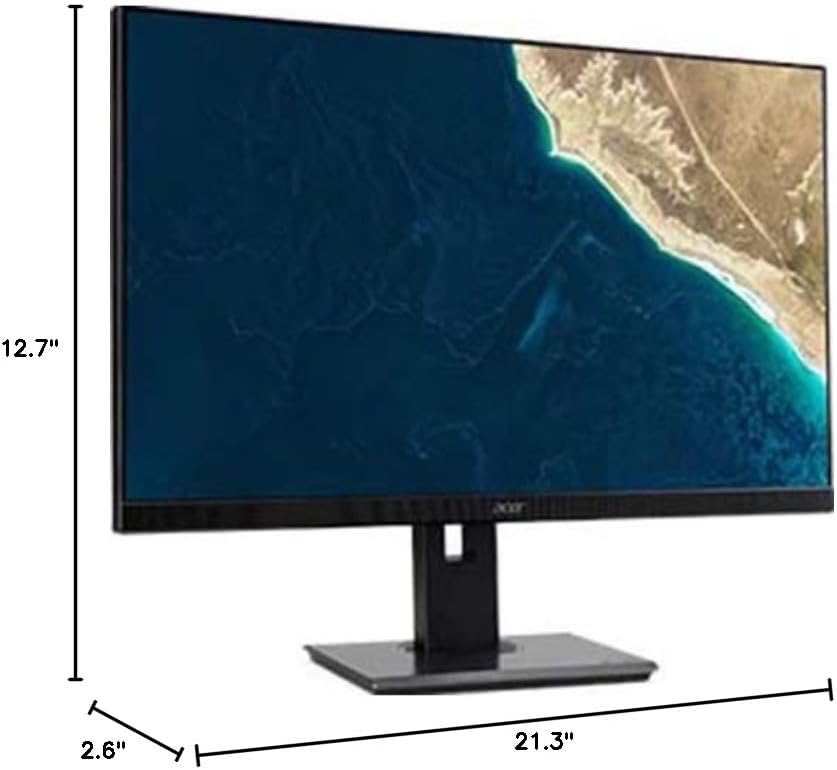
Figure 7.1.1: Acer B247Y Monitor Dimensions. This image shows the approximate height (12.7"), width (21.3"), and depth (2.6") of the monitor without the stand.
| वैशिष्ट्य | तपशील |
|---|---|
| मॉडेल क्रमांक | B247Y |
| स्क्रीन आकार | 23.8 इंच (60.5 सेमी) |
| डिस्प्ले प्रकार | LED LCD, IPS Panel, Anti-glare (AG) |
| कमाल ठराव | 1920 x 1080 (पूर्ण HD) |
| गुणोत्तर | १६:१० |
| रीफ्रेश दर | 75 Hz |
| प्रतिसाद वेळ | 4ms (gray-to-gray) |
| चमक (नमुनेदार) | 250 cd/m² |
| मूळ कॉन्ट्रास्ट गुणोत्तर | १६:१० |
| डायनॅमिक कॉन्ट्रास्ट रेशो | १६:१० |
| Viewकोन (H/V) | 178° / 178° |
| कनेक्टिव्हिटी | VGA, DisplayPort 1.2, HDMI, Audio-in, Audio-out |
| एकात्मिक स्पीकर्स | 2 x 2.0W |
| अर्गोनॉमिक ऍडजस्टमेंट्स | Tilt (-5° to 25°), Swivel (+/- 45°), Height Adjustment (120mm), Pivot (90°) |
| VESA Mount Support | 100 x 100 मिमी |
| स्टँडसह परिमाण (W x H x D) | 21.3" x 14.9"~19.6" x 7.6" (54.0cm x 37.9cm~49.9cm x 19.3cm) |
| स्टँडसह वजन | 12.3 पौंड (5.6 किलो) |
| पॉवर अडॅप्टर | अंतर्गत |
| रंग | काळा |
8. हमी आणि समर्थन
Your Acer B247Y monitor comes with a Limited Three-Year Warranty. Please retain your proof of purchase for warranty claims.
For technical support, service, or warranty inquiries, please refer to the official Acer support website or contact their customer service department. Contact information can typically be found on the Acer webसाइटवर किंवा तुमच्या उत्पादनासोबत असलेल्या वॉरंटी कार्डमध्ये.
केन्सिंग्टन लॉक: The monitor supports a Kensington lock for security. Attach a compatible Kensington lock (sold separately) to the security slot on the monitor to deter theft.