
1. उत्पादन संपलेview
The Kulannder 5D Diamond Painting LED Magnifier Lamp is designed to assist with detailed tasks such as diamond painting, cross-stitch, needlework, reading, and small repairs. It features a main lens with 4X magnification and a smaller inset lens with 6X magnification, complemented by three integrated LED lights for enhanced illumination. The flexible gooseneck and strong clip allow for versatile positioning and secure attachment to various surfaces.

Image 1.1: Kulannder LED Magnifier Lamp, illustrating its flexible design and clip for attachment.
2. पॅकेज सामग्री
- 1 x LED Light Magnifier with Clip
- १ x लेन्स क्लीनिंग कापड
3. उत्पादन तपशील
| वैशिष्ट्य | तपशील |
|---|---|
| ब्रँड | कुलांदर |
| रंग | काळा |
| Magnifier Material | ऍक्रेलिक लेन्स |
| प्रकाश स्रोत | 3 x LED Illuminating Lamps |
| Magnification (Large Lens) | 4X |
| Magnification (Small Lens) | 6X |
| उर्जा स्त्रोत | 3 x AAA बॅटरी (समाविष्ट नाही) |
| गुसनेक लांबी | Approximately 33cm / 13 inches |
| Clamp उघडत आहे | Approximately 6cm / 2.36 inches |
४. सेटअप सूचना
Follow these steps to set up your Kulannder LED Magnifier Lamp:
- अनपॅक घटक: Carefully remove the magnifying glass head and the gooseneck with the attached clamp पॅकेजिंग पासून.
- Connect Head to Gooseneck: Securely connect the magnifying glass head to the top of the gooseneck. Ensure it clicks into place or is firmly screwed on, depending on the model.
- बॅटरी स्थापित करा: Locate the battery compartment on the magnifying glass head. Open it and insert three (3) AAA batteries (not included), ensuring correct polarity. Close the compartment securely.
- पृष्ठभागावर जोडा: Use the strong clamp to attach the lamp to a stable surface such as a desk, table, or workbench. Ensure the clamp is firmly secured to prevent accidental dislodgement.
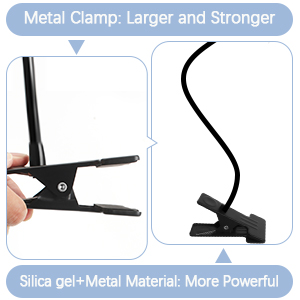
Image 4.1: Visual guide for connecting the magnifier head, installing batteries, and clamping the unit to a surface.
5. ऑपरेटिंग सूचना
Operating your LED Magnifier Lamp सरळ आहे:
- पॉवर चालू/बंद: Locate the ON/OFF switch on the side of the magnifying glass head. Slide the switch to the "ON" position to turn on the LED lights. Slide it to "OFF" to turn them off.
- स्थिती समायोजित करा: The flexible gooseneck allows for 360-degree adjustment. Bend and position the gooseneck to direct the magnifier and light precisely over your work area. The gooseneck is designed to hold its position without collapsing.
- Utilize Magnification: Use the large 4X lens for general magnification. For finer details, utilize the smaller 6X inset lens.

Image 5.1: The flexible gooseneck allows for precise positioning of the magnifier and light.
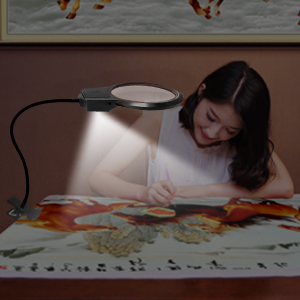
Image 5.2: The magnifier features both 4X and 6X lenses for varying levels of detail.
6. देखभाल
To ensure the longevity and optimal performance of your magnifier lamp:
- लेन्स साफ करणे: Use the provided lens cleaning cloth to gently wipe the magnifier lenses. Avoid using abrasive materials or harsh chemical cleaners, as these can scratch or damage the acrylic lens.
- बॅटरी बदलणे: When the LED lights dim or stop working, replace all three AAA batteries with new ones. Ensure correct polarity during installation.
- स्टोरेज: वापरात नसताना, एल साठवाamp in a clean, dry place away from direct sunlight and extreme temperatures.

Image 6.1: Use the included lens cloth for gentle cleaning of the magnifier lens.
7. समस्या निवारण
- दिवे चालू होत नाहीत:
- चालू/बंद स्विच "चालू" स्थितीत आहे का ते तपासा.
- योग्य ध्रुवीयतेसह बॅटरी योग्यरित्या स्थापित केल्याची खात्री करा.
- जुन्या बॅटऱ्या नव्याने बदला.
- Lights Flickering:
- हे बहुतेकदा बॅटरी पॉवर कमी असल्याचे दर्शवते. बॅटरी बदला.
- Ensure battery compartment connections are clean and secure.
- Magnifier Not Holding Position:
- cl ची खात्री कराamp स्थिर पृष्ठभागावर सुरक्षितपणे जोडलेले आहे.
- Adjust the gooseneck carefully to find a stable position.
8. हमी आणि समर्थन
The Kulannder LED Magnifier Lamp comes with a one-year warranty. If you encounter any quality issues or require assistance, please contact Kulannder customer support. Refer to the product packaging or the retailer's webविशिष्ट संपर्क माहितीसाठी साइट.