
1. परिचय
The UNI-T UT251A is a high-accuracy, high-sensitivity leakage current clamp meter designed for precise testing of AC leakage current. This high-resolution meter is suitable for various applications, including checking leakage current in motors, home appliances, and other electrical equipment up to 600A. It features a 4-digit LCD digital display with 10000 display count, auto-ranging capabilities, a 2/s sampling rate, peak hold function, and the ability to store 99 sets of data. The device also includes an RS-232 interface for data transmission, data hold, auto power-off, overload indication, and low battery indication.
2. सुरक्षितता माहिती
कृपया डिव्हाइस चालवण्यापूर्वी सर्व सुरक्षा सूचना वाचा आणि समजून घ्या. या सूचनांचे पालन न केल्यास विजेचा धक्का, आग किंवा गंभीर दुखापत होऊ शकते.
- विद्युत प्रणालींसोबत काम करताना नेहमी योग्य वैयक्तिक संरक्षक उपकरणे (पीपीई) घाला.
- Do not use the meter if it appears damaged or is operating abnormally.
- Ensure the battery compartment is securely closed before use.
- कोणत्याही फंक्शनसाठी कमाल इनपुट रेटिंग ओलांडू नका.
- Avoid touching live circuits with bare hands or conductive materials.
- डिव्हाइस कोरडे आणि स्वच्छ ठेवा.
- Refer to local and national safety codes for proper electrical work procedures.
3. उत्पादन संपलेview
The UNI-T UT251A is a compact and robust leakage current clamp meter. Key features include:
- 4-digit LCD Digital Display: Provides clear readings with a 10000 display count.
- ऑटो श्रेणी: योग्य मापन श्रेणी स्वयंचलितपणे निवडते.
- 2/s Sampलिंग दर: Ensures quick and responsive measurements.
- पीक होल्ड: Captures and displays the maximum measured value.
- डेटा लॉगिंग: Stores up to 99 sets of data for later analysis.
- RS-232 इंटरफेस: Allows connection to a PC for data transfer and analysis.
- डेटा होल्ड: डिस्प्लेवरील वर्तमान वाचन गोठवते.
- ऑटो पॉवर बंद: निष्क्रियतेच्या कालावधीनंतर स्वयंचलितपणे बंद होऊन बॅटरीचे आयुष्य वाचवते.
- ओव्हरलोड संकेत: Alerts the user when the measurement exceeds the range.
- कमी बॅटरी संकेत: Notifies the user when the battery needs replacement.

आकृती 3.1: समोर view of the UNI-T UT251A Leakage Current Clamp Meter, showing the display, clamp jaw, and control buttons.
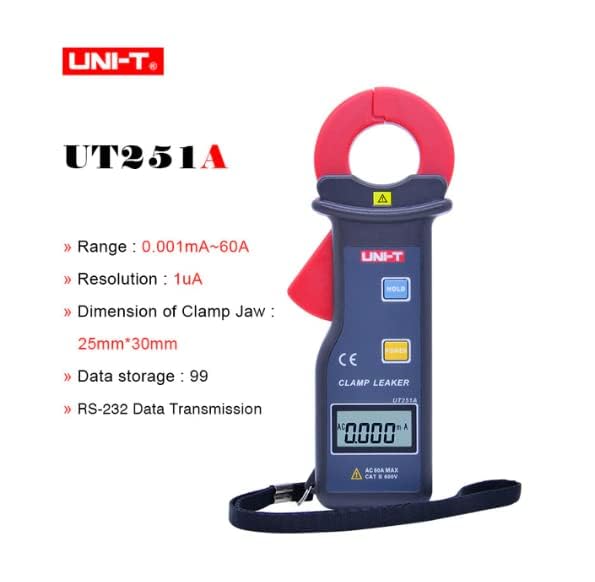
Figure 3.2: The UNI-T UT251A Clamp Meter highlighting its range, resolution, clamp jaw dimension, data storage, and RS-232 data transmission capabilities.
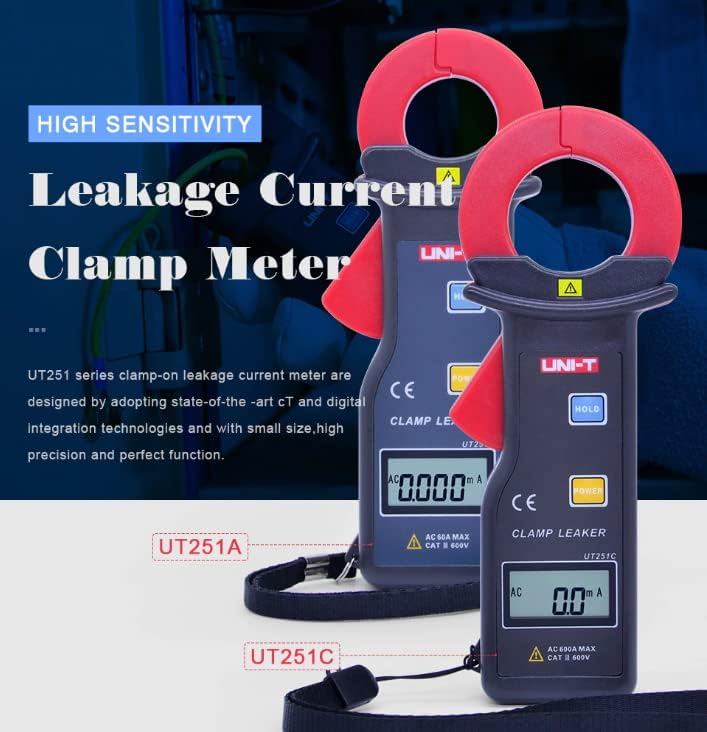
Figure 3.3: Comparison of UT251A and UT251C models, emphasizing their high sensitivity for leakage current measurement.
4. सेटअप
4.1 बॅटरी इंस्टॉलेशन
- मीटरच्या मागील बाजूस बॅटरी कंपार्टमेंट कव्हर शोधा.
- Use a screwdriver to loosen the screw(s) and remove the cover.
- Insert the 9V battery (6F22) into the compartment, observing correct polarity.
- Replace the battery compartment cover and tighten the screw(s).
4.2 प्रारंभिक तपासणी
- Press the POWER button to turn on the meter.
- Verify that the LCD display shows "0.000mA" or a similar low reading in a stable environment.
- If a low battery indicator appears, replace the battery before use.
5. ऑपरेटिंग सूचना
5.1 Measuring AC Leakage Current
- Turn on the meter by pressing the पॉवर बटण
- cl उघडाamp ट्रिगर दाबून जबडा.
- काळजीपूर्वक clamp the meter around a single conductor (live, neutral, or ground wire) of the circuit you wish to measure. Ensure the jaw is completely closed.
- Read the leakage current value displayed on the LCD. The meter will automatically select the appropriate range.
- For accurate readings, ensure no other conductors are within the clamp जबडा.
5.2 डेटा होल्ड फंक्शन
- मापन दरम्यान, दाबा धरा डिस्प्लेवरील वर्तमान वाचन गोठवण्यासाठी बटण.
- दाबा धरा button again to release the data hold and resume live measurement.
६.६ पीक होल्ड फंक्शन
- The meter automatically captures peak values. Refer to the specific manual for detailed instructions on accessing and clearing peak hold readings.

Figure 5.1: The UNI-T UT251A Clamp Meter in use, measuring current on an electrical wire.

Figure 5.2: A user wearing protective gloves operating the UNI-T UT251A Clamp Meter within an electrical panel, demonstrating a typical application.
6. Data Logging and RS-232 Interface
The UT251A can store up to 99 sets of measurement data. This data can be retrieved and analyzed using the RS-232 interface and the provided PC software.
४.१ डेटा साठवणे
- During a measurement, press the appropriate button (refer to the specific manual for button identification, often labeled "MEM" or similar) to save the current reading.
- The meter will indicate successful data storage, often by displaying a memory location number.
6.2 Connecting to PC via RS-232
- Install the PC software from the provided CD onto your computer.
- Connect the RS-232 interface cable to the meter's RS-232 port and to your computer's serial port (or a USB-to-serial adapter).
- पीसी सॉफ्टवेअर लाँच करा.
- Follow the software's instructions to establish communication with the meter and download the stored data.
Video 6.1: An official product video demonstrating the features and usage of the UNI-T UT251A/UT251C clamp meters, including a comparison of the two models and their accessories.
7. देखभाल
7.1 स्वच्छता
- मीटरचा क पुसून टाका.asinजाहिरातीसह gamp कापड आणि सौम्य डिटर्जंट. घर्षण किंवा सॉल्व्हेंट्स वापरू नका.
- cl ठेवाamp jaw clean and free of debris to ensure accurate measurements.
7.2 बॅटरी बदलणे
- When the low battery indicator appears, replace the 9V battery as described in the "Battery Installation" section.
- Remove the battery if the meter will not be used for an extended period to prevent leakage.
५.८.१ स्टोरेज
- मीटर थंड, कोरड्या जागी, थेट सूर्यप्रकाश आणि अति तापमानापासून दूर ठेवा.
- साठवणूक आणि वाहतूक करताना संरक्षणासाठी पुरवलेल्या कॅरींग बॅगचा वापर करा.
8. समस्या निवारण
| समस्या | संभाव्य कारण | उपाय |
|---|---|---|
| मीटर चालू होत नाही. | बॅटरी संपली आहे किंवा चुकीच्या पद्धतीने बसवली आहे. | Check battery polarity or replace the 9V battery. |
| चुकीचे वाचन. | डर्टी क्लamp jaw; external magnetic fields; multiple conductors in jaw. | cl साफ कराamp jaw; move away from strong magnetic fields; ensure only one conductor is clampएड |
| "OL" (ओव्हरलोड) प्रदर्शित झाला. | Measured current exceeds the meter's range. | Ensure the current is within the meter's specified range (up to 60A for UT251A). |
| पीसीशी कनेक्ट होऊ शकत नाही. | Incorrect cable connection; software not installed or configured properly. | Verify RS-232 cable connection; reinstall PC software; check software communication settings. |
9. तपशील
| वैशिष्ट्यपूर्ण | तपशील |
|---|---|
| मॉडेल | UT251A |
| Range (Leakage Current) | 0.001mA ~ 60A |
| ठराव | ५००µA |
| प्रदर्शन संख्या | 10000 |
| Sampलिंग दर | 2 वेळा / सेकंद |
| Clamp Jaw Dimension | 25 मिमी x 30 मिमी |
| डेटा स्टोरेज | 99 संच |
| इंटरफेस | RS-232 |
| शक्ती | 9V बॅटरी (6F22) |
| डिस्प्ले आकार | 32 मिमी x 15 मिमी |
| उत्पादनाचे निव्वळ वजन | 120 ग्रॅम |
| उत्पादनाचा आकार | 175 मिमी x 70 मिमी x 38 मिमी |
| सुरक्षितता रेटिंग | कॅट III 600V |
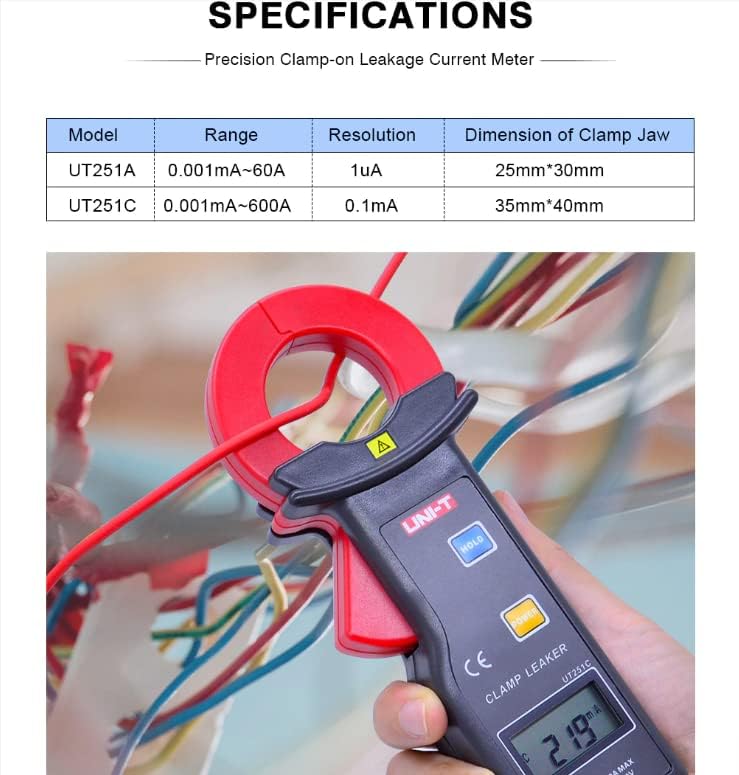
Figure 9.1: Detailed specifications table comparing the UT251A and UT251C models, including range, resolution, and clamp आकार
२. बॉक्समध्ये काय आहे?
The standard package for the UNI-T UT251A includes:
- UNI-T UT251A Leakage Current Clamp मीटर
- 9V Battery (6F22)
- RS-232 Interface Cable
- PC Software CD
- गिफ्ट बॉक्स
- कॅरींग बॅग
- इंग्रजी मॅन्युअल
- टूल बॉक्स

Figure 10.1: The UNI-T UT251A Clamp Meter shown with its packaging and included accessories, such as the RS-232 cable and software CD.
11. हमी आणि समर्थन
For warranty information and technical support, please refer to the documentation included with your product or contact UNI-T customer service directly. Details can typically be found on the official UNI-T webसाइटवर किंवा तुमच्या खरेदी केंद्राद्वारे.