
1. परिचय
Thank you for choosing the X.Cell M100 Wireless Mouse. This manual provides essential information for setting up, operating, and maintaining your new wireless mouse. Please read these instructions carefully before use to ensure optimal performance and longevity of your device.
2. पॅकेज सामग्री
तुमच्या पॅकेजमध्ये सर्व वस्तू आहेत का ते तपासा:
- X.Cell M100 Wireless Mouse
- यूएसबी नॅनो रिसीव्हर
- AA Battery (may be pre-installed or included separately)
- वापरकर्ता मॅन्युअल (हा दस्तऐवज)
3. सेटअप
- बॅटरी घाला: Locate the battery compartment on the underside of the mouse. Open the cover and insert the provided AA battery, ensuring correct polarity (+/-). Close the battery compartment cover.
- यूएसबी रिसीव्हर कनेक्ट करा: Remove the USB Nano Receiver from its storage slot, usually located inside the battery compartment or near it. Plug the receiver into an available USB port on your computer (PC or Mac).
- पॉवर चालू: Turn on the mouse using the power switch, typically located on the underside. The mouse is designed for plug-and-play functionality, meaning it should automatically connect to your computer within a few seconds.
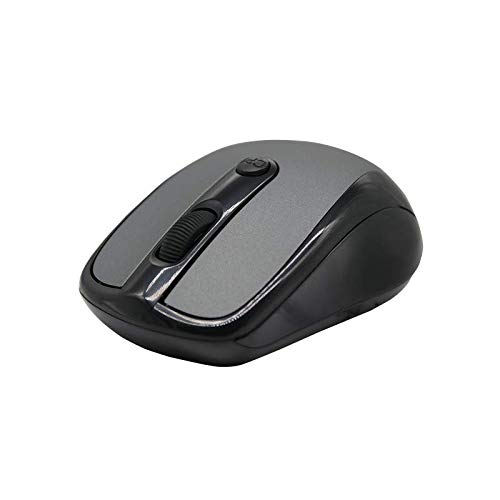
This image shows the X.Cell M100 Wireless Mouse from a top-down perspective, highlighting its ergonomic design and button layout.
4. ऑपरेटिंग सूचना
The X.Cell M100 Wireless Mouse utilizes 2.4 GHz wireless technology, providing a stable connection with an operating range of up to 10 meters. It is compatible with both PC and Mac systems.
- डावे बटण: आयटम निवडण्यासाठी, उघडण्यासाठी प्राथमिक क्लिक फंक्शन files, इ.
- उजवे बटण: Secondary click function for context menus and additional options.
- स्क्रोल व्हील: कागदपत्रे नेव्हिगेट करण्यासाठी वर किंवा खाली रोल करा आणि web पृष्ठे. स्क्रोल व्हील मधल्या क्लिक बटणासारखे देखील कार्य करते.
- DPI Button (if present): Some models may include a DPI button to adjust cursor sensitivity. Refer to the mouse's physical design for this feature.

A hand demonstrates the comfortable grip and usage of the X.Cell M100 Wireless Mouse during operation.
5. देखभाल
- स्वच्छता: उंदीर स्वच्छ करण्यासाठी मऊ, कोरडे कापड वापरा. हट्टी घाणीसाठी, किंचित डीampकपड्यावर पाणी घाला. कठोर रसायने किंवा अपघर्षक पदार्थ वापरणे टाळा.
- बॅटरी बदलणे: When the mouse performance degrades or it stops responding, replace the AA battery. Follow the steps in the 'Setup' section for battery insertion. The mouse is designed for approximately 12 months of battery life under typical usage.
- स्टोरेज: When not in use for extended periods, turn off the mouse to conserve battery life. Store the USB Nano Receiver in its designated slot to prevent loss.
6. समस्या निवारण
| समस्या | उपाय |
|---|---|
| माउस प्रतिसाद देत नाही |
|
| कर्सरची हालचाल अनियमित किंवा मंद आहे. |
|
| कनेक्शन समस्या |
|
7. तपशील
- मॉडेल: XL-M-100-BLK
- कनेक्टिव्हिटी: 2.4 GHz वायरलेस
- ऑपरेटिंग रेंज: 10 मीटर पर्यंत
- सुसंगतता: PC & Mac
- उर्जा स्त्रोत: 1 x AA बॅटरी
- अंदाजे बॅटरी आयुष्य: 12 महिने
- परिमाण (L x W x H): 2.4 x 6.4 x 4.6 सेमी
- वजन: 80 ग्रॅम
- रंग: काळा
8. हमी आणि समर्थन
Specific warranty details and direct support contact information are not provided in the product description. Please refer to the product packaging or the official X.Cell website for the most current warranty policy and customer support options. Keep your purchase receipt as proof of purchase for any warranty claims.