
1. परिचय
Thank you for choosing the Baseus Encok S06 Magnetic Bluetooth In-Ear Earphones. This manual provides essential information for the proper setup, operation, maintenance, and troubleshooting of your new earphones. Please read this manual thoroughly before use to ensure optimal performance and longevity of the product.
The Baseus Encok S06 features a dual battery design for extended playback, Bluetooth 4.1 for stable connectivity, and a magnetic design for convenient storage. It includes an in-built microphone with CVC Noise Suppression and a 3-button remote for easy control of music and calls.

प्रतिमा 1.1: ओव्हरview of the Baseus Encok S06 Earphones.
This image displays the complete Baseus Encok S06 earphones, highlighting their in-ear design, magnetic earbuds, and the inline control module. The black color and sleek design are visible.
२. बॉक्समध्ये काय आहे?
Upon unboxing your Baseus Encok S06 earphones, please verify that all the following components are present:
- Baseus Encok S06 Earphones
- Ear-hooks (various sizes)
- Ear-muffs (small and big sizes)
- चार्जिंग केबल (मायक्रो यूएसबी)

प्रतिमा २: उत्पादन पॅकेजमधील सामग्री.
This image shows all items included in the Baseus Encok S06 package: the earphones themselves, two pairs of ear-hooks, two pairs of ear-muffs (small and large), and a Micro USB charging cable.
3. सेटअप
७.१ इअरफोन चार्ज करणे
Before first use, fully charge your earphones.
- Locate the charging port on the inline control module.
- Connect the provided Micro USB charging cable to the port.
- केबलचे दुसरे टोक USB पॉवर सोर्सशी जोडा (उदा., संगणक USB पोर्ट, वॉल अॅडॉप्टर).
- The indicator light will show charging status (refer to product specific LED behavior, typically red for charging, blue/off for fully charged).
- पूर्ण चार्ज होण्यासाठी साधारणपणे २-३ तास लागतात.
३.२ ब्लूटूथ डिव्हाइससह जोडणी करणे
To connect your earphones to a smartphone, tablet, or other Bluetooth-enabled device:
- Ensure the earphones are turned off.
- Press and hold the multi-function button (usually the center button on the inline remote) for approximately 5-7 seconds until the indicator light flashes red and blue alternately. This indicates pairing mode.
- तुमच्या डिव्हाइसवर, ब्लूटूथ सक्षम करा आणि नवीन डिव्हाइस शोधा.
- Select "Baseus Encok S06" (or similar name) from the list of available devices.
- Once connected, the indicator light on the earphones will typically flash blue slowly or turn off.
- पासवर्ड विचारल्यास, "0000" एंटर करा.
चालू केल्यावर इयरफोन्स शेवटच्या जोडलेल्या डिव्हाइसशी आपोआप पुन्हा कनेक्ट होण्याचा प्रयत्न करतील.
4. ऑपरेटिंग सूचना
The Baseus Encok S06 features an intuitive 3-button inline remote for easy control.
| बटण/कृती | कार्य |
|---|---|
| Multi-function Button (Center) |
|
| व्हॉल्यूम अप (+) बटण |
|
| आवाज कमी करा (-) बटण |
|
The magnetic design allows the earbuds to snap together when not in use, preventing tangles and making them easy to wear around your neck.
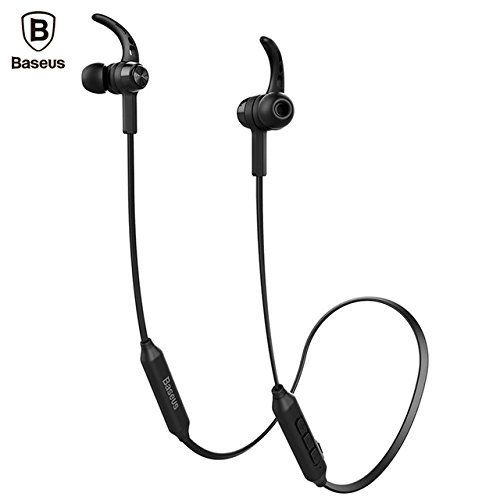
Image 4.1: Close-up of the inline control module.
ही प्रतिमा तपशीलवार माहिती देते view of the Baseus Encok S06 earphones, specifically highlighting the inline control module with its three buttons and the magnetic earbuds.
5. देखभाल
योग्य देखभाल तुमच्या इयरफोन्सचे दीर्घायुष्य आणि इष्टतम कामगिरी सुनिश्चित करते.
- स्वच्छता: Use a soft, dry, lint-free cloth to clean the earphones. Do not use harsh chemicals, cleaning solvents, or strong detergents. For ear tips, remove them and clean with a mild soap solution, then rinse thoroughly and dry completely before reattaching.
- स्टोरेज: When not in use, store the earphones in a cool, dry place, away from direct sunlight and extreme temperatures. The magnetic design helps keep the cables tangle-free.
- ओलावा टाळा: Do not expose the earphones to water or excessive moisture. While designed for daily use, they are not waterproof.
- काळजीपूर्वक हाताळा: Avoid dropping the earphones or subjecting them to strong impacts. Do not pull on the cable excessively.
6. समस्या निवारण
If you encounter issues with your Baseus Encok S06 earphones, refer to the following common solutions:
| समस्या | संभाव्य कारण / उपाय |
|---|---|
| इअरफोन चालू होत नाहीत. |
|
| डिव्हाइससोबत पेअर करू शकत नाही. |
|
| आवाज नाही किंवा आवाज कमी नाही. |
|
| कॉलची गुणवत्ता खराब आहे. |
|
7. तपशील
| वैशिष्ट्य | तपशील |
|---|---|
| मॉडेलचे नाव | ENCKS6 |
| ब्रँड | बेसियस |
| कनेक्टिव्हिटी तंत्रज्ञान | वायरलेस (ब्लूटूथ) |
| वायरलेस कम्युनिकेशन तंत्रज्ञान | ब्लूटूथ 4.1 |
| कान प्लेसमेंट | कानात |
| फॉर्म फॅक्टर | कानात |
| नियंत्रण पद्धत | Button (3-button inline remote) |
| विशेष वैशिष्ट्ये | Magnetic design, Built-in microphone with CVC Noise Suppression, Dual Battery |
| आयटम वजन | 60 ग्रॅम |
8. हमी आणि समर्थन
8.1 हमी माहिती
हे उत्पादन ए सह येते ६ महिन्यांची वॉरंटी provided by the manufacturer from the date of purchase. Please retain your proof of purchase for warranty claims. The warranty covers manufacturing defects and malfunctions under normal use. It does not cover damage caused by misuse, accidents, unauthorized modifications, or normal wear and tear.
8.2 ग्राहक समर्थन
For further assistance, technical support, or warranty inquiries, please contact Baseus customer service through their official webसाइट किंवा ज्या किरकोळ विक्रेत्याकडून तुम्ही उत्पादन खरेदी केले आहे.
महत्त्वाचे: Do not attempt to disassemble or repair the earphones yourself, as this will void the warranty.