
परिचय
This manual provides detailed instructions for the setup, operation, and maintenance of your Digoo DG-C3 Wireless Weather Station. This device integrates a hygrometer, thermometer, weather forecast station, and alarm clock functions, offering comprehensive environmental monitoring and timekeeping capabilities. Please read this manual thoroughly before using the product to ensure correct operation and to maximize its features.
पॅकेज सामग्री
- Digoo DG-C3 Wireless Weather Station Unit
- यूएसबी पॉवर केबल
- वापरकर्ता मॅन्युअल (हा दस्तऐवज)
टीप: बॅटरी (२x AAA) समाविष्ट नाहीत आणि त्या स्वतंत्रपणे खरेदी केल्या पाहिजेत.
उत्पादन संपलेview
Familiarize yourself with the various components of your Digoo DG-C3 weather station.
फ्रंट डिस्प्ले
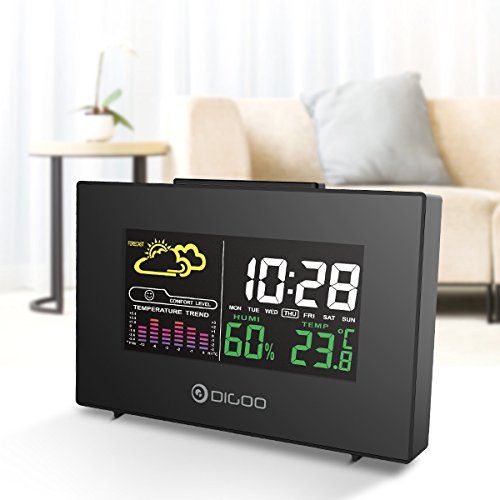
The front display features a color backlit screen showing the current time, day of the week, indoor humidity, indoor temperature, and a weather forecast icon. It also includes a comfort level indicator and a temperature trend graph.
- वेळ आणि तारीख: Digital display of current time and day.
- हवामान अंदाज: अंदाजित हवामान परिस्थिती दर्शविणारे चिन्ह (उदा., सूर्यप्रकाशित, ढगाळ, पावसाळी).
- आराम पातळी: Indicates indoor comfort based on temperature and humidity.
- Temperature Trend: Bar graph showing recent temperature changes.
- आर्द्रता: पर्सेनtage display of indoor humidity.
- तापमान: Digital display of indoor temperature (Celsius or Fahrenheit).
बॅक पॅनेल
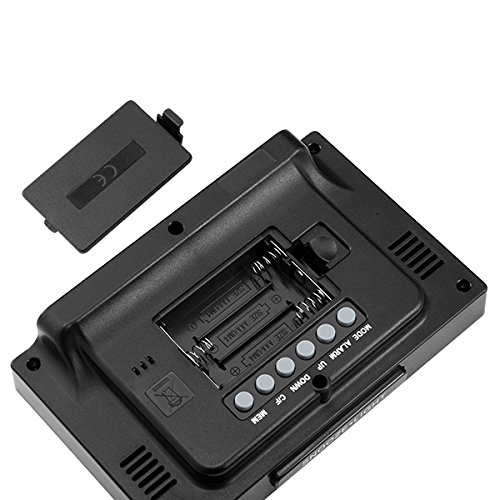
The back of the unit houses the battery compartment and various control buttons for setting the device.
- बॅटरी कंपार्टमेंट: Holds 3x AAA batteries for power backup.
- मोड बटण: Used to switch between display modes and enter setting mode.
- अलार्म बटण: Used to set and activate/deactivate the alarm.
- यूपी बटण: Used to increase values during settings or view maximum records.
- डाउन बटण: Used to decrease values during settings or view minimum records.
- °C/°F बटण: सेल्सिअस आणि फॅरेनहाइट तापमान युनिट्समध्ये टॉगल करते.
- MEM बटण: वापरले view memory records for temperature and humidity.
शीर्ष पॅनेल
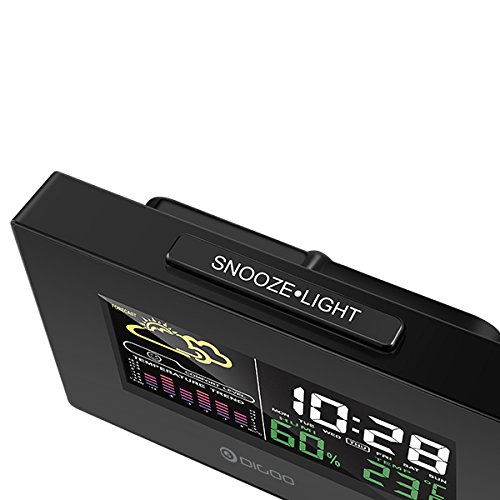
The top of the unit features a single button for snooze and backlight functions.
- SNOOZE·LIGHT Button: Press to activate the backlight or snooze the alarm.
सेटअप
1. पॉवरिंग चालू
- बॅटरी स्थापना: Open the battery compartment cover on the back of the unit. Insert 3x AAA batteries, ensuring correct polarity (+/-). Close the cover. Batteries provide backup power and allow for portability.
- USB Power Connection: For continuous power and backlight, connect the provided USB cable to the USB port on the unit and to a compatible USB power adapter (not included) or a computer USB port.
- The display will light up and show default settings.
2. Initial Settings (Time, Date, Unit)
- वेळ सेटिंग:
- दाबा आणि धरून ठेवा मोड button for approximately 3 seconds to enter time setting mode. The hour digit will flash.
- वापरा UP or खाली तास समायोजित करण्यासाठी बटणे.
- दाबा मोड again to confirm the hour and move to minute setting. The minute digit will flash.
- वापरा UP or खाली मिनिट समायोजित करण्यासाठी बटणे.
- दाबा मोड again to confirm and move to 12/24 hour format selection.
- वापरा UP or खाली buttons to select 12-hour or 24-hour format.
- दाबा मोड वेळ सेटिंगची पुष्टी करण्यासाठी आणि बाहेर पडण्यासाठी.
- तारीख सेटिंगः
- वेळ सेट केल्यानंतर, दाबा मोड again to enter date setting mode. The year will flash.
- वापरा UP or खाली वर्ष समायोजित करण्यासाठी बटणे.
- दाबा मोड to confirm and move to month setting.
- वापरा UP or खाली महिना समायोजित करण्यासाठी बटणे.
- दाबा मोड to confirm and move to day setting.
- वापरा UP or खाली दिवस समायोजित करण्यासाठी बटणे.
- दाबा मोड तारीख सेटिंगची पुष्टी करण्यासाठी आणि बाहेर पडण्यासाठी.
- तापमान युनिट निवड:
- दाबा ° से / ° फॅ button on the back of the unit to switch between Celsius (°C) and Fahrenheit (°F) temperature display.
ऑपरेटिंग सूचना
1. Alarm Clock Function
- अलार्म सेट करणे:
- दाबा अलार्म वर्तमान अलार्म वेळ प्रदर्शित करण्यासाठी एकदा बटण दाबा.
- दाबा आणि धरून ठेवा अलार्म button for approximately 3 seconds. The hour digit will flash.
- वापरा UP or खाली अलार्म तास समायोजित करण्यासाठी बटणे.
- दाबा अलार्म again to confirm the hour and move to minute setting. The minute digit will flash.
- वापरा UP or खाली अलार्म मिनिट समायोजित करण्यासाठी बटणे.
- दाबा अलार्म अलार्म सेटिंगची पुष्टी करण्यासाठी आणि बाहेर पडण्यासाठी.
- अलार्म सक्रिय करणे/निष्क्रिय करणे:
- सामान्य वेळेच्या प्रदर्शन मोडमध्ये असताना, दाबा अलार्म button repeatedly to toggle the alarm ON or OFF. An alarm icon will appear on the display when the alarm is active.
- स्नूझ फंक्शनः
- जेव्हा अलार्म वाजतो, तेव्हा दाबा स्नूझ·लाइट button on the top of the unit to activate the snooze function. The alarm will temporarily stop and sound again after a few minutes (typically 5-10 minutes).
- To stop the alarm completely, press any other button on the back panel.
2. हवामान अंदाज
The weather station provides a weather forecast based on internal atmospheric pressure changes. The forecast icons (e.g., sunny, cloudy, rainy) are predictions for the next 12-24 hours and may not always match local weather services, which use more comprehensive data.
- The forecast icon is displayed on the upper left of the screen.
- The device requires a period of stable operation (typically 24 hours) to calibrate and provide accurate forecasts.
६.३. तापमान आणि आर्द्रता प्रदर्शन
- The current indoor temperature and humidity are continuously displayed on the screen.
- Viewing Min/Max Records:
- दाबा MEM button once to display the maximum recorded temperature and humidity.
- दाबा MEM again to display the minimum recorded temperature and humidity.
- दाबा MEM a third time to return to current readings.
- To clear the min/max records, press and hold the MEM 3 सेकंदांसाठी बटण viewनोंदी.
4. बॅकलाइट नियंत्रण
- When powered by USB, the backlight will remain on.
- फक्त बॅटरीने चालत असताना, दाबा स्नूझ·लाइट button to temporarily activate the backlight for a few seconds.
देखभाल
- स्वच्छता: Wipe the unit with a soft, dry cloth. Do not use abrasive cleaners or solvents. Avoid getting moisture into the unit.
- बॅटरी बदलणे: When the display becomes dim or functions irregularly, replace the 3x AAA batteries in the back compartment. Ensure correct polarity.
- स्टोरेज: If not using the device for an extended period, remove the batteries to prevent leakage. Store in a cool, dry place.
समस्यानिवारण
| समस्या | संभाव्य कारण | उपाय |
|---|---|---|
| डिस्प्ले रिकामा किंवा मंद आहे. | कमी बॅटरी किंवा वीज कनेक्शन नाही. | Replace batteries or connect the USB power cable. |
| चुकीची वेळ/तारीख. | Time/date not set correctly after power loss or initial setup. | Follow the "Initial Settings" section to reset time and date. |
| Weather forecast seems inaccurate. | Device needs calibration time; local conditions may differ from pressure-based forecast. | Allow 24 hours for calibration. Understand that the forecast is based on internal pressure changes. |
| अलार्म वाजत नाही. | अलार्म सक्रिय केलेला नाही किंवा आवाज खूप कमी आहे (जर समायोजित करता येईल तर). | Ensure the alarm icon is displayed. Check alarm settings. |
तपशील
| मॉडेल: | DG-C3 |
| कनेक्टिव्हिटी: | यूएसबी (शक्तीसाठी) |
| उर्जा स्त्रोत: | 3x AAA Batteries (not included) or USB Power |
| विशेष वैशिष्ट्ये: | Hygrometer, Thermometer, Weather Forecast, Alarm Clock, Color Backlight, Portable |
| डिस्प्ले: | Color Backlit LCD |
| तापमान एकक: | °C / °F निवडण्यायोग्य |
हमी आणि समर्थन
For warranty information or technical support, please refer to the documentation provided at the time of purchase or contact your retailer. Keep your purchase receipt as proof of purchase.