
1. परिचय
Thank you for choosing the Multilaser TC190 2.4 GHz Wireless Keyboard with Integrated Touchpad. This device is designed to provide a convenient and efficient input solution for your PC or Smart TV, combining a full keyboard with a multi-touch touchpad. This manual will guide you through the setup, operation, and maintenance of your new keyboard to ensure optimal performance and longevity.
2. सुरक्षितता माहिती
- डिव्हाइसला पाणी, ओलावा आणि अति तापमानापासून दूर ठेवा.
- स्वतः डिव्हाइस वेगळे करण्याचा किंवा दुरुस्त करण्याचा प्रयत्न करू नका. सर्व सर्व्हिसिंग पात्र कर्मचाऱ्यांकडे पाठवा.
- Use only specified batteries (if applicable) and dispose of them properly.
- डिव्हाइसवर जोरदार प्रभाव टाकणे किंवा त्याच्या अधीन करणे टाळा.
- मऊ, कोरड्या कापडाने उपकरण स्वच्छ करा. द्रव क्लीनर किंवा एरोसोल वापरू नका.
3. पॅकेज सामग्री
कृपया पॅकेजमधील सामग्री काळजीपूर्वक तपासा. जर काही वस्तू गहाळ किंवा खराब झाल्या असतील तर तुमच्या किरकोळ विक्रेत्याशी संपर्क साधा.
- Multilaser TC190 Wireless Keyboard with Integrated Touchpad
- USB २.४ GHz रिसीव्हर
- वापरकर्ता मॅन्युअल
- (Batteries may or may not be included depending on the region/retailer)
4. उत्पादन संपलेview
Familiarize yourself with the components of your Multilaser TC190 keyboard.
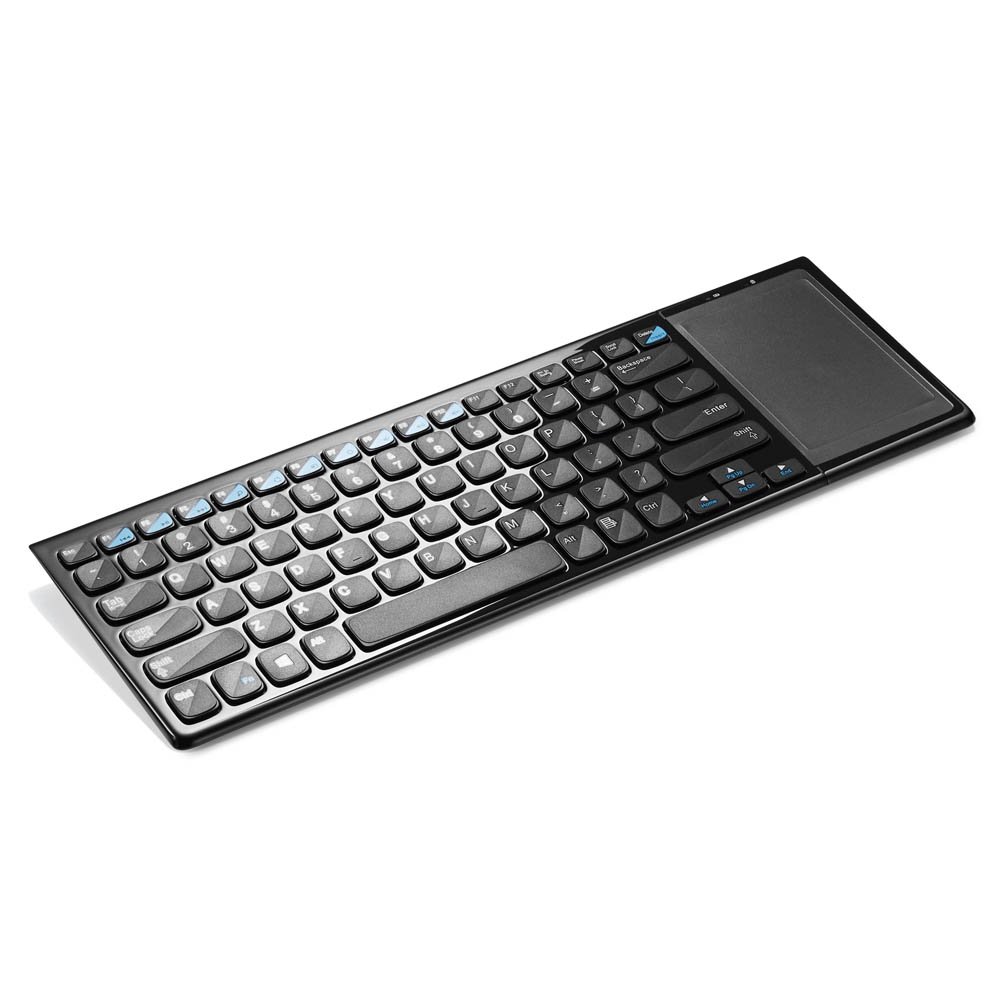
आकृती 1: Multilaser TC190 Wireless Keyboard with Integrated Touchpad. This image shows the full keyboard layout with the touchpad located on the right side, indicating its compact design and integrated functionality.
- कीबोर्ड लेआउट: Standard QWERTY layout with multimedia function keys.
- एकात्मिक टचपॅड: Located on the right side, supporting multi-touch gestures.
- USB Receiver Compartment: Usually located in the battery compartment for storage.
- उर्जा कळ: On/Off switch to conserve battery life.
- बॅटरी कंपार्टमेंट: For inserting required batteries.
5. सेटअप
- बॅटरी स्थापित करा: Open the battery compartment cover on the back of the keyboard. Insert the required batteries (typically AAA, refer to the compartment for exact type and polarity). Close the cover securely.
- यूएसबी रिसीव्हर कनेक्ट करा: Locate the USB 2.4 GHz receiver, usually stored inside the battery compartment. Plug the USB receiver into an available USB port on your PC or Smart TV.
- पॉवर चालू: Slide the power switch on the keyboard to the "ON" position.
- स्वयंचलित कनेक्शन: The keyboard should automatically connect to your device within a few seconds. No additional drivers are typically required for most operating systems.
6. ऑपरेटिंग सूचना
३. कीबोर्ड फंक्शन्स
The Multilaser TC190 features a standard keyboard layout. Use the keys as you would with any conventional keyboard for typing text, navigating menus, and executing commands.
- फंक्शन की (Fn): Some keys may have secondary functions (e.g., volume control, media playback) accessible by pressing the Fn इच्छित फंक्शन की सोबत एकाच वेळी की दाबा.
- मल्टीमीडिया की: Dedicated multimedia keys (if present) allow quick access to media controls.
१. टचपॅड फंक्शन्स
The integrated multi-touch touchpad replaces a traditional mouse. Below are common gestures:
- सिंगल फिंगर टॅप: लेफ्ट-क्लिक करा.
- दोन बोटांनी टॅप करा: राईट क्लिक.
- एका बोटाने ड्रॅग: कर्सर हलवा.
- दोन बोटांनी स्क्रोल करा: Scroll up or down in documents and web पृष्ठे
- Pinch to Zoom: Use two fingers to zoom in or out (application dependent).
7. देखभाल
- स्वच्छता: Use a soft, lint-free cloth to wipe the keyboard and touchpad. For stubborn dirt, slightly dampen the cloth with water or a mild, non-abrasive cleaner. Ensure no liquid enters the device.
- बॅटरी बदलणे: When the keyboard's performance degrades or it stops responding, replace the batteries. Always use fresh batteries of the correct type.
- स्टोरेज: If storing the keyboard for an extended period, remove the batteries to prevent leakage. Store in a cool, dry place.
8. समस्या निवारण
| समस्या | संभाव्य उपाय |
|---|---|
| Keyboard is unresponsive. |
|
| Touchpad is not working correctly. |
|
| Connection issues / Lag. |
|
9. तपशील
| वैशिष्ट्य | तपशील |
|---|---|
| ब्रँड | मल्टीलाझर |
| मॉडेल | TC190 |
| कनेक्टिव्हिटी | २.४ GHz वायरलेस (USB रिसीव्हर) |
| सुसंगत साधने | पीसी, स्मार्ट टीव्ही |
| कीबोर्ड वर्णन | मल्टीमीडिया |
| विशेष वैशिष्ट्ये | Wireless, Integrated Multi-touch Touchpad |
| उर्जा स्त्रोत | बॅटरी पॉवर्ड |
| आयटम वजन | 800 ग्रॅम |
10. हमी आणि समर्थन
Multilaser products are manufactured to high-quality standards. For information regarding warranty terms and conditions, please refer to the warranty card included with your product or visit the official Multilaser website. For technical support or customer service, please contact Multilaser customer support through their official channels.
अधिकृत Webसाइट: www.multilaser.com.br (कृपया तुमच्या प्रादेशिक webजागा)