
परिचय
This manual provides detailed instructions for the use and maintenance of your Strong SRT 7404 HD remote control. This remote is designed as an original replacement for the Strong SRT 7404 HD FRANSAT receiver, ensuring full compatibility and functionality.
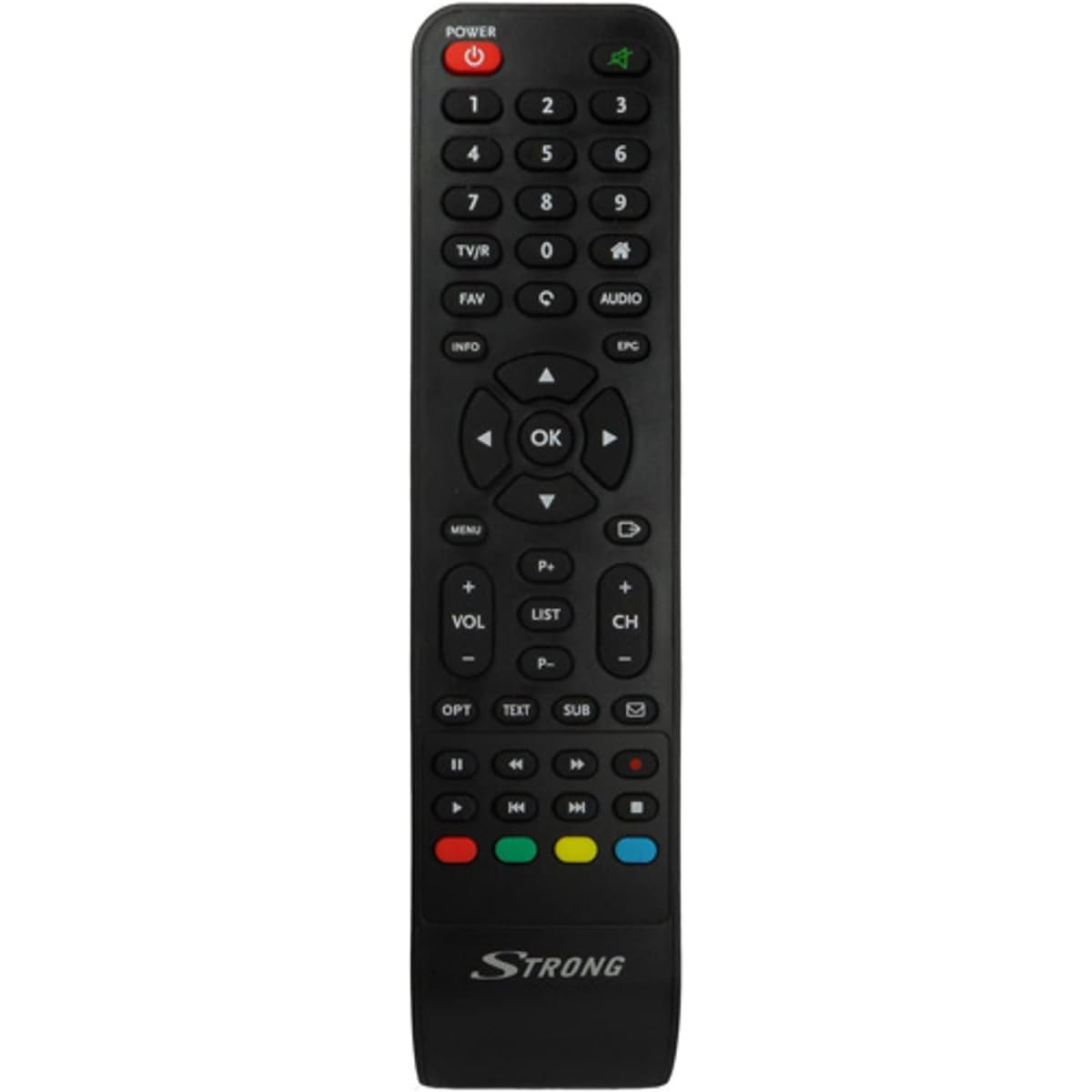
Image: The Strong SRT 7404 HD remote control, black in color, featuring various control buttons for television and receiver functions.
सेटअप
1. बॅटरी इन्स्टॉलेशन
- रिमोट कंट्रोलच्या मागील बाजूस बॅटरी कंपार्टमेंट शोधा.
- बॅटरी कव्हर उघडण्यासाठी ते खाली किंवा बाणाने दर्शविलेल्या दिशेने सरकवा.
- Insert two AAA alkaline batteries (not included), ensuring the positive (+) and negative (-) terminals align correctly with the markings inside the compartment.
- बॅटरी कव्हर सुरक्षितपणे क्लिक होईपर्यंत ते परत स्थितीत सरकवून बदला.
Note: Always use new alkaline batteries for optimal performance. Do not mix old and new batteries, or different types of batteries.
2. प्रारंभिक वापर
The Strong SRT 7404 HD remote control is an original replacement and is pre-programmed for the Strong SRT 7404 HD FRANSAT receiver. No additional setup or pairing is typically required. Simply install the batteries and point the remote control towards your receiver to begin operation.
ऑपरेटिंग सूचना
This section outlines the basic functions of the remote control buttons.
- पॉवर बटण: रिसीव्हर चालू किंवा बंद करते.
- चॅनल वर/खाली: Navigates through television channels.
- आवाज वर/खाली: ऑडिओ व्हॉल्यूम समायोजित करते.
- बटण नि: शब्द करा Silences or restores the audio.
- संख्या बटणे (0-9): Directly selects channels or enters numerical data.
- मेनू बटण: Accesses the receiver's main menu.
- नेव्हिगेशन बटणे (वर, खाली, डावीकडे, उजवीकडे, ठीक आहे): मेनू नेव्हिगेट करण्यासाठी आणि निवडींची पुष्टी करण्यासाठी वापरले जाते.
- बाहेर पडा/मागे जाण्याचे बटण: मागील स्क्रीनवर परत येते किंवा मेनूमधून बाहेर पडते.
- माहिती बटण: प्रोग्राम माहिती प्रदर्शित करते.
- रंग बटणे (लाल, हिरवा, पिवळा, निळा): Functions vary depending on the on-screen menu or application.
Refer to your Strong SRT 7404 HD FRANSAT receiver's manual for specific functions related to its menu system and advanced features.
देखभाल
साफसफाई
रिमोट कंट्रोल स्वच्छ करण्यासाठी, त्याची पृष्ठभाग मऊ, कोरड्या कापडाने हळूवारपणे पुसून टाका. हट्टी घाणीसाठी, किंचित डीampen the cloth with water. Avoid using abrasive cleaners, solvents, or alcohol, as these can damage the remote's finish or internal components.
बॅटरी बदलणे
Replace batteries when the remote control becomes unresponsive or its range decreases significantly. Follow the battery installation steps outlined in the "Setup" section. Dispose of used batteries according to local regulations.
स्टोरेज
जास्त काळ वापरात नसताना, गळती टाळण्यासाठी बॅटरी काढून टाका, ज्यामुळे रिमोट कंट्रोल खराब होऊ शकतो. रिमोट थेट सूर्यप्रकाश आणि अति तापमानापासून दूर थंड, कोरड्या जागी ठेवा.
समस्यानिवारण
- रिमोट कंट्रोल प्रतिसाद देत नाही:
- Check if the batteries are correctly inserted with the correct polarity (+/-).
- जुन्या बॅटरी नवीन अल्कलाइन बॅटरीने बदला.
- Ensure there are no obstructions between the remote control and the receiver's infrared sensor.
- Make sure you are within the effective operating range (up to 10 meters).
- रिमोट थेट रिसीव्हरकडे वळवा.
- विशिष्ट बटणे काम करत नाहीत:
- रिमोट कंट्रोल पृष्ठभाग स्वच्छ करा, विशेषतः प्रतिसाद न देणाऱ्या बटणांभोवती, योग्य संपर्कात अडथळा आणणारी कोणतीही घाण किंवा मोडतोड काढून टाकण्यासाठी.
- If cleaning and battery replacement do not resolve the issue, the button or remote may be faulty.
तपशील
| वैशिष्ट्य | तपशील |
|---|---|
| ब्रँड | मजबूत |
| मॉडेलचे नाव | 7404 |
| विशेष वैशिष्ट्य | हलके |
| रंग | काळा |
| कमाल समर्थित उपकरणे | 1 |
| सुसंगत साधने | TV Decoder (Strong SRT 7404 HD FRANSAT Receiver) |
| कनेक्टिव्हिटी तंत्रज्ञान | रेडिओ वारंवारता |
| बटणांची संख्या | 5 |
| कंट्रोलर प्रकार | रिमोट कंट्रोल |
| कमाल श्रेणी | 10 मीटर |
| बॅटरी प्रकार | Alkaline (AAA, not included) |
| मूळ देश | चीन |
हमी आणि समर्थन
हमी माहिती
This Strong SRT 7404 HD remote control comes with a 2-year warranty from the date of purchase. This warranty covers manufacturing defects under normal use. Please retain your proof of purchase for warranty claims.
ग्राहक समर्थन
For further assistance, technical support, or warranty inquiries, please contact Strong customer service. Contact details can typically be found on the official Strong webसाइटवर किंवा तुमच्या उत्पादन विक्रेत्याद्वारे.
You can visit the official Strong brand store for more information: Strong Brand Store