
परिचय
This manual provides essential information for the safe operation, maintenance, and care of your Hyper Tough 2.4A Orbit Sander, Model 2112. Please read and understand all instructions before using the product to ensure proper function and to prevent injury.
The Hyper Tough 2.4A Orbit Sander is designed for dry sanding on painted surfaces, wood, plastic, and metal. It is suitable for smoothing rough surfaces, removing old finishes, and preparing surfaces for new paint or other finishes.
सामान्य सुरक्षा माहिती
चेतावणी: या पॉवर टूलसह प्रदान केलेल्या सर्व सुरक्षा इशारे, सूचना, चित्रे आणि तपशील वाचा. खाली सूचीबद्ध केलेल्या सर्व सूचनांचे पालन करण्यात अयशस्वी झाल्यास विद्युत शॉक, आग आणि/किंवा गंभीर दुखापत होऊ शकते.
कार्य क्षेत्र सुरक्षा
- कामाचे क्षेत्र स्वच्छ आणि चांगले प्रकाशित ठेवा. गोंधळलेले किंवा अंधारलेले भाग अपघातांना आमंत्रण देतात.
- स्फोटक वातावरणात, जसे की ज्वलनशील द्रव, वायू किंवा धूळ यांच्या उपस्थितीत उर्जा साधने चालवू नका. पॉवर टूल्स स्पार्क तयार करतात ज्यामुळे धूळ किंवा धुके पेटू शकतात.
- पॉवर टूल चालवताना मुलांना आणि जवळच्या लोकांना दूर ठेवा. विचलित झाल्यामुळे तुमचे नियंत्रण सुटू शकते.
विद्युत सुरक्षा
- पॉवर टूल प्लग आउटलेटशी जुळले पाहिजेत. प्लग कधीही कोणत्याही प्रकारे बदलू नका.
- पाईप्स, रेडिएटर्स, रेंज आणि रेफ्रिजरेटर यांसारख्या मातीच्या किंवा जमिनीच्या पृष्ठभागाशी शरीराचा संपर्क टाळा. तुमचे शरीर मातीने किंवा जमिनीवर बसलेले असल्यास विजेचा धक्का लागण्याचा धोका वाढतो.
- पाऊस किंवा ओल्या स्थितीत पॉवर टूल्स उघड करू नका. पॉवर टूलमध्ये पाणी शिरल्याने विद्युत शॉकचा धोका वाढतो.
- कॉर्डचा गैरवापर करू नका. पॉवर टूल वाहून नेण्यासाठी, ओढण्यासाठी किंवा अनप्लग करण्यासाठी कॉर्डचा कधीही वापर करू नका. कॉर्डला उष्णता, तेल, तीक्ष्ण कडा किंवा हलणाऱ्या भागांपासून दूर ठेवा. खराब झालेल्या किंवा अडकलेल्या दोरांमुळे विद्युत शॉकचा धोका वाढतो.
वैयक्तिक सुरक्षा
- नेहमी डोळ्यांचे संरक्षण करा. सुरक्षा चष्मा किंवा गॉगल वापरा.
- Wear appropriate personal protective equipment such as a dust mask, non-skid safety shoes, hard hat, or hearing protection for appropriate conditions.
- अतिरेक करू नका. नेहमी योग्य पाऊल आणि संतुलन ठेवा. हे अनपेक्षित परिस्थितीत पॉवर टूलचे चांगले नियंत्रण सक्षम करते.
- व्यवस्थित कपडे घाला. सैल कपडे किंवा दागिने घालू नका. आपले केस आणि कपडे हलत्या भागांपासून दूर ठेवा. सैल कपडे, दागिने किंवा लांब केस हलत्या भागांमध्ये पकडले जाऊ शकतात.
उत्पादन संपलेview
Familiarize yourself with the components of your Hyper Tough 2.4A Orbit Sander before operation.
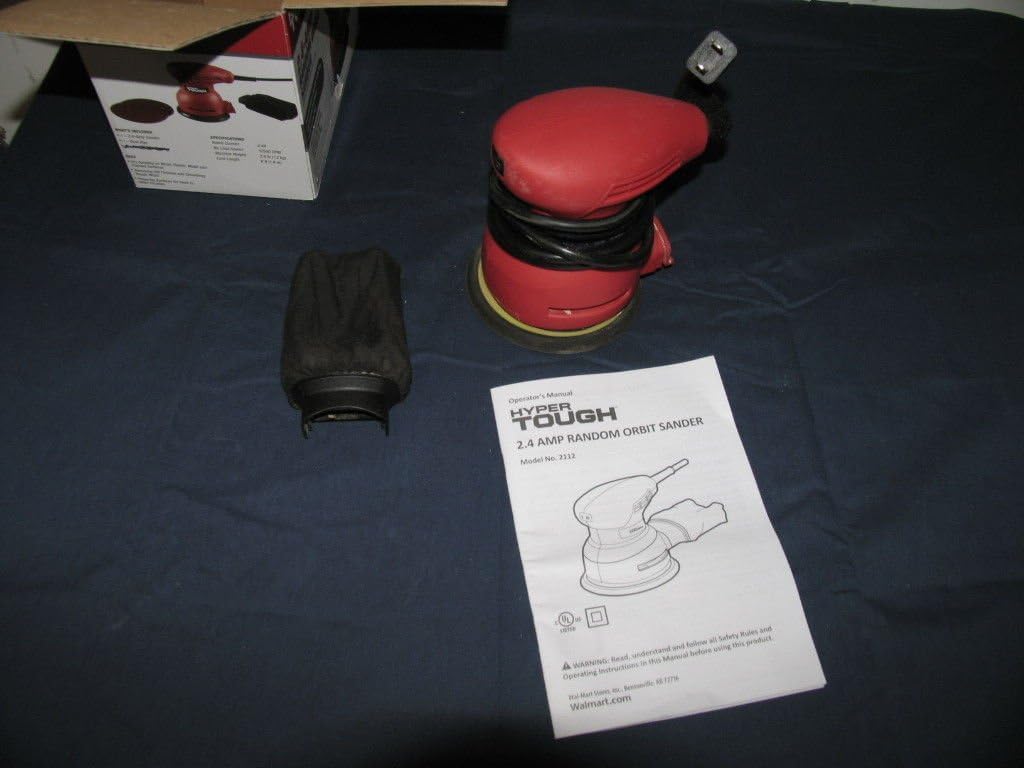
आकृती 1: Hyper Tough 2.4A Orbit Sander with accessories and manual.

आकृती 2: Underside of the sander with dust bag attached.
मुख्य घटक:
- सँडिंग पॅड: Hook-and-loop system for quick sandpaper changes.
- धूळ गोळा करणारी पिशवी: Attaches to the sander for dust extraction.
- चालू/बंद स्विच: Sealed to prevent dust ingress.
- पॉवर कॉर्ड: 6-foot length for extended reach.
सेटअप
सॅंडपेपर जोडत आहे
- सँडर पॉवर सोर्सपासून अनप्लग केलेला असल्याची खात्री करा.
- Select the appropriate grit sandpaper for your task. The sander uses hook-and-loop sandpaper.
- Align the holes on the sandpaper with the holes on the sanding pad to ensure proper dust extraction.
- Press the sandpaper firmly onto the sanding pad, ensuring it is securely attached across the entire surface.
डस्ट कलेक्शन बॅग संलग्न करणे
- सँडर अनप्लग केलेला असल्याची खात्री करा.
- सँडरवर धूळ काढण्याचे पोर्ट शोधा.
- Slide the dust collection bag onto the port until it is firmly seated. Ensure a tight fit to maximize dust collection efficiency.
ऑपरेटिंग सूचना
ऑपरेशनपूर्वी
- Always wear safety glasses and a dust mask.
- वर्कपीस सुरक्षितपणे cl आहे याची खात्री कराampसँडिंग करताना हालचाल रोखण्यासाठी एड किंवा धरून ठेवा.
- Check that the sandpaper is correctly attached and the dust bag is securely in place.
- सँडरला योग्य पॉवर आउटलेटमध्ये प्लग करा.
Sanding Procedure
- सँडरला दोन्ही हातांनी घट्ट धरून ठेवा.
- टूल चालू करण्यापूर्वी सँडिंग पॅड वर्कपीसवर सपाट ठेवा.
- Press the On/Off switch to start the sander.
- Move the sander slowly and evenly over the surface in overlapping circular or linear patterns. Avoid applying excessive pressure; the weight of the tool is usually sufficient.
- Keep the sander moving to prevent gouging or creating swirl marks. The mechanical pad brake helps reduce free-spin to minimize gouging.
- When finished, lift the sander from the workpiece before turning it off.
- Press the On/Off switch to turn the sander off.
- Unplug the sander from the power source after use.
टीप: For best results, start with a coarser grit sandpaper to remove material quickly, then switch to finer grits for a smoother finish.
देखभाल
साफसफाई
- साफ करण्यापूर्वी नेहमी सँडर अनप्लग करा.
- उपकरणाचा बाहेरील भाग स्वच्छ धुवा, damp कापड कठोर रसायने किंवा अपघर्षक क्लीनर वापरू नका.
- Periodically clean the ventilation openings to prevent overheating. Use compressed air if available.
धूळ संकलन पिशवी
- Empty the dust collection bag frequently, especially when sanding fine dust. A full bag reduces dust extraction efficiency.
- To empty, remove the bag from the sander and shake out the dust.
- Clean the inside of the bag periodically to ensure optimal airflow.
सँडिंग पॅड
- Inspect the sanding pad regularly for wear or damage. Replace if necessary to maintain sanding performance.
- Ensure the hook-and-loop surface is clean and free of debris for proper sandpaper adhesion.
समस्यानिवारण
| समस्या | संभाव्य कारण | उपाय |
|---|---|---|
| सँडर सुरू होत नाही. | वीजपुरवठा नाही. सदोष स्विच. | पॉवर कॉर्ड आणि आउटलेट तपासा. Contact customer support for switch replacement. |
| खराब धूळ संकलन. | धुळीची पिशवी भरलेली किंवा चुकीच्या पद्धतीने जोडलेली. Sandpaper holes not aligned. | Empty and reattach dust bag securely. Ensure sandpaper holes align with pad holes. |
| जास्त कंपन किंवा आवाज. | Damaged sanding pad. Loose sandpaper. | Inspect and replace sanding pad if damaged. Reattach sandpaper firmly. |
| Sander leaves swirl marks. | Applying too much pressure. Not moving the sander evenly. सँडपेपर घातलेला. | दबाव कमी करा. Move sander smoothly and evenly. सॅंडपेपर बदला. |
तपशील
- मॉडेल क्रमांक: 2112
- ब्रँड: अति कठीण
- उर्जा स्त्रोत: इलेक्ट्रिक
- AC अडॅप्टर वर्तमान: 2.4 Amps
- ग्रिट प्रकार: Medium (typically ships with 80 grit)
- आयटम वजन: ०.४५ पौंड (अंदाजे ०.४ किलो)
- उत्पादन परिमाणे: ६ x ५ x ३ इंच (अंदाजे १५.२ x १२.७ x ७.६ सेमी)
- कॉर्डची लांबी: १० फूट (अंदाजे ३ मीटर)
- सँडिंग पॅड: हुक आणि लूप प्रणाली
हमी आणि समर्थन
This product is tested and certified to look and work like new. For specific warranty information or technical support, please refer to the documentation included with your purchase or contact the manufacturer directly. Keep your purchase receipt as proof of purchase.
For further assistance, please visit the Hyper Tough webसाइट किंवा त्यांच्या ग्राहक सेवा विभागाशी संपर्क साधा.


