
1. परिचय
This manual provides instructions for the OEM RMT-B119A remote control, designed as a replacement or secondary remote for various Sony Blu-ray player models. This remote offers full functionality for controlling your Blu-ray player's features.
Compatible Sony Blu-ray Player Models:
- BDP-BX59
- BDP-S390
- BDP-S590
- BDP-BX110
- BDP-S1100
- BDP-S3100
- BDP-BX310
2. सेटअप
2.1 बॅटरी इंस्टॉलेशन
रिमोट कंट्रोलला दोन (२) AAA बॅटरीची आवश्यकता आहे (समाविष्ट नाही). बॅटरी बसवण्यासाठी या पायऱ्या फॉलो करा:
- रिमोट कंट्रोलच्या मागील बाजूस बॅटरी कंपार्टमेंट कव्हर शोधा.
- टॅबवर दाबा आणि कव्हर खाली सरकवा जेणेकरून कंपार्टमेंट उघडेल.
- दोन AAA बॅटरी घाला, पॉझिटिव्ह (+) आणि निगेटिव्ह (-) टर्मिनल्स कंपार्टमेंटमधील खुणांनुसार योग्यरित्या संरेखित आहेत याची खात्री करा.
- बॅटरी कंपार्टमेंट कव्हर सुरक्षितपणे क्लिक होईपर्यंत परत जागेवर सरकवा.
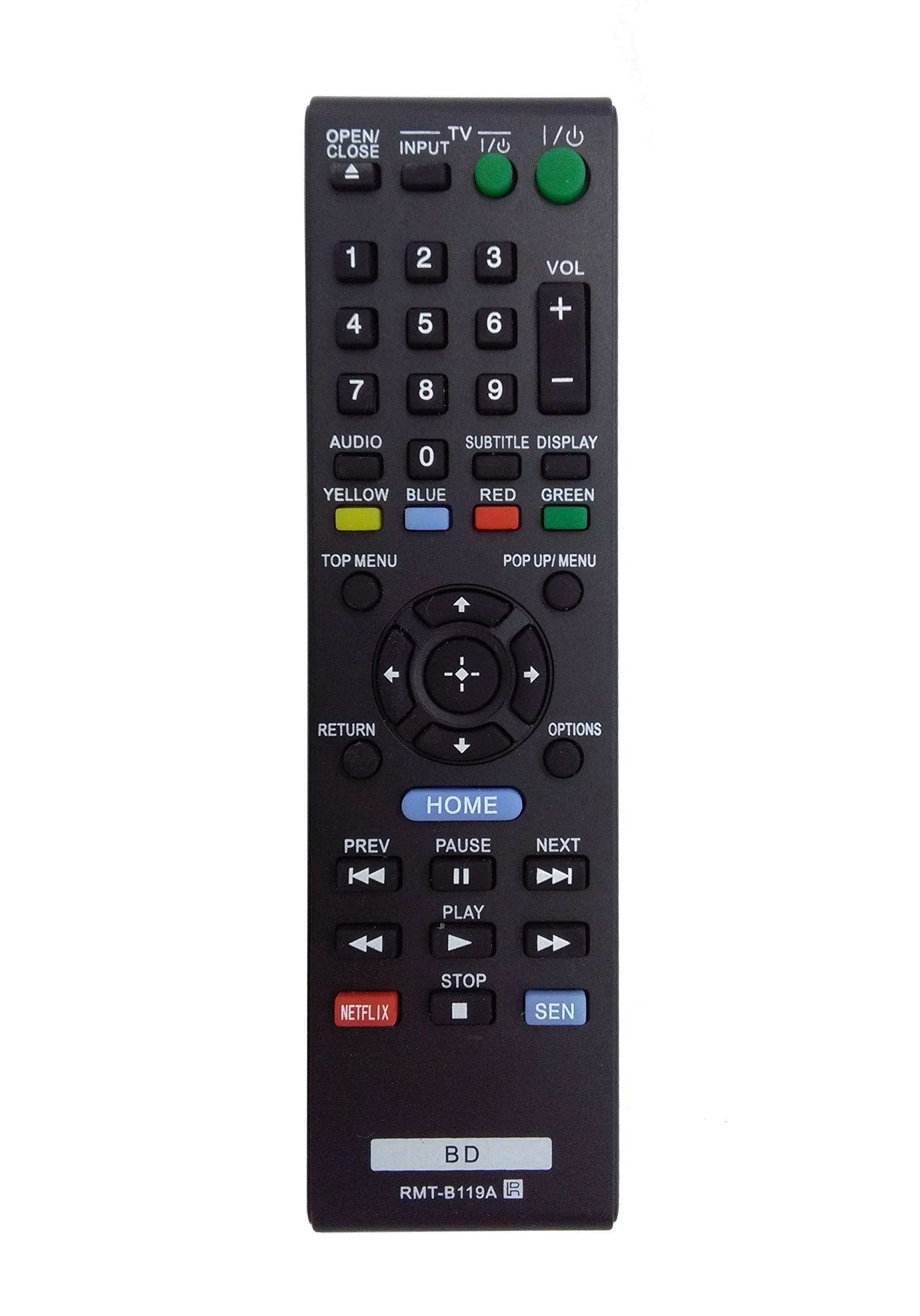
Image: The OEM RMT-B119A remote control, showing the full button layout on the front and a partial view of the open battery compartment on the back, revealing the battery terminals.
3. ऑपरेटिंग सूचना
3.1 Remote Control Layout and Button Functions
Familiarize yourself with the buttons on your RMT-B119A remote control. Below is a description of each button's primary function.
Image: The OEM RMT-B119A remote control, displaying all buttons and their labels.
- पॉवर (I/O): Turns the Blu-ray player on or off.
- OPEN/CLOSE (▲): डिस्क ट्रे उघडते किंवा बंद करते.
- इनपुट: Switches the input source on the connected TV (if programmed).
- टीव्ही: Switches the remote to TV control mode (if programmed).
- नंबर पॅड (०-९): Used for direct track selection, chapter selection, or entering numerical data.
- VOL (+/-): Adjusts the volume level (typically for the connected TV, if programmed).
- ऑडिओ: Changes the audio track or language during playback.
- SUBTITLE DISPLAY: Toggles subtitle display on or off, or cycles through available subtitle languages.
- YELLOW, BLUE, RED, GREEN: Color-coded function buttons, typically used for specific features within menus or interactive content. Their function varies depending on the disc or menu.
- शीर्ष मेनू: Accesses the main menu of the Blu-ray disc.
- POP UP/MENU: Displays the pop-up menu during disc playback.
- Directional Pad (↑↓←→): मेनू आणि पर्यायांमधून नेव्हिगेट करते.
- Center Button (Enter/Select): Confirms a selection or enters a menu item.
- परतावा: मागील स्क्रीन किंवा मेनूवर परत जाते.
- पर्याय: Displays context-sensitive options or settings.
- मुख्यपृष्ठ: Accesses the Blu-ray player's home menu.
- मागील (◀◀): Skips to the beginning of the current track/chapter or the previous track/chapter.
- PAUSE (▌▌): प्लेबॅक थांबवते.
- NEXT (▶▶): Skips to the next track or chapter.
- PLAY (▶): प्लेबॅक सुरू होते किंवा पुन्हा सुरू होते.
- थांबवा (■): प्लेबॅक थांबवते.
- नेटफ्लिक्स: Direct access button for the Netflix streaming service.
- सेन: Direct access button for the Sony Entertainment Network (now PlayStation Video/Music).
- BD: Likely a dedicated button for Blu-ray Disc functions or to switch to Blu-ray mode.
4. देखभाल
तुमच्या रिमोट कंट्रोलचे दीर्घायुष्य आणि योग्य कार्य सुनिश्चित करण्यासाठी, या देखभाल मार्गदर्शक तत्त्वांचे पालन करा:
- स्वच्छता: रिमोट कंट्रोल मऊ, कोरड्या कापडाने पुसून टाका. हट्टी घाणीसाठी, किंचित डीampकापड पाण्याने किंवा सौम्य, अपघर्षक नसलेल्या क्लिनरने धुवा. कठोर रसायने किंवा सॉल्व्हेंट्स वापरणे टाळा.
- बॅटरी बदलणे: जेव्हा रिमोटचा प्रतिसाद मंदावतो किंवा तो काम करणे थांबवतो तेव्हा बॅटरी बदला. दोन्ही बॅटरी नेहमी एकाच वेळी एकाच प्रकारच्या नवीन बॅटरीने बदला.
- स्टोरेज: Store the remote in a cool, dry place away from direct sunlight, extreme temperatures, and high humidity. If the remote will not be used for an extended period, remove the batteries to prevent leakage.
- थेंब टाळा: रिमोटला भौतिक परिणामांपासून वाचवा, कारण थेंब अंतर्गत घटकांना नुकसान करू शकतात.
5. समस्या निवारण
जर तुम्हाला तुमच्या रिमोट कंट्रोलमध्ये समस्या येत असतील, तर सामान्य समस्या आणि उपायांसाठी खालील तक्त्याचा संदर्भ घ्या:
| समस्या | संभाव्य कारण | उपाय |
|---|---|---|
| रिमोट काम करत नाही. | मृत किंवा चुकीच्या पद्धतीने घातलेल्या बॅटरी. | योग्य ध्रुवीयता (+/-) सुनिश्चित करून, बॅटरी नवीन बॅटरीने बदला. |
| रिमोट अधूनमधून काम करते. | Low battery power or obstruction. | Replace batteries. Ensure no objects are blocking the remote's signal path to the Blu-ray player. |
| रिमोट टीव्ही नियंत्रित करत नाही. | Remote not programmed for TV or TV mode not selected. | This remote is primarily for Blu-ray players. TV control functionality may require specific programming not covered by this manual, or may not be supported by this OEM model. |
| बटणे प्रतिसाद देत नाहीत किंवा चिकट असतात. | बटणांखाली घाण किंवा कचरा. | Clean the remote control surface. Avoid spilling liquids on the remote. |
6. तपशील
- ब्रँड: OEM
- मॉडेल क्रमांक: RMT-B119A
- कनेक्टिव्हिटी तंत्रज्ञान: इन्फ्रारेड (IR)
- सुसंगत उपकरणे: Sony Blu-ray Players (specific models listed in Introduction)
- उर्जा स्त्रोत: 2 x AAA बॅटरी (समाविष्ट नाही)
- कमाल श्रेणी: अंदाजे 10 मीटर (33 फूट)
- विशेष वैशिष्ट्य: अर्गोनॉमिक डिझाइन
7. हमी आणि समर्थन
This OEM RMT-B119A remote control comes with a 30-दिवसांची वॉरंटी खरेदीच्या तारखेपासून, उत्पादन दोष कव्हर करून. वॉरंटी दाव्यांसाठी कृपया तुमचा खरेदीचा पुरावा जपून ठेवा.
For technical support or warranty inquiries, please contact the retailer or manufacturer directly. Refer to your purchase documentation for specific contact information.