
परिचय
The GIGABYTE GM-M7600 is a wireless precision optical mouse designed for comfortable and reliable use. This manual provides instructions for setting up, operating, maintaining, and troubleshooting your device.
पॅकेज सामग्री
सर्व वस्तू उपलब्ध आहेत याची खात्री करण्यासाठी कृपया पॅकेजमधील सामग्री तपासा:
- GIGABYTE GM-M7600 Wireless Optical Mouse
- Portable Nano USB Receiver
- 2 x AAA बॅटरीज
सेटअप
1. बॅटरी स्थापित करणे
The GM-M7600 mouse requires two AAA batteries for operation. The batteries are included in the package.
- माऊसच्या खालच्या बाजूला बॅटरी कंपार्टमेंट कव्हर शोधा.
- कंपार्टमेंट उघडण्यासाठी कव्हर हळूवारपणे सरकवा किंवा उचला.
- दोन AAA बॅटरी घाला, पॉझिटिव्ह (+) आणि निगेटिव्ह (-) टर्मिनल्स कंपार्टमेंटमधील खुणांनुसार योग्यरित्या संरेखित आहेत याची खात्री करा.
- बॅटरी कंपार्टमेंट कव्हर सुरक्षितपणे बंद करा.
२. यूएसबी रिसीव्हर कनेक्ट करणे
The mouse connects to your computer via a portable Nano USB receiver.
- Locate the Nano USB receiver. It may be stored inside the mouse's battery compartment or packaged separately.
- Plug the Nano USB receiver into an available USB port on your computer (Laptop or Personal Computer).
- Your operating system (e.g., Windows XP, Linux) should automatically detect and install the necessary drivers. This process may take a few moments.
- एकदा ड्रायव्हर्स स्थापित झाले की, माउस वापरण्यासाठी तयार आहे.
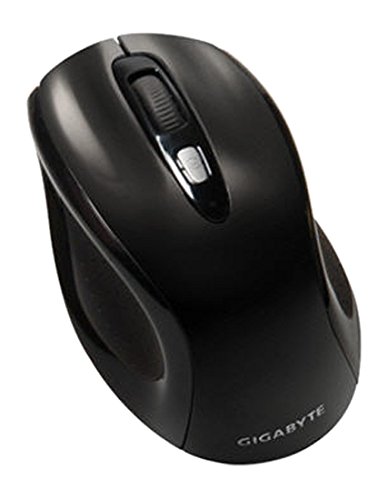
आकृती 1: GIGABYTE GM-M7600 Wireless Optical Mouse. This image displays the ergonomic design of the mouse, highlighting its form factor and the location of its buttons. The Nano USB receiver is typically stored within the mouse or connected to a computer's USB port.
ऑपरेटिंग सूचना
1. पॉवर चालू/बंद
The mouse typically has a power switch on its underside. Slide the switch to the 'ON' position to activate the mouse. Slide it to 'OFF' when not in use to conserve battery life.
2. Adjusting DPI (Sensitivity)
The GM-M7600 features an adjustable DPI switch, allowing you to change the mouse sensitivity between 800 DPI and 1600 DPI. This switch is usually located near the scroll wheel. Press the DPI button to toggle between the two sensitivity settings.
१. माऊसची मूलभूत कार्ये
- लेफ्ट क्लिक: आयटम निवडण्यासाठी, उघडण्यासाठी प्राथमिक बटण files, आणि सॉफ्टवेअरशी संवाद साधणे.
- राईट क्लिक: संदर्भ मेनू आणि अतिरिक्त पर्यायांमध्ये प्रवेश करण्यासाठी दुय्यम बटण.
- स्क्रोल व्हील: कागदपत्रांमधून स्क्रोल करण्यासाठी वापरले जाते आणि web पृष्ठे. हे मधल्या क्लिक बटण म्हणून देखील कार्य करू शकते.
देखभाल
७.२. साफसफाई
इष्टतम कामगिरी आणि देखावा राखण्यासाठी:
- Disconnect the mouse from your computer and turn off the power switch.
- मऊ, लिंट-फ्री कापड किंचित वापरा dampमाऊसचा पृष्ठभाग पुसण्यासाठी पाण्याने किंवा सौम्य साफसफाईच्या द्रावणाने भिजवा.
- कठोर रसायने, अपघर्षक क्लीनर वापरणे किंवा थेट माऊसवर द्रव फवारणी करणे टाळा.
- Clean the optical sensor area on the underside of the mouse with a dry cotton swab to remove any dust or debris.
2. बॅटरी बदलणे
When the mouse performance degrades or it stops responding, it may be time to replace the batteries.
- पॉवर स्विच वापरून माउस बंद करा.
- Open the battery compartment as described in the 'Installing Batteries' section.
- जुन्या AAA बॅटरी काढा.
- Insert two new AAA batteries, observing the correct polarity (+/-).
- Close the battery compartment and turn the mouse back on.
समस्यानिवारण
If you encounter issues with your GIGABYTE GM-M7600 mouse, try the following solutions:
- माउस प्रतिसाद देत नाही:
- माऊस चालू असल्याची खात्री करा.
- बॅटरी योग्यरित्या बसवल्या आहेत का आणि पुरेशा चार्ज आहेत का ते तपासा. आवश्यक असल्यास बदला.
- Ensure the Nano USB receiver is securely plugged into a working USB port on your computer. Try a different USB port.
- तुमचा संगणक रीस्टार्ट करा.
- अनियमित कर्सर हालचाल:
- माऊसच्या खालच्या बाजूला असलेला ऑप्टिकल सेन्सर स्वच्छ करा.
- तुम्ही माउस योग्य पृष्ठभागावर वापरत आहात याची खात्री करा. जास्त परावर्तित किंवा पारदर्शक पृष्ठभाग टाळा.
- Check for any wireless interference. Move the mouse closer to the receiver or away from other wireless devices.
- DPI switch not working:
- Ensure the mouse is powered on and connected.
- DPI बटण घट्ट दाबा.
तपशील
| मॉडेलचे नाव | GM-M7600 |
| ब्रँड | गिगाबाइट |
| कनेक्टिव्हिटी तंत्रज्ञान | 2.4GHz Radio Frequency Wireless |
| हालचाली शोध | ऑप्टिकल |
| समायोज्य डीपीआय | 800 / 1600 DPI |
| बटणांची संख्या | ३ (डावीकडे, उजवीकडे, स्क्रोल व्हील/मधला क्लिक) |
| उर्जा स्त्रोत | 2 x AAA बॅटरी (समाविष्ट) |
| प्राप्तकर्ता प्रकार | Portable Nano USB Receiver |
| सुसंगत साधने | लॅपटॉप, वैयक्तिक संगणक |
| ऑपरेटिंग सिस्टम समर्थन | Linux, Windows XP |
| संलग्न साहित्य | Plastic with Rubberized Finish |
| रंग | काळा |
हमी आणि समर्थन
For warranty information and technical support, please refer to the warranty card included with your product or visit the official GIGABYTE webजागा. वॉरंटी दाव्यांसाठी तुमची खरेदी पावती ठेवा.