
परिचय
Welcome to the Greenlee DM-810A True RMS Digital Multimeter user manual. This document provides essential information for the safe and effective operation, maintenance, and troubleshooting of your device. The DM-810A is designed for accurate measurement of AC/DC voltage, AC/DC current, resistance, capacitance, frequency, and continuity, making it a versatile tool for electrical professionals.
सुरक्षितता माहिती
मीटरचे सुरक्षित ऑपरेशन आणि सेवा सुनिश्चित करण्यासाठी, या सूचनांचे अनुसरण करा. या चेतावणींचे पालन करण्यात अयशस्वी झाल्यास गंभीर जखम किंवा मृत्यू होऊ शकतो.
- Always read and understand the entire instruction manual before using the meter.
- Do not exceed the maximum input limits for any function.
- व्हॉल्यूमसह काम करताना सावधगिरी बाळगाtag30V AC RMS, 42V पीक किंवा 60V DC पेक्षा जास्त. हे व्हॉल्यूमtages एक शॉक धोका ठरू.
- Always use the proper terminals, function, and range for your measurements. The DM-810A features a Beep-Jack audible and visible warning to guard against improper A and mA terminal plug-in.
- Inspect test leads for damaged insulation or exposed metal before each use. Replace if damaged.
- जर मीटर खराब झालेले दिसत असेल किंवा केस उघडे असेल तर ते वापरू नका.
- ऑपरेशन करण्यापूर्वी बॅटरी कव्हर सुरक्षितपणे बंद असल्याची खात्री करा.
- Adhere to local and national safety codes. Use personal protective equipment (PPE) such as approved safety glasses and electrically insulated gloves when necessary.
उत्पादन संपलेview
This section identifies the key parts and controls of your Greenlee DM-810A multimeter.

आकृती 1: समोर view of the Greenlee DM-810A Digital Multimeter, showing the display, function selector dial, and input jacks.
- डिस्प्ले: Large LCD for clear readings, often with dual display capability.
- Function Selector Dial: Used to select the desired measurement function (e.g., V~, V-, A~, A-, Ω, CAP, Hz, Continuity).
- इनपुट जॅक:
- COM: सर्व मोजमापांसाठी सामान्य (ऋण) इनपुट.
- VΩHz: Positive input for voltage, resistance, frequency, and capacitance measurements.
- mAμA: Positive input for milliampपूर्वी आणि सूक्ष्मampere current measurements.
- A: Positive input for ampere current measurements.
- बटणे:
- निवडा: Toggles between functions on a single dial position (e.g., AC/DC voltage, diode/continuity).
- रेंजः Manually selects measurement range or returns to auto-ranging.
- △: Delta function for relative measurements.
- होल्ड: वर्तमान डिस्प्ले रीडिंग फ्रीज करते.
सेटअप
बॅटरी स्थापना
The Greenlee DM-810A requires batteries for operation. Refer to the back of the meter for the battery compartment. Use a screwdriver to open the compartment, insert the specified batteries (typically AA or 9V, check the compartment label), observing correct polarity, and then securely close the cover.
चाचणी लीड कनेक्ट करीत आहे
Always ensure test leads are properly connected before taking measurements.
- मध्ये ब्लॅक टेस्ट लीड घाला COM (common) input jack.
- Insert the red test lead into the appropriate positive input jack based on the measurement you intend to make:
- खंड साठीtage, resistance, capacitance, or frequency, use the VΩHz जॅक
- For milliampere or microampere current, use the mAμA जॅक
- साठी ampere current, use the A जॅक
- The meter's Beep-Jack feature will provide an audible and visible alert if the function selector is set to a current measurement (A or mA) but the test lead is incorrectly plugged into a voltage/resistance jack, or vice-versa. This helps prevent damage to the meter and ensures correct setup.
ऑपरेटिंग सूचना
This section details how to perform various measurements with your DM-810A multimeter.
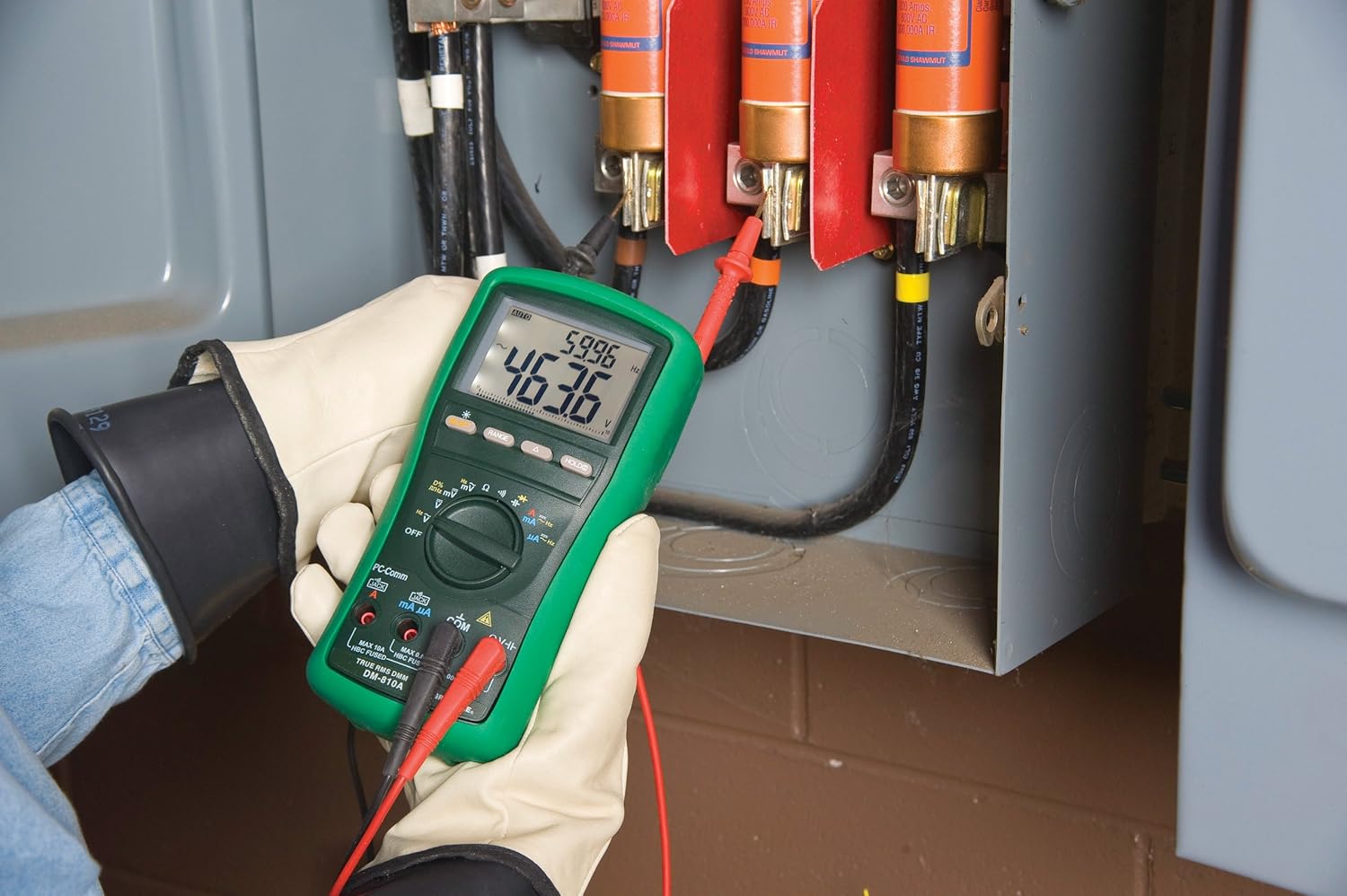
आकृती 2: The Greenlee DM-810A Digital Multimeter being used to take measurements within an electrical panel, demonstrating practical application.
मापन AC/DC व्हॉल्यूमtage
- Set the function selector to V~ (AC Voltage) किंवा V- (DC खंडtage). Use the SELECT button to toggle if both are on one position.
- काळ्या चाचणीची लीड ला जोडा COM and the red test lead to VΩHz.
- Connect the test probes in parallel across the circuit or component to be measured.
- खंड वाचाtagप्रदर्शनावरील e मूल्य.
एसी/डीसी करंट मोजत आहे
महत्त्वाचे: विद्युतप्रवाह मोजण्यासाठी मीटरला सर्किटशी मालिकेत जोडणे आवश्यक आहे. मीटर जोडण्यापूर्वी सर्किट डी-एनर्जाइज्ड असल्याची खात्री करा.
- सर्किट डी-एनर्जाइझ करा.
- Set the function selector to A~ (AC Current) or A- (DC Current), or mA~ / mA-.
- काळ्या चाचणीची लीड ला जोडा COM. Connect the red test lead to mAμA for small currents or A for larger currents (up to 10A). The Beep-Jack warning will activate if leads are in the wrong jacks for the selected function.
- Open the circuit where the current is to be measured and connect the meter in series.
- Re-energize the circuit and read the current value.
- De-energize the circuit before disconnecting the meter.
Measuring Resistance (Ω)
- De-energize the circuit or component.
- Set the function selector to Ω.
- काळ्या चाचणीची लीड ला जोडा COM and the red test lead to VΩHz.
- घटकावर चाचणी प्रोब जोडा.
- प्रतिकार मूल्य वाचा.
Measuring Capacitance (CAP)
- Ensure the capacitor is fully discharged before measurement.
- Set the function selector to CAP.
- काळ्या चाचणीची लीड ला जोडा COM and the red test lead to VΩHz.
- कॅपेसिटर टर्मिनल्सवर चाचणी प्रोब जोडा.
- Read the capacitance value.
Measuring Frequency (Hz)
- Set the function selector to Hz.
- काळ्या चाचणीची लीड ला जोडा COM and the red test lead to VΩHz.
- सिग्नल स्रोतावर चाचणी प्रोब जोडा.
- Read the frequency value.
सातत्य चाचणी
- De-energize the circuit or component.
- Set the function selector to the continuity symbol (often shared with diode test, use SELECT to toggle).
- काळ्या चाचणीची लीड ला जोडा COM and the red test lead to VΩHz.
- Connect the test probes across the circuit path or component.
- ऐकू येणारा बीप सातत्य (कमी प्रतिकार) दर्शवतो. डिस्प्ले प्रतिकार मूल्य दर्शवेल.
देखभाल
साफसफाई
जाहिरातीने मीटर पुसून टाकाamp कापड आणि सौम्य डिटर्जंट. अॅब्रेसिव्ह किंवा सॉल्व्हेंट्स वापरू नका. वापरण्यापूर्वी मीटर पूर्णपणे कोरडे असल्याची खात्री करा.
बॅटरी बदलणे
When the battery indicator appears on the display, replace the batteries immediately to ensure accurate readings. Follow the battery installation steps outlined in the Setup section.
फ्यूज बदलणे
If the current measurement functions cease to work, the internal fuses may need replacement. Refer to the meter's internal diagram (usually accessible by opening the battery compartment or back casing) for fuse specifications and replacement instructions. Always replace fuses with those of the specified type and rating to maintain safety and performance.
समस्यानिवारण
This section provides solutions for common issues encountered during the operation of your DM-810A multimeter.
| समस्या | संभाव्य कारण | उपाय |
|---|---|---|
| डिस्प्ले नाही किंवा मंद डिस्प्ले नाही | मृत किंवा कमी बॅटरी | बॅटरी बदला. |
| चुकीचे वाचन | Incorrect function/range selected; Damaged test leads; External interference | Verify function and range; Inspect and replace test leads; Move away from strong electromagnetic fields. |
| सध्याचे मापन काम करत नाही. | Blown fuse; Incorrect lead connection | Check and replace fuses; Ensure leads are in the correct A or mA jacks. |
| Beep-Jack warning active | Test leads connected to incorrect input jacks for the selected function | Adjust test lead connections to match the selected function on the dial. |
| Continuity test not beeping | ओपन सर्किट; उच्च प्रतिकार | Ensure the circuit is closed; Check for breaks in the circuit or component. |
तांत्रिक तपशील
The following table outlines the key technical specifications for the Greenlee DM-810A Digital Multimeter.
| वैशिष्ट्य | मूल्य |
|---|---|
| ब्रँड | ग्रीनली |
| मॉडेल | DM-810A |
| मापन प्रकार | खरे RMS डिजिटल मल्टीमीटर |
| उर्जा स्त्रोत | बॅटरी पॉवर्ड |
| शैली | डिजिटल |
| आयटम वजन | 16 औंस (1 पाउंड) |
| उत्पादनाची परिमाणे (L x W x H) | 10 x 10 x 12 इंच |
| प्रमाणपत्रे | CE, CSA, UL |
| UPC | 783310087434 |
हमी आणि समर्थन
हमी माहिती
The Greenlee DM-810A Digital Multimeter comes with a २ वर्षांची उत्पादकाची वॉरंटी. ही वॉरंटी सामान्य वापरात असलेल्या साहित्यातील दोष आणि कारागिरीला व्यापते. वॉरंटी दाव्यांसाठी कृपया खरेदीचा पुरावा जपून ठेवा.
ग्राहक समर्थन
For technical assistance, warranty service, or to inquire about replacement parts, please contact Greenlee customer support. Refer to the official Greenlee webसर्वात अद्ययावत संपर्क माहितीसाठी साइट किंवा उत्पादन पॅकेजिंग.