
1. परिचय
खरेदी केल्याबद्दल धन्यवाद.asing the GPX CDP6806DT Personal CD Player. This manual provides important safety instructions, operational guidelines, and maintenance procedures to ensure optimal performance and longevity of your device. Please read this manual thoroughly before using the product and retain it for future reference.
2. सुरक्षितता माहिती
महत्त्वाच्या सुरक्षितता सूचना
- युनिटला पाणी किंवा ओलावा उघड करू नका.
- रेडिएटर्स, हीट रजिस्टर, स्टोव्ह किंवा इतर उपकरणे (यासह) यासारख्या उष्णता स्त्रोतांजवळ युनिट ठेवणे टाळा. amplifiers) जे उष्णता निर्माण करतात.
- युनिट वेगळे करण्याचा किंवा बदलण्याचा प्रयत्न करू नका. सर्व सर्व्हिसिंग पात्र सेवा कर्मचाऱ्यांकडे पाठवा.
- Use only the specified batteries (2 x AA batteries). Ensure correct polarity when inserting batteries.
- जर युनिट विस्तारित कालावधीसाठी वापरली जात नसेल तर बॅटरी काढून टाका.
- Avoid listening at high volume levels for prolonged periods to prevent hearing damage.
- युनिट फक्त कोरड्या कापडाने स्वच्छ करा.
3. पॅकेज सामग्री
Carefully unpack your GPX CDP6806DT Personal CD Player and ensure all items are present:
- GPX CDP6806DT Personal CD Player
- वापरकर्ता मॅन्युअल (हा दस्तऐवज)
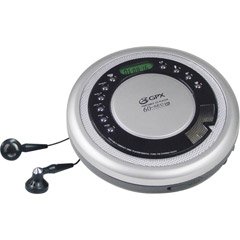
Figure 1: GPX CDP6806DT Personal CD Player. This image illustrates the compact design and general appearance of the device.
२. नियंत्रणे आणि वैशिष्ट्ये
Familiarize yourself with the controls and features of your GPX CDP6806DT for optimal use.
- एलसीडी डिस्प्ले: 6-digit display for track number, time, and FM frequency.
- PLAY/PAUSE (►/−): Press to start or pause CD playback.
- थांबवा (■): Press to stop CD playback.
- SKIP/SEARCH (◀◀/▶▶): Press to skip tracks. Hold to search within a track.
- व्हॉल्यूम (+/-): ऑडिओ आउटपुट पातळी समायोजित करते.
- MODE/PROG: Selects playback mode (Repeat, Random) or programs CD tracks.
- FM TUNER (ON/OFF/BAND): Switches to FM radio mode, turns FM on/off, or changes FM band.
- PRESET (+/-): Navigates saved FM radio presets.
- सीडी कंपार्टमेंट: Area for inserting audio CDs.
- बॅटरी कंपार्टमेंट: Located on the bottom, holds 2 AA batteries.
- हेडफोन जॅक (३.५ मिमी): Connects headphones for private listening.
Figure 2: GPX CDP6806DT Controls Layout. This image provides a visual reference for the location of various buttons and ports on the device.
5. सेटअप
5.1 बॅटरी इंस्टॉलेशन
The GPX CDP6806DT requires two (2) AA batteries (not included) for portable operation.
- युनिटच्या तळाशी बॅटरी कंपार्टमेंट शोधा.
- बॅटरी कंपार्टमेंट कव्हर उघडा स्लाइड करा.
- कंपार्टमेंटमध्ये दर्शविल्याप्रमाणे योग्य ध्रुवीयता (+ आणि -) सुनिश्चित करून, दोन AA बॅटरी घाला.
- बॅटरी कंपार्टमेंट कव्हर सुरक्षितपणे बंद करा.
5.2 कनेक्टिंग हेडफोन
For private listening, connect your 3.5mm stereo headphones (not included) to the headphone jack located on the side of the unit.
6. ऑपरेटिंग सूचना
३.२ सीडी प्लेबॅक
The unit supports CD and CD-R/RW disc formats.
- Open the CD compartment lid by gently pressing the OPEN button (if present, or lifting the lid).
- Place a CD with the label side facing up onto the center spindle.
- Close the CD compartment lid firmly until it clicks.
- दाबा PLAY/PAUSE (►/−) button to begin playback. The track number and elapsed time will appear on the LCD display.
- प्लेबॅक विराम देण्यासाठी, दाबा PLAY/PAUSE (►/−). पुन्हा सुरू करण्यासाठी पुन्हा दाबा.
- प्लेबॅक थांबविण्यासाठी, दाबा थांबवा (■) बटण
- पुढील ट्रॅकवर जाण्यासाठी, दाबा SKIP/SEARCH (▶▶).
- To go back to the beginning of the current track, press SKIP/SEARCH (◀◀) once. Press twice to go to the previous track.
- To search rapidly forward or backward within a track, hold down SKIP/SEARCH (▶▶) or (◀◀) अनुक्रमे
- वापरून आवाज समायोजित करा व्हॉल्यूम (+/-) नियंत्रणे.
५.५ एफएम रेडिओ ऑपरेशन
The unit features a digital FM tuner with station presets.
- स्लाइड करा एफएम ट्यूनर switch to the ON position or press the बँड एफएम मोडमध्ये प्रवेश करण्यासाठी बटण.
- दाबा SKIP/SEARCH (▶▶) or (◀◀) इच्छित फ्रिक्वेन्सीवर मॅन्युअली ट्यून करण्यासाठी बटणे.
- To auto-scan and save stations, hold down the PLAY/PAUSE (►/−) button (or refer to specific instructions for auto-scan if available on the device).
- To recall saved presets, use the PRESET (+/-) बटणे
6.3 CD Programming (24-Track)
You can program up to 24 tracks to play in a specific order.
- सीडी बंद झाल्यावर, दाबा MODE/PROG button. "PROG" will flash on the display.
- वापरा SKIP/SEARCH (▶▶) or (◀◀) तुम्हाला प्रोग्राम करायचा असलेला पहिला ट्रॅक निवडण्यासाठी बटणे.
- दाबा MODE/PROG again to confirm the selection. The display will show the program number and the next available program slot.
- Repeat steps 2 and 3 to add up to 24 tracks to your program.
- After programming all desired tracks, press PLAY/PAUSE (►/−) प्रोग्राम केलेले प्लेबॅक सुरू करण्यासाठी.
- To clear the program, press the थांबवा (■) बटण दोनदा.
6.4 Anti-Skip Protection (ASP)
The GPX CDP6806DT features a 60-second Anti-Skip Protection system. This system buffers audio data to minimize interruptions caused by minor shocks or vibrations during CD playback. The ASP activates automatically when a CD is playing.
7. देखभाल
7.1 युनिट साफ करणे
- युनिटचा बाहेरील भाग मऊ, कोरड्या कापडाने पुसून टाका.
- अपघर्षक क्लीनर, मेण किंवा सॉल्व्हेंट्स वापरू नका.
- If the CD lens needs cleaning, use a specialized CD lens cleaner disc or a soft, lint-free cloth designed for optical lenses.
7.2 बॅटरी काळजी
- जर युनिट जास्त काळ वापरत नसेल तर गळती रोखण्यासाठी बॅटरी काढून टाका.
- जुन्या आणि नवीन बॅटरी किंवा वेगवेगळ्या प्रकारच्या बॅटरी एकत्र करू नका.
- वापरलेल्या बॅटरीची स्थानिक नियमांनुसार जबाबदारीने विल्हेवाट लावा.
8. समस्या निवारण
If you experience issues with your GPX CDP6806DT, please consult the following table for common problems and solutions.
| समस्या | संभाव्य कारण / उपाय |
|---|---|
| युनिट चालू होत नाही. | Check if batteries are inserted correctly with proper polarity. Ensure batteries are fresh and not depleted. |
| हेडफोन्समधून आवाज येत नाही. | Ensure headphones are fully plugged into the headphone jack. Increase the volume level. Test with another pair of headphones. |
| CD skips or playback is interrupted. | Ensure the CD is clean and free of scratches or smudges. Clean the CD with a soft, lint-free cloth. Ensure the unit is on a stable surface or held steadily during use. |
| सीडी वाजत नाही. | Ensure the CD is inserted correctly with the label side up. Close the CD compartment lid completely. Check if the CD is a supported format (CD, CD-R/RW). |
| एफएम रेडिओ रिसेप्शन खराब आहे. | Extend the headphone cable as it acts as the antenna. Try moving to a different location. |
9. तपशील
- ब्रँड: GPX
- मॉडेल: CDP6806DT
- समर्थित डिस्क स्वरूप: सीडी, सीडी-आर / आरडब्ल्यू
- अँटी-स्किप संरक्षण: 60 सेकंद
- डिस्प्ले: 6-अंकी LCD
- रेडिओ: Digital FM Tuner with Presets
- CD Programming: 24-ट्रॅक
- उर्जा स्त्रोत: 2 x AA बॅटरी (समाविष्ट नाही)
- कनेक्टिव्हिटी: 3.5mm Headphone Jack (Auxiliary)
10. हमी आणि समर्थन
For detailed warranty information, please refer to the warranty card included with your original product packaging. For technical support, service inquiries, or to purchase replacement parts, please visit the official GPX website or contact their customer service department using the contact information provided in your product documentation.
कृपया वॉरंटी दाव्यांसाठी तुमचा खरेदीचा पुरावा ठेवा.