
1. परिचय
Welcome to the user manual for your new Singing Machine SMVG-620 CD+G Karaoke System. This system is designed to provide hours of entertainment with its CD+G playback capabilities, built-in camera, 5.5-inch monitor, and AM/FM radio. Please read this manual thoroughly before operating your unit to ensure proper use and to maximize your enjoyment.
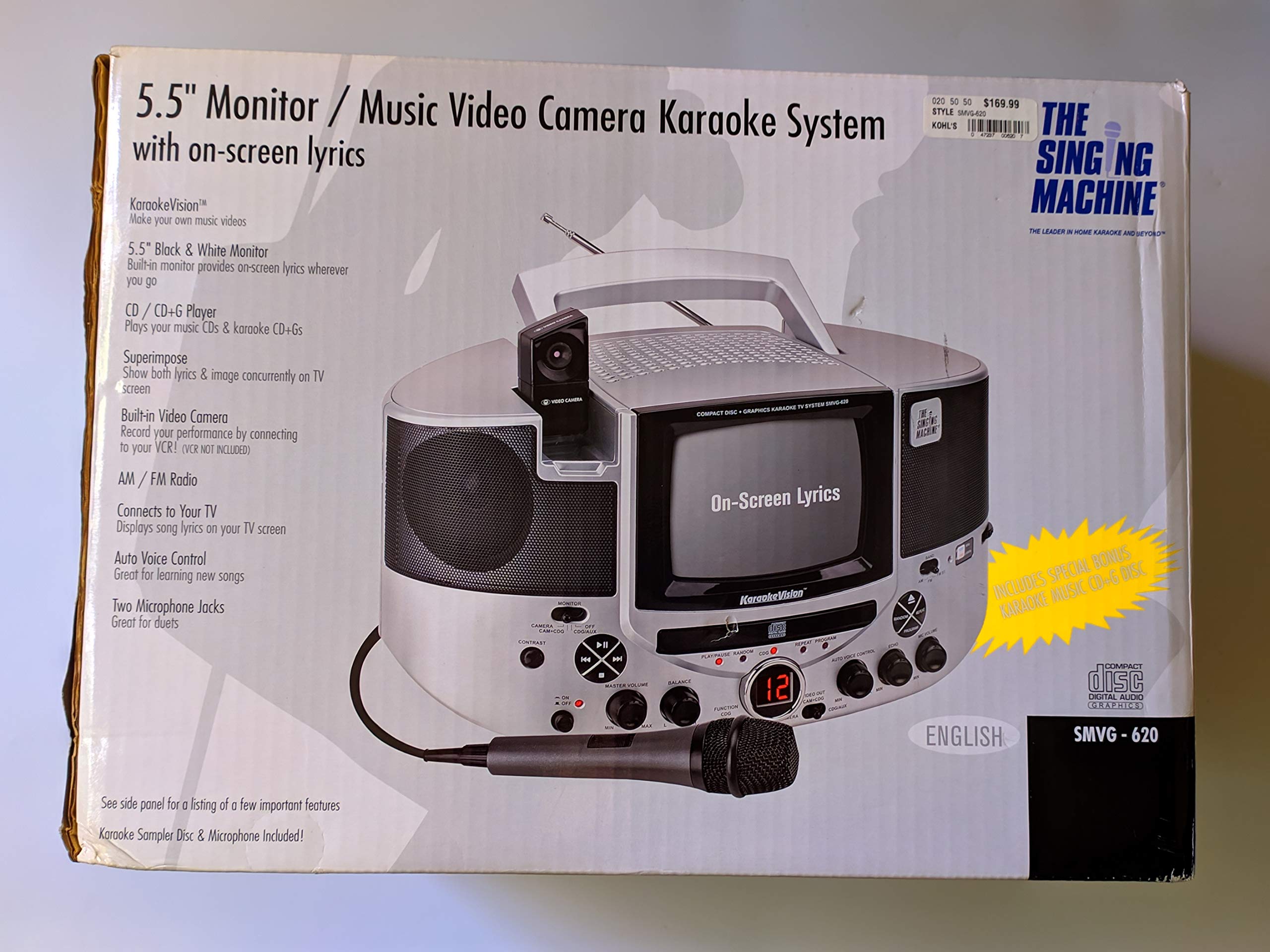
आकृती 1.1: The Singing Machine SMVG-620 CD+G Karaoke System.
For optimal performance and safety, always follow the instructions and warnings provided.
2. महत्वाची सुरक्षितता माहिती
- सूचना वाचा: उपकरण चालवण्यापूर्वी सर्व सुरक्षा आणि ऑपरेटिंग सूचना वाचल्या पाहिजेत.
- सूचना राखून ठेवा: सुरक्षितता आणि ऑपरेटिंग सूचना भविष्यातील संदर्भासाठी ठेवल्या पाहिजेत.
- चेतावणीकडे लक्ष द्या: उपकरणावरील सर्व इशारे आणि ऑपरेटिंग निर्देशांचे पालन केले पाहिजे.
- सूचनांचे अनुसरण करा: सर्व ऑपरेटिंग आणि वापर सूचनांचे पालन केले पाहिजे.
- पाणी आणि ओलावा: हे उपकरण पाण्याजवळ वापरू नका.
- स्वच्छता: फक्त कोरड्या कापडाने स्वच्छ करा.
- वायुवीजन: कोणत्याही वायुवीजन छिद्रांना अडथळा आणू नका. उत्पादकाच्या सूचनांनुसार स्थापित करा.
- उष्णता: रेडिएटर्स, उष्णता रजिस्टर, स्टोव्ह किंवा इतर उपकरणे (यासह amplifiers) जे उष्णता निर्माण करतात.
- पॉवर-कॉर्ड संरक्षण: पॉवर कॉर्ड चालू होण्यापासून किंवा पिंच करण्यापासून संरक्षित करा, विशेषत: प्लग, सुविधा रिसेप्टॅकल्स आणि ते उपकरणातून बाहेर पडण्याच्या बिंदूवर.
- संलग्नक/अॅक्सेसरीज: केवळ निर्मात्याने निर्दिष्ट केलेल्या संलग्नक/ॲक्सेसरीज वापरा.
- विजा: विजेच्या वादळात किंवा दीर्घकाळ न वापरलेले असताना हे उपकरण अनप्लग करा.
- सर्व्हिसिंग: पात्र सेवा कर्मचाऱ्यांना सर्व सेवांचा संदर्भ द्या. कोणत्याही प्रकारे उपकरण खराब झाल्यावर सेवा आवश्यक आहे.
3. पॅकेज सामग्री
Carefully unpack your Singing Machine SMVG-620 system and ensure all items listed below are present and in good condition.
- SMVG-620 CD+G Karaoke System
- One (1) Microphone
- Sampler CD+G Disc
- Audio/Video RCA Cables
- एसी पॉवर अॅडॉप्टर
- सूचना पुस्तिका

आकृती 3.1: Contents of the box, including the microphone, RCA cables, and the instruction manual.
4. उत्पादन संपलेview
Familiarize yourself with the various parts and controls of your SMVG-620 Karaoke System.

आकृती 4.1: मागील view of the product packaging highlighting key features and components of the SMVG-620 system.
प्रमुख वैशिष्ट्ये:
- 5.5" Black & White Monitor: For on-screen lyrics from CD+G discs.
- Built-in Color Camera: Allows you to see yourself on the monitor or connected TV.
- Dual Microphone Jacks: Connect two microphones for duets (one microphone included).
- एएम/एफएम रेडिओ: तुमच्या आवडत्या रेडिओ स्टेशन्सवर ट्यून करा.
- CD+G प्लेयर: Plays standard audio CDs and CD+Graphics discs.
- ऑटो व्हॉइस कंट्रोल (AVC): Helps maintain vocal balance by automatically reducing the main vocal track when you sing.
- इको कंट्रोल: Adds depth and resonance to your voice.
- Professional Style Microphone: For clear vocal pickup.
- ऑडिओ/व्हिडिओ आउटपुट: Connects to your TV for larger screen display and enhanced audio.
5. सेटअप
5.1 वीज जोडणी
- युनिट स्थिर, सपाट पृष्ठभागावर ठेवल्याची खात्री करा.
- Connect the AC power adapter to the DC IN jack on the back of the SMVG-620 unit.
- Plug the other end of the AC power adapter into a standard wall outlet (AC 120V ~ 60Hz).
२.२ टेलिव्हिजनशी जोडणे
ला view lyrics on a larger screen and enhance audio, connect the SMVG-620 to your television using the supplied Audio/Video RCA cables.
- Locate the AUDIO OUT (white and red) and VIDEO OUT (yellow) jacks on the back of the SMVG-620.
- Connect the white plug of the RCA cable to the white AUDIO OUT jack on the karaoke system and to the white AUDIO IN jack on your TV.
- Connect the red plug of the RCA cable to the red AUDIO OUT jack on the karaoke system and to the red AUDIO IN jack on your TV.
- Connect the yellow plug of the RCA cable to the yellow VIDEO OUT jack on the karaoke system and to the yellow VIDEO IN jack on your TV.
- Turn on your TV and select the correct A/V input source (e.g., AV1, Video 1) that corresponds to the jacks you used.
5.3 मायक्रोफोन कनेक्शन
Plug the microphone into either the MIC 1 or MIC 2 jack on the front of the SMVG-620 unit.
6. ऑपरेशन
6.1 पॉवरिंग चालू/बंद
दाबा पॉवर button located on the front panel to turn the unit ON or OFF.
6.2 CD+G Playback
- Open the CD compartment door and carefully place a CD+G disc (or standard audio CD) onto the spindle with the label side facing up. Close the door.
- निवडा CD+G mode using the FUNCTION selector.
- दाबा खेळा/विराम द्या प्लेबॅक सुरू करण्यासाठी बटण.
- समायोजित करा मास्टर व्हॉल्यूम knob to your desired listening level.
- वापरा वगळा बटणे (<< or >>) ट्रॅक दरम्यान नेव्हिगेट करण्यासाठी.
- विराम देण्यासाठी, दाबा खेळा/विराम द्या पुन्हा. पुन्हा सुरू करण्यासाठी पुन्हा दाबा.
- प्लेबॅक थांबविण्यासाठी, दाबा थांबा बटण
५.३ मायक्रोफोनचा वापर
- Ensure the microphone is connected to a MIC jack.
- समायोजित करा एमआयसी व्हॉल्यूम knob to control the microphone's output level.
- वळवा ECHO knob to add an echo effect to your voice.
- द AUTO VOICE CONTROL (AVC) switch can be toggled ON/OFF. When ON, the original vocal track on a CD+G disc will be reduced when you sing into the microphone.
६.४ एएम/एफएम रेडिओ
- निवडा AM or FM mode using the FUNCTION selector.
- चांगल्या रिसेप्शनसाठी FM अँटेना वाढवा.
- वळवा ट्यूनिंग तुमचे इच्छित रेडिओ स्टेशन निवडण्यासाठी नॉब दाबा.
- समायोजित करा मास्टर व्हॉल्यूम गाठ
6.5 Camera Function
The built-in camera allows you to display your image on the 5.5-inch monitor or a connected TV.
- Ensure the unit is powered on and connected to a TV if you wish to use an external display.
- The camera feed will automatically display when the unit is in CD+G or Video mode, or when no other video source is active.
7. देखभाल
7.1 युनिट साफ करणे
- साफ करण्यापूर्वी नेहमी पॉवर आउटलेटमधून युनिट अनप्लग करा.
- बाहेरील पृष्ठभाग स्वच्छ करण्यासाठी मऊ, कोरडे कापड वापरा.
- अपघर्षक क्लीनर, मेण किंवा सॉल्व्हेंट्स वापरू नका कारण ते फिनिशिंग खराब करू शकतात.
- सीडी लेन्ससाठी, विशेष सीडी लेन्स क्लीनर डिस्क वापरा.
७.३ सीडी केअर
- प्लेइंग पृष्ठभागावर बोटांचे ठसे जाऊ नयेत म्हणून सीडी त्यांच्या कडांनी हाताळा.
- ओरखडे टाळण्यासाठी वापरात नसताना डिस्क त्यांच्या केसमध्ये ठेवा.
- मऊ, लिंट-फ्री कापडाने डिस्क स्वच्छ करा, मध्यभागी बाहेरून पुसून टाका.
8. समस्या निवारण
If you encounter any issues with your SMVG-620, please refer to the following common problems and solutions.
| समस्या | संभाव्य कारण | उपाय |
|---|---|---|
| शक्ती नाही | पॉवर कॉर्ड योग्यरित्या जोडलेली नाही. | एसी अॅडॉप्टर युनिट आणि कार्यरत वॉल आउटलेटमध्ये सुरक्षितपणे जोडलेले असल्याची खात्री करा. |
| स्पीकर्समधून आवाज येत नाही | Master Volume is too low. चुकीचा फंक्शन मोड निवडला. | Increase the MASTER VOLUME. Select the correct FUNCTION (CD+G, AM, FM). |
| मायक्रोफोनमधून आवाज नाही | Microphone not connected. MIC VOLUME is too low. मायक्रोफोन स्विच बंद आहे. | Plug microphone into MIC 1 or MIC 2 jack. Increase the MIC VOLUME. Ensure microphone switch is ON. |
| No video on TV / No lyrics | RCA cables not connected correctly. Incorrect TV input selected. Not a CD+G disc. | Check all RCA cable connections (yellow for video). Select the correct A/V input on your TV. Ensure you are playing a CD+G disc for lyrics. |
| CD skipping | डिस्क गलिच्छ किंवा कोरलेली आहे. युनिट अस्थिर पृष्ठभागावर आहे. | Clean the disc or try another disc. Place the unit on a stable, vibration-free surface. |
9. तपशील
| मॉडेल क्रमांक | SMVG-620 (SIN SMVG620) |
| उर्जा स्त्रोत | AC 120V ~ 60Hz (via AC Adapter) |
| मॉनिटर | 5.5-inch Black & White |
| स्पीकर गणना | 2 |
| सुसंगत साधने | दूरदर्शन |
| मीडिया प्रकार | CD, CD+G |
| उत्पादनाचे परिमाण (LxWxH) | ९.४ x ५.६ x २.५९ सेमी (३.७ x २.२१ x १.०२ इंच) |
| आयटम वजन | 3.9 किलो (8.6 पौंड) |
10. हमी आणि समर्थन
For warranty information and customer support, please refer to the warranty card included with your product or contact The Singing Machine directly. You may also consult your retailer for details regarding their return and warranty policies.
निर्माता: गायन यंत्र